 SEO & Accessibility
 AI
 Localization
 Ecommerce
 Forms
 Fields
 Development
 Security
 Templating
 Performance
 Control Panel
 Widgets
 Assets
 Utilities
 Mailer Adapters
 Social Networking
 Integrations

Login Lockdown
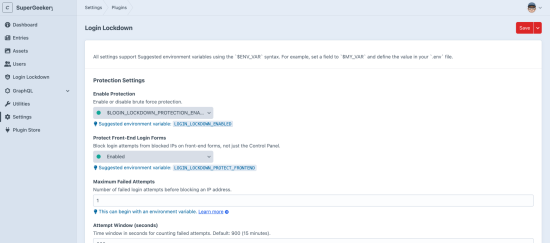
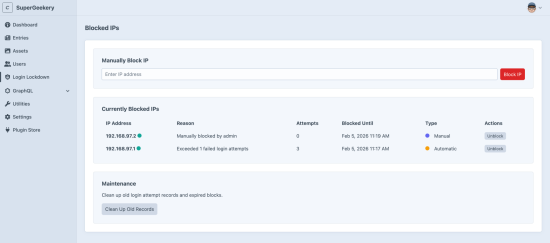
Login Lockdown stops brute force password attacks at the source. It tracks failed logins per IP address and blocks an IP that keeps failing from logging in to the control panel and your front-end login forms, for as long as you choose. You're notified by email or Pushover when it happens.
Login Lockdown and Craft's built-in protection
Craft already slows down password guessing. Login Lockdown adds what Craft doesn't do: it blocks the attacker, across every username.
| Protection | Craft 5.9.15+ | Craft 6 | Login Lockdown |
|---|---|---|---|
| Lock an account after repeated bad passwords | 5 in an hour, 5-minute cooldown | Same | — |
| Rate-limit login attempts per IP | 10 per minute | Same | — |
| Rate-limit per login name + IP | — | 5 per minute | — |
| Hide whether an account exists | Off by default | On by default | — |
| Block an IP after failed logins across any usernames | — | — | ✓ Threshold and window you set |
| Long lockouts that grow while the attack continues | — | — | ✓ Default 24 hours |
| Cover the whole control panel and front-end login forms | — | — | ✓ |
| Allowlist your own IPs | — | — | ✓ |
| See and manage blocked IPs and attempt history | — | — | ✓ Control panel and CLI |
| Get told when an IP is blocked | — | — | ✓ Email and Pushover |
Craft's account lockout protects the account, but an attacker can use it to lock a real user out by guessing at their username. Craft's rate limits reset within a minute, so a patient attacker or a botnet keeps going. Login Lockdown stops the source instead, and tells you about it.
How It Works
- When a user fails to log in (to either the Control Panel or a front-end login form), the plugin records the attempt along with their IP address.
- If the same IP address exceeds the maximum allowed failed attempts within the configured time window, the IP is blocked.
- Blocked IPs receive a 403 Forbidden response when attempting to log in via the Control Panel or front-end forms.
- After the lockout duration expires, the IP is automatically unblocked.
- Whitelisted IPs are never blocked, regardless of failed attempts.
Note: Both Control Panel and front-end login forms are protected by default. Front-end protection can be disabled in the settings if desired.
Client IPs can't be faked with request headers. If your site is behind Cloudflare, a load balancer or another reverse proxy, tell Craft which proxies to trust so the plugin sees each visitor's real IP; the README explains how for Craft 5 and Craft 6.
Craft 5 and Craft 6
One release runs on both: Craft CMS 5.9.18 or later with PHP 8.2, or Craft CMS 6 with PHP 8.5, where it works through Craft's Yii2 adapter.
Configuration
Configure the plugin via Settings → Login Lockdown in the control panel.
All settings support environment variables using the $ENV_VAR syntax. For example, set a field to $MY_VAR and define the value in your .env file.
Protection Settings
| Setting | Default | Type | Description |
|---|---|---|---|
| Enable Protection | true | boolean | Enable or disable brute force protection |
| Protect Front-End Login Forms | true | boolean | Block login attempts from blocked IPs on front-end forms (not just CP) |
| Maximum Failed Attempts | 5 | integer | Number of failed login attempts before blocking |
| Attempt Window | 900 | integer | Time window in seconds for counting failed attempts (15 min) |
| Lockout Duration | 86400 | integer | How long to block an IP in seconds (24 hours) |
| Block Message | (see below) | string | Message displayed to blocked users |
| Whitelisted IP Addresses | (none) | array | IPs that should never be blocked |
Default block message: "Access temporarily blocked due to too many failed login attempts. Please try again later."
Notification Settings
| Setting | Default | Type | Description |
|---|---|---|---|
| Enable Notifications | false | boolean | Send notifications when an IP is blocked |
| Notification Email | (empty) | string | Email address for block notifications |
| Enable Pushover | false | boolean | Send push notifications via Pushover |
| Pushover User Key | (empty) | string | Your Pushover user key |
| Pushover API Token | (empty) | string | Your Pushover application API token |
Environment Variable Support
All settings support Craft CMS environment variable syntax. In the control panel, enter a value like $MY_ENV_VAR and define the actual value in your .env file.
To install this plugin, copy the command above to your terminal.
This plugin doesn't have any reviews.