 SEO & Accessibility
 AI
AI Localization
 Ecommerce
 Forms
Forms Fields
 Development
 Security
 Templating
 Performance
 Control Panel
 Widgets
 Assets
 Utilities
 Mailer Adapters
 Social Networking
 Integrations
Alt Extend

How it works
Alt Extend adds a Twig filter called | alt that automatically extends your image alt texts with a text you define globally — your company name, a location, a slogan, whatever fits your project. You configure it once and every image picks it up.
The problem
You run a corporate site, a hotel page or a local business and want every image alt text to include your brand or location for SEO reasons. Craft gives you a native alt field on every asset — but adding "My Company in Berlin" to 200 images by hand is nobody's idea of a good time. And if the wording changes six months later, you get to do it all over again.
The solution
Set your text once in the plugin settings. Then use the | alt filter in your templates:
<img src="{{ image.url }}" alt="{{ image | alt }}">
That's it. The filter reads the native alt text from the asset and appends (or prepends) your configured text with a separator of your choice.
An image with the alt text "Team photo in the office" becomes:
Team photo in the office | My Company in Berlin
If the asset has no alt text at all, only your configured text is returned — no empty separators, no broken markup.
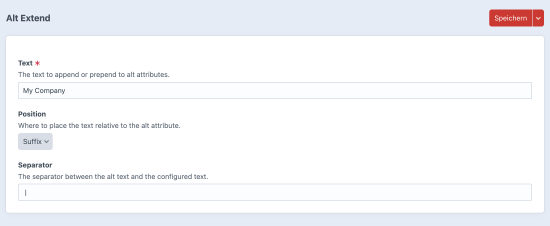
Settings
The plugin settings live under Settings > Plugins > Alt Extend in the Control Panel:
- Text — the text to add (e.g.
My Company in Berlin) - Position — suffix (default) or prefix
- Separator — the characters between the original alt text and your text (default:
|)
Per-asset opt-out
Not every image needs the extension — think logos, decorative graphics or partner assets. During installation the plugin creates a Lightswitch field called Disable Alt Extend. Add it to your asset volume's field layout and toggle it on for any image that should keep its original alt text untouched.
Features at a glance
- Single Twig filter
| alt— works with Asset elements and plain strings - Global text, position (suffix/prefix) and separator configurable in the CP
- Per-asset opt-out via a Lightswitch field on the asset itself
- No database tables, no complex setup
- Lightweight, zero dependencies beyond Craft itself
To install this plugin, copy the command above to your terminal.
This plugin doesn't have any reviews.