 SEO & Accessibility
 AI
 Localization
 Ecommerce
 Forms
 Fields
 Development
 Security
 Templating
 Performance
 Control Panel
 Widgets
 Assets
 Utilities
 Mailer Adapters
 Social Networking
 Integrations

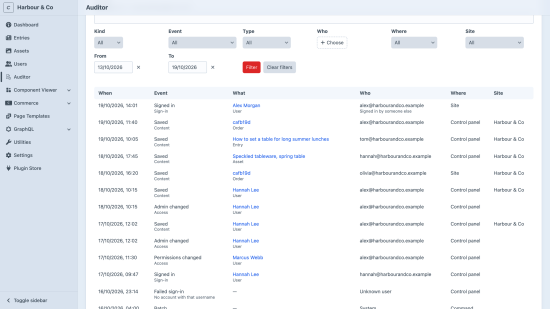
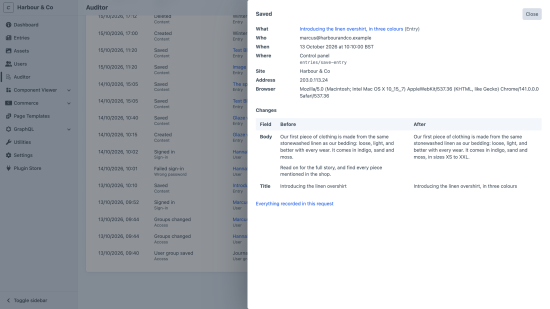
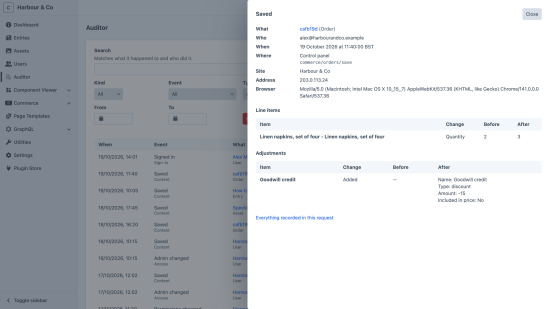
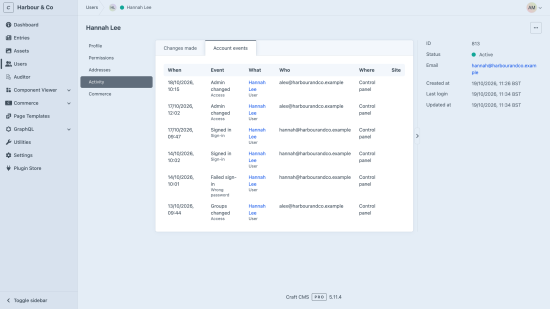
Auditor keeps one log of everything that matters for accountability on a Craft site. Anyone you give permission to can answer "who changed this, when, from where, and what did it say before?" — and "who signed in, who failed to, and who was given access?" — without reading log files or the database.
Every change, with its before and after
Entries, assets, users, categories, Craft Commerce orders and products, and any element type a plugin adds: created, saved, deleted, restored and moved, with the value each field had before and after. A form that re-posts every field is recorded as changing only what actually changed. Drafts and autosaves stay out of the way; publishing is what gets recorded.
Every security event in the same log
Sign-ins, failed sign-ins with the real reason, lock-outs, password and email changes, two-step and passkey methods, group and permission changes, admin rights given or taken, and one person signing in as another — with every row in that session naming both.
Wherever it came from
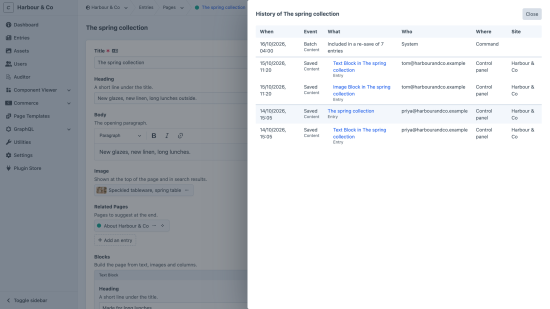
The control panel, a form on the site, a console command or a queue job, each tagged with its route, command or job, and the IP address and browser for people allowed to see them. A resave of every entry is one row describing the batch, not a thousand.
Fast, and never in the way
A page that changes nothing does no auditing work at all. Changes are written once, at the end of the request, and only if they were committed — a save that fails leaves no trace. A resave of 1,000 entries measured under 1% slower. If recording ever fails, the save or sign-in carries on.
Pro: history where people work
- History in every entry's, asset's, product's and user's action menu: each publish, with its blocks' changes beneath it, and the batches it was part of.
- Activity on every user: what they changed, and what happened to their account.
Personal data, handled
Redact fields whose values should never be kept, set how long rows are kept, and when a user is
deleted their name leaves the log while the record of what happened stays. Settings live in
config/auditor.php, versioned with your code.
To install this plugin, copy the command above to your terminal.
This plugin doesn't have any reviews.