 SEO & Accessibility
 AI
AI Localization
 Ecommerce
 Forms
Forms Fields
 Development
 Security
 Templating
 Performance
 Control Panel
 Widgets
 Assets
 Utilities
 Mailer Adapters
 Social Networking
 Integrations
Bandage
Everything Craft's Contact Form plugin doesn't do.
Contact Form is deliberately tiny: it takes a POST, validates an email address and a message, and sends one email. That's the whole plugin. It's a good plugin — but a site running it has no record of what it received, no defence against the spam a public form attracts within a week, no way to tell the sender you got their message, no way to send the enquiry anywhere but one fixed address, and no way to recover the fortnight of enquiries that vanished while the mail server was down.
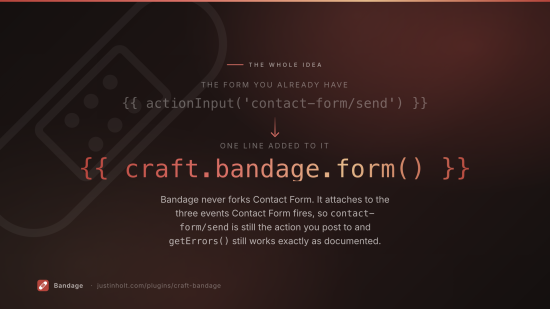
Bandage adds all of that without changing your form. It attaches through the only three events
Contact Form fires, so contact-form/send is still the action you post to, submission is still
Contact Form's model, and submission.getErrors() still works exactly as documented. Adopting
Bandage means adding one tag to a template you already have.
Requires Craft CMS 5.3+, PHP 8.2+, and craftcms/contact-form 3.x.
Installation
composer require justinholtweb/craft-bandage
php craft plugin/install bandage
Contact Form is a dependency, so Composer will fetch it. If you haven't installed it in Craft yet:
php craft plugin/install contact-form
Getting started
Add one tag to the form you already have:
<form method="post" accept-charset="UTF-8">
  {{ csrfInput() }}
  {{ actionInput('contact-form/send') }}
  {{ redirectInput('contact/thanks') }}

  {# This is the only line Bandage needs. #}
  {{ craft.bandage.form() }}

  <input type="email" name="fromEmail" value="{{ submission is defined ? submission.fromEmail }}">
  <textarea name="message[body]"></textarea>
  <input type="text" name="message[Phone]">

  <button type="submit">Send</button>
</form>
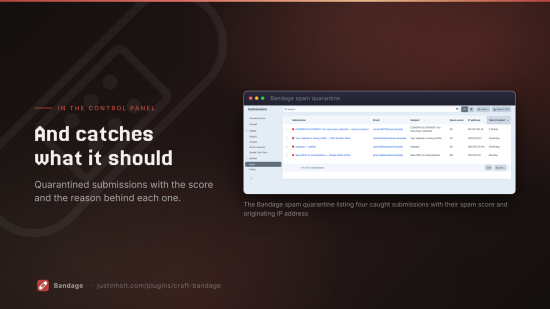
That tag renders three hidden inputs: which form profile applies, a honeypot, and a signed timestamp. From that moment every submission is stored, scored for spam, and reviewable in the control panel under Bandage → Submissions.
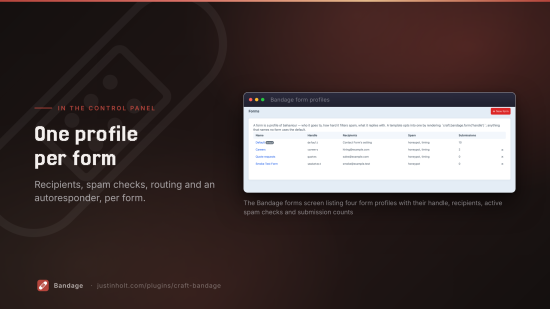
For a second form with its own behaviour, name it:
{{ craft.bandage.form('support') }}
What it adds
Stored submissions
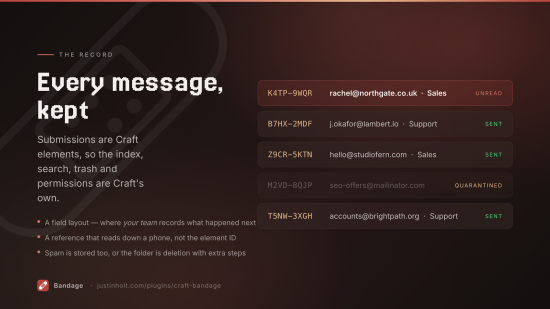
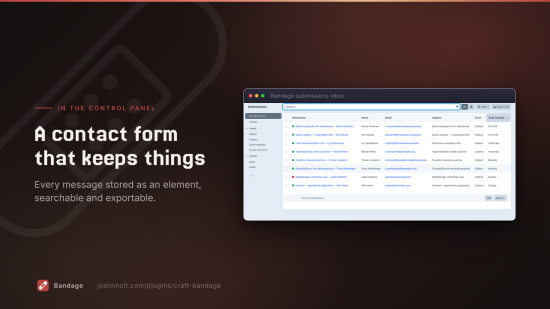
Every message becomes a Craft element, so the element index, search, exporter, trash, per-user permissions and a field layout are Craft's own rather than a second implementation of each.
The field layout is the part people miss: it's where your team records what happened next — who
followed up, what the outcome was — on the same screen as the message itself. It is not the
visitor's form; their answers arrive as whatever message[...] keys your Twig posts.
Each submission gets a short human-quotable reference (K4TP-9WQR), so somebody can read it down
a phone. Not the element ID: quoting that tells the recipient how much mail you get.
Spam defence
| Check | What it catches |
|---|---|
| Honeypot | A field people can't see and bots fill in |
| Time trap | A form submitted in 400ms, or one sitting open for three days |
| Rate limit | The same address submitting twelve times in a minute |
| Word / pattern blocklists | Literal phrases, and regular expressions |
| Sender / IP blocking | Addresses, *@domain.com wildcards, CIDR ranges |
| Throwaway addresses | Mailinator and friends |
| MX check | A sender domain that can't receive mail at all |
| Link counting | The cheapest signal there is |
| CAPTCHA | reCAPTCHA v2/v3, hCaptcha, Cloudflare Turnstile |
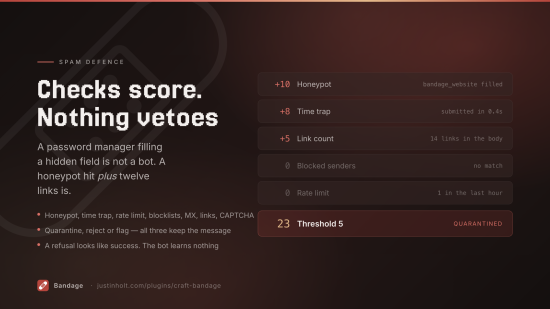
Checks score rather than veto. A honeypot hit on its own can be forgiven — a password manager filling a hidden field is not a bot — while a honeypot hit plus a twelve-link body is not. When the score reaches the threshold, one of three things happens:
- Quarantine — stored, marked spam, nothing sent, visitor sees the ordinary success message.
- Reject — stored, marked spam, nothing sent, visitor sees an error.
- Flag — sent anyway, but marked, so you can tune the thresholds against real traffic.
All three store the message. A spam folder nobody can review is deletion with extra steps, and the only way to find a false positive is to be able to look.
Add your own signals:
use justinholtweb\bandage\services\Spam;
use justinholtweb\bandage\events\SpamCheckEvent;

Event::on(Spam::class, Spam::EVENT_AFTER_SPAM_CHECK, function(SpamCheckEvent $e) {
    if (str_ends_with((string)$e->submission->fromEmail, '.example')) {
        $e->verdict->add('ourCheck', 10, 'reserved TLD');
    }
});
Field validation
Contact Form validates two things: that fromEmail is an email address and that message isn't
empty. Every other field on your form is unvalidated, and a visitor who mistypes a phone number
finds out never.
Rules cover required, email, URL, number, whole number, pattern, length, and allow/deny lists, each optionally conditional. Errors land under the name the input already has:
{% set errors = craft.bandage.errors(submission) %}
{{ errors.Phone ? errors.Phone|first }}

{# or, equivalently #}
{{ submission.getErrors('message[Phone]')|first }}
Recipient routing
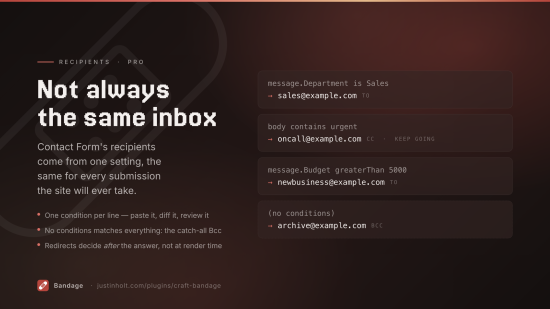
The most-asked-for thing Contact Form can't do — its recipients come from one setting and are the same for every submission the site ever takes.
message.Department is Sales   →  sales@example.com
body contains urgent          →  Cc: oncall@example.com
A rule with no conditions matches everything, which is how you write a catch-all Bcc. A rule with no to addresses adds copies without moving the enquiry.
Conditional redirects
Contact Form's redirect is hashed into the page by redirectInput() at render time — which is
before anybody has answered anything. Bandage decides afterwards, from what they actually said.
Autoresponder
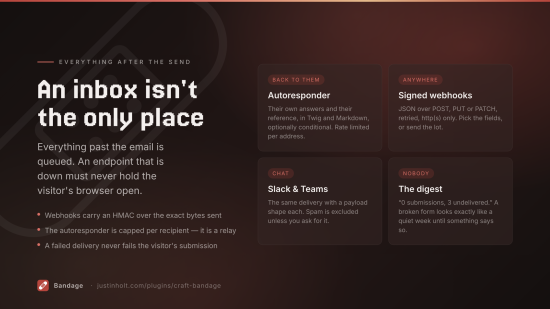
A confirmation back to the sender, with their own answers and their reference, in Twig and Markdown, optionally conditional.
It is rate limited per recipient address, and that is not a nicety: an autoresponder is a mail relay that takes its destination from the request body. Without a cap, anyone can point your contact form at a third party and have your domain — with your real SPF — mail-bomb them.
Integrations
Signed JSON webhooks, Slack and Microsoft Teams. Everything is delivered on the queue: an endpoint that has gone down must not hold the visitor's browser open, and must never fail their submission.
Webhooks carry X-Bandage-Signature: sha256=…, an HMAC over the exact bytes sent.
Attachments
Contact Form attaches uploads to the email and lets PHP delete the temporary files. The only surviving copy is in whichever inbox the message reached — and if the send failed, there is none.
Bandage copies them into an asset volume, with per-file size, count and extension limits. It also fixes a real gap: Contact Form checks extensions after the send event and, on failure, returns false having added no error to the model — so the visitor is told "there was a problem with your submission, please check the form" about a form in which nothing is marked wrong.
Export, retention and the digest
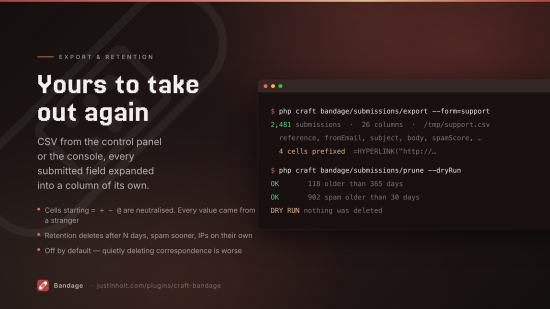
CSV export from the control panel and the console, with each submitted field expanded into a column
of its own, and leading =, +, -, @ neutralised — every value in that file came from a
stranger, and =HYPERLINK("http://evil","Click") in a name field is a live link the moment somebody
opens it in Excel.
Retention deletes submissions after N days, spam sooner, and can blank stored IP addresses while keeping the message. All off by default: a plugin that quietly deletes your correspondence is worse than one that keeps it.
The digest email exists for a failure that is otherwise silent. A form stops working — a mail server changed, a recipient bounced, a spam rule got too tight — and nobody notices, because no email arriving looks exactly like a quiet week. A digest that says "0 submissions, 3 undelivered" is the first thing that makes the difference visible.
Template reference
| Tag | What it does |
|---|---|
craft.bandage.form(handle) | The hidden inputs. The one required tag. |
craft.bandage.captcha(handle) | CAPTCHA markup on its own, if you want to place it yourself |
craft.bandage.errors(submission) | Per-field errors, keyed by the label you know |
craft.bandage.reference() | The reference of the submission just stored |
craft.bandage.submissions() | A query for stored submissions |
craft.bandage.forms() | Every configured form |
craft.bandage.form() accepts options: { captcha: false } to suppress the CAPTCHA markup,
{ theme: 'dark' } to pass through to the provider, { honeypotLabel: '…' } to reword the
visually-hidden label.
Templating notifications
Subject, body and autoresponder templates are Twig object templates:
Enquiry from {fromName} about {message.Department}
Available: fromName, fromEmail, subject, body, reference, submission, and fields
(aliased as message) holding your extra keys.
Conditions
One per line, written field operator value:
message.Department is Sales
body contains urgent
fromEmail matches @(gmail|outlook)\.com$
subject isNotEmpty
Fields are fromName, fromEmail, subject, body, or message.Whatever. Operators: is,
isNot, contains, notContains, startsWith, endsWith, matches, isEmpty, isNotEmpty,
greaterThan, lessThan.
Console
php craft bandage/submissions/prune [--dryRun] [--limit=500]
php craft bandage/submissions/export [--form=support] [--path=/tmp/out.csv]
php craft bandage/submissions/purge-spam
php craft bandage/digest/send [--force] [--since='-7 days']
Craft has no scheduler, so the digest needs a cron entry.
Events
| Event | When |
|---|---|
Spam::EVENT_AFTER_SPAM_CHECK | After the built-in checks, to add your own |
Submissions::EVENT_BEFORE_STORE | Before a submission is written |
Submissions::EVENT_AFTER_STORE | After it is written |
Editions
| Lite (free) | Pro ($79) | |
|---|---|---|
| Stored submissions, field layout, search, trash | ✓ | ✓ |
| Spam scoring, honeypot, time trap, blocklists, CAPTCHA | ✓ | ✓ |
| Attachment capture and limits | ✓ | ✓ |
| CSV export, retention, the digest | ✓ | ✓ |
| Multiple form profiles | ✓ | |
| Field validation rules | ✓ | |
| Recipient routing | ✓ | |
| Conditional redirects | ✓ | |
| Autoresponder | ✓ | |
| Webhooks, Slack, Microsoft Teams | ✓ |
Pro is $79, with a $29 annual renewal for updates. Lite is free and stays free.
Downgrading never deletes configuration — it stops it applying.
Documentation
Full documentation is at justinholt.com/plugins/craft-bandage/docs.
Licence
Proprietary. See LICENSE.md.
Standard
Pro
Plus $29/year after one year.
To install this plugin, copy the command above to your terminal.
This plugin doesn't have any reviews.