 SEO & Accessibility
 AI
AI Localization
 Ecommerce
 Forms
Forms Fields
 Development
 Security
 Templating
 Performance
 Control Panel
 Widgets
 Assets
 Utilities
 Mailer Adapters
 Social Networking
 Integrations
Best Sellers (Reports for Craft Commerce)

Best Sellers for Craft Commerce
Essential sales insights and top-performing product data for Craft Commerce stores.
Commerce has no reports of its own. Best Sellers adds the reports merchants expect.
Reports
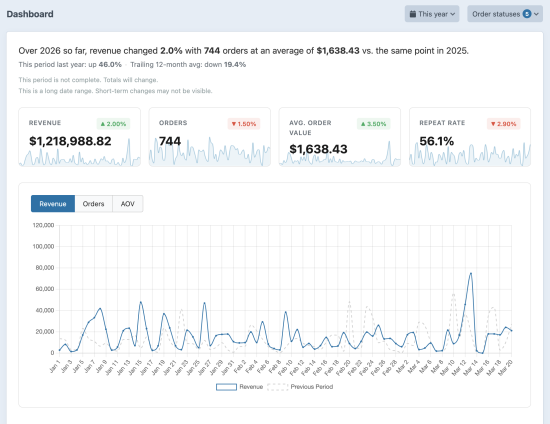
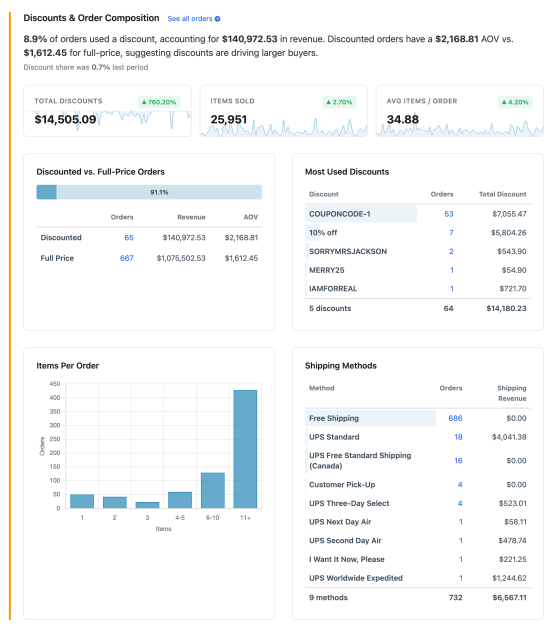
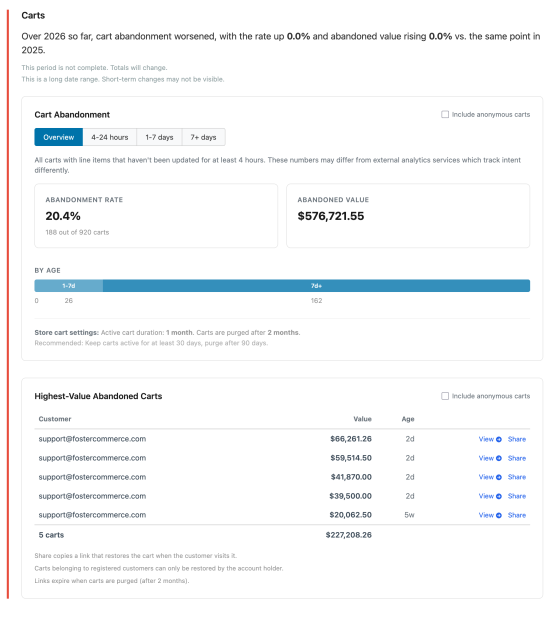
- Dashboard: revenue, orders, AOV, repeat rate, discounts, customers, and abandoned carts for any date range, with a written summary comparing it to the previous period, the same period last year, and a 12-month average.
- Orders: every completed order, filterable by payment status, shipping method, discount, and your own order fields, with a Date Shipped column.
- Transactions: captured, refunded, and net amounts per gateway, filtered by transaction date and order date.
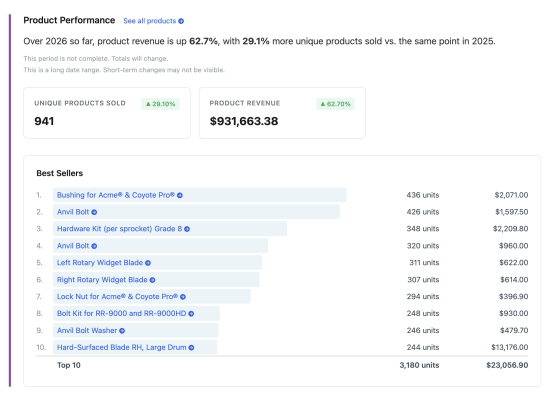
- Products: units sold, item subtotal, and item sales net of discounts, by product or by variant, with a drill-down to the orders behind each row.
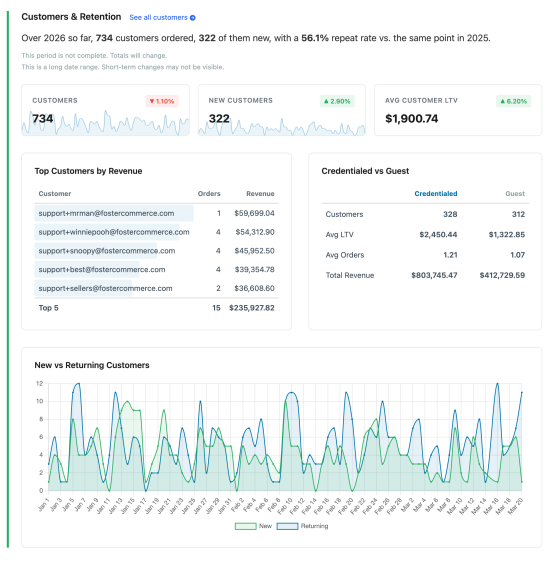
- Customers: order count, total spent, AOV, and last purchase, for credentialed and guest customers.
- Locations: where your orders ship, by country, state, and city, with the top products for each country or state.
- Operations: store emails by order status, coupon usage, and backfill logs on one page.
Unit costs and profit
Optionally record what each item cost you in your own Money field on your variants and the plugin will use that to report cost, gross profit, and gross margin by product or variant. The dashboard adds gross profit and margin cards. Each cost is recorded on the order, and Fill Unit Costs adds costs to past orders.
Custom field filters
Optionally filter the Products and Orders reports by your own custom fields. Each order field you choose also shows as a column on the Orders report and in its CSV export.
Templating
Use your sales data in Twig to build best-seller listings, "most popular" sorting, and buy-again pages.
{# The 10 best-selling products of the last 30 days #}
{% set bestSellers = craft.products()
    .bestSellers('30 days ago')
    .orderBy('totalQtySold DESC')
    .limit(10)
    .all() %}

{% for product in bestSellers|filter(product => product.totalQtySold) %}
    {{ product.title }}: {{ product.totalQtySold }} sold
{% endfor %}

{# Units sold and net item sales for one variant #}
{{ craft.bestsellers.variantTotalSales(variant.id, '30 days ago') }}
{{ craft.bestsellers.variantTotalItemSalesNet(variant.id)|commerceCurrency }}

{# A logged-in customer's previous purchase #}
{% if currentUser %}
    {% set previousOrder = craft.bestsellers.previousPurchaseByUser(variant.id, currentUser) %}
    {% if previousOrder %}
        You bought this on {{ previousOrder.dateOrdered|date('M j, Y') }}
    {% endif %}
{% endif %}
Operational tools
- Cart restore: share a link from the dashboard that puts a customer's abandoned cart back in their browser.
- Bulk order PDFs: download invoices for many orders at once.
- Backfill: processing existing order history from the console or the Utilities page.
Documentation
Full documentation is at fostercommerce.com.
Custom field filters
Filter the Products report by your variant fields and the Orders report by your order fields: relation fields, dropdowns, radio buttons, checkboxes, multi-selects, and lightswitches. Order fields also appear as columns and in the CSV export.
Templating
Build best-seller listings and buy-again pages in Twig.
{# The 10 best-selling products of the last 30 days #}
{% set bestSellers = craft.products()
    .bestSellers('30 days ago')
    .orderBy('totalQtySold DESC')
    .limit(10)
    .all() %}

{% for product in bestSellers|filter(product => product.totalQtySold) %}
    {{ product.title }}: {{ product.totalQtySold }} sold
{% endfor %}

{# Units sold and net item sales for one variant #}
{{ craft.bestsellers.variantTotalSales(variant.id, '30 days ago') }}
{{ craft.bestsellers.variantTotalItemSalesNet(variant.id)|commerceCurrency }}

{# A logged-in customer's previous purchase #}
{% if currentUser %}
    {% set previousOrder = craft.bestsellers.previousPurchaseByUser(variant.id, currentUser) %}
    {% if previousOrder %}
        You bought this on {{ previousOrder.dateOrdered|date('M j, Y') }}
    {% endif %}
{% endif %}
Operational tools
- Cart restore: copy a link from the dashboard that restores a customer's abandoned cart on your storefront. A registered customer's cart restores only for that customer.
- Bulk order PDFs: download invoices or packing slips for the orders you select, as a ZIP or one combined PDF.
- Backfill: add your existing orders from the console or the Utilities page, with date ranges and a queue-based rebuild.
Documentation
Full documentation is at fostercommerce.com.
Standard
Plus $97/year after one year.
To install this plugin, copy the command above to your terminal.