 SEO & Accessibility
 AI
AI Localization
 Ecommerce
 Forms
Forms Fields
 Development
 Security
 Templating
 Performance
 Control Panel
 Widgets
 Assets
 Utilities
 Mailer Adapters
 Social Networking
 Integrations
Bouncer
Access rules for Craft CMS. One place to say who may see what — covering both halves of the problem, not just the easy one.
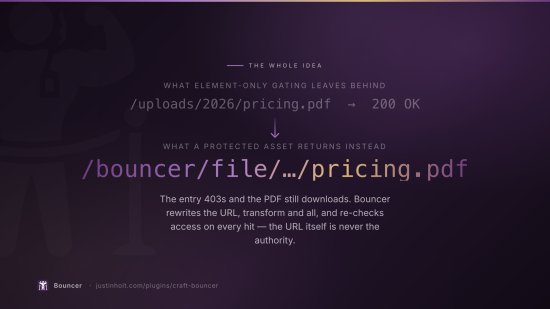
Most access-control plugins gate elements. That stops the entry rendering, and leaves its title
in the index page, its excerpt in the search results, its URL in the sitemap, and the PDF attached
to it sitting at /uploads/2026/contract.pdf for anyone who guesses the path. Bouncer closes all
four, because all four leak.
Craft 5.3+ · PHP 8.2+ · no build step · no runtime dependencies beyond Craft's own.
What a rule is
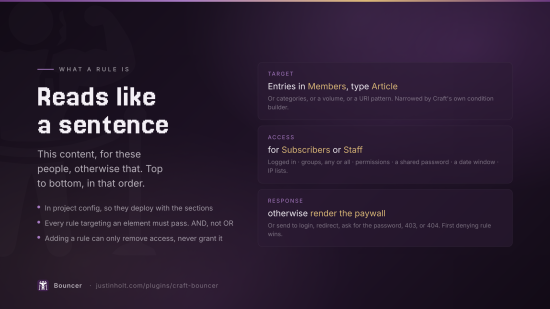
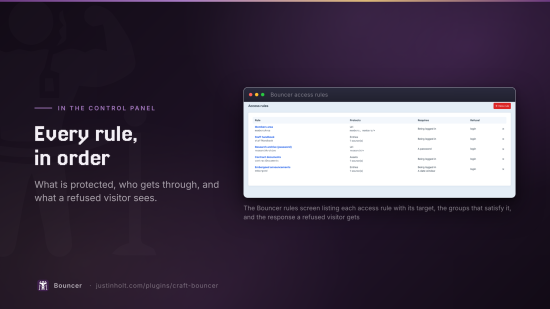
Three parts, and they read top to bottom as a sentence: this content, for these people, otherwise that.
| Target | Entries (by section and entry type) · categories · assets (by volume) · front-end URI patterns. Optionally narrowed by Craft's own element condition builder. |
| Access | Being logged in · user groups (any or all) · Craft permissions · a shared password · a date window · IP allow/deny lists. |
| Response | Send to login · redirect · render a template · ask for the password · 403 · 404. |
Rules live in project config, so they deploy with the sections they protect. An access rule that has to be re-entered by hand in production is an access rule that one day will not be.
How multiple rules combine
Every rule that targets an element must pass. AND, not OR — so adding a rule can only ever remove access, never grant it. "Editors or subscribers" is expressible inside one rule's group list, so nothing is lost by the strict default.
Ordering only decides whose response a refused visitor gets: the first matching rule that denies.
Where it is enforced
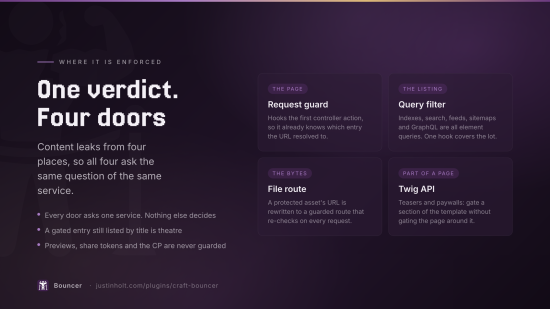
Four places, because content leaks from four places:
| What it protects | |
|---|---|
| The request guard | The page itself. Hooks the first controller action, so it knows which entry the URL resolved to. |
| The query filter | Listings, search results, RSS feeds, sitemaps and GraphQL — they are all element queries, so one hook covers all of them. |
| The file route | The bytes. Protected assets' URLs are rewritten to a guarded route that re-checks access on every hit. |
| The Twig API | Teasers, paywalls, and any part of a page you want to gate without gating the page. |
Previews, share tokens and the control panel are never guarded — those are Craft's own ways of showing somebody content they were given access to, and gating them makes the plugin look broken rather than making the site safer.
Protecting files
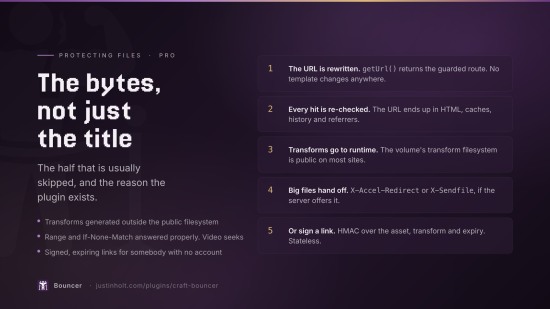
This is the half that is usually skipped, and it is the reason the plugin exists.
- URLs are rewritten — a protected asset's
getUrl()returns/bouncer/file/<uid>/<name>, transform and all, so no template changes anywhere. - Every request is re-checked. The URL is public knowledge — it ends up in HTML, caches, history and referrer headers — so it is never treated as the authority.
- Transforms are generated into Craft's runtime directory, not into the volume's transform filesystem. That filesystem is public on most sites, so generating a thumbnail of a protected image the normal way publishes it at a derivable URL.
- Ranges, conditional requests and hand-off.
RangeandIf-None-Matchare answered properly (a protected video has to be seekable), and large files can be handed to nginx or Apache withX-Accel-Redirect/X-Sendfile. - Signed, expiring links for sharing one file with somebody who has no account:
craft.bouncer.signedUrl(asset, 3600).
The exposure audit
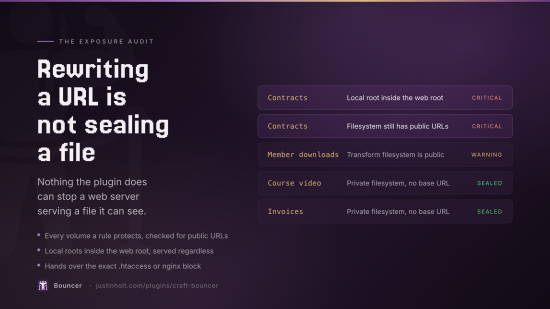
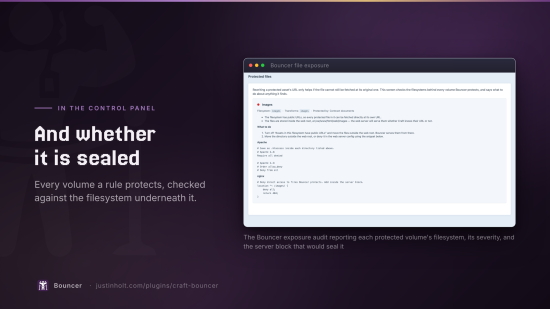
Rewriting a URL does nothing if the original still works. Files → Exposure in the control panel checks every volume a rule protects and reports:
- filesystems that still have public URLs,
- transform filesystems that still have public URLs,
- local roots that sit inside the web root — fetchable whether Craft knows their URL or not,
and generates the exact .htaccess or nginx block to seal each one off.
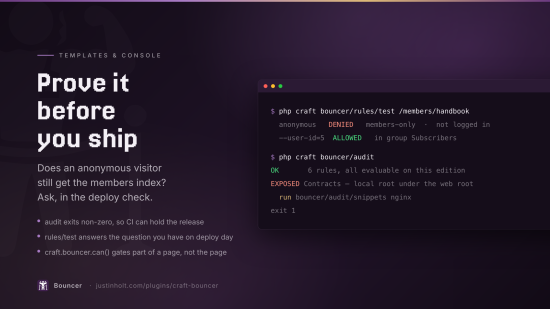
craft bouncer/audit             # exits non-zero if anything is still exposed — put this in CI
craft bouncer/audit/snippets nginx
Templates
{% if craft.bouncer.can(entry) %}
    {{ entry.body }}
{% else %}
    {{ entry.body|teaser(55) }}
    <a href="/subscribe">Read the rest</a>
{% endif %}
craft.bouncer.can(subject) | An element, a URI string, or '@ruleHandle' |
craft.bouncer.cannot(subject) | The inverse, for readability |
craft.bouncer.check(subject) | The whole verdict: .allowed, .reason, .rule, .isProtected, .passwordWouldUnlock |
craft.bouncer.isProtected(subject) | True even for a visitor who is allowed through |
craft.bouncer.signedUrl(asset, seconds) | A link that works without an account, for a while |
craft.bouncer.isUnlocked('handle') | Whether a password-gated rule is unlocked in this session |
entry.body\|teaser(55) | A preview cut on words, not on markup |
entries\|bouncer | Drop the ones this visitor may not have, for arrays the query filter cannot reach |
Opting a query out
{% set locked = craft.entries.section('members').bouncer(false).all() %}
Sites legitimately want to list what they are not showing — "12 more articles for subscribers". Without a documented way to turn the filter off, whoever needs that will find an undocumented one.
Console
craft bouncer/audit                       # rules + file exposure; non-zero on a problem
craft bouncer/audit/snippets [apache|nginx]
craft bouncer/rules/list
craft bouncer/rules/test <elementId|uri> [--user-id=5]
craft bouncer/log/prune [days]
craft bouncer/files/clear-transforms
bouncer/rules/test is the question everybody actually has — does an anonymous visitor still get
the members index? — and it belongs in a deploy check.
Editions
Lite — entries, categories and URI targets; require login, user groups, permissions; every non-password response; the query filter; the Twig API.
Pro — asset protection and the whole file-delivery half; password gating; date windows; IP rules; the element condition builder; the access log; the console commands.
Pro is $59, with a $29 annual renewal for updates. Lite is free and stays free.
On a lapsed licence, Bouncer fails closed. Pro-only conditions are not evaluated on Lite, and a
rule left with nothing evaluable denies everybody. A licence lapse that silently opened a
members area would be worse than one that locked it, so the control panel names every affected rule
and bouncer/audit exits non-zero.
Settings worth knowing about
| Guard front-end requests | The main switch. Turn it off to stage rules — and turn it off first if a rule locks you out. |
| Filter element queries | On. Without it, protected titles still appear in every listing. |
| Admins are exempt | On. The alternative is a plugin whose first act on a typo is to lock the installer out of their own site. |
| Control panel users are exempt | Off, and it should stay off — that is a much wider group than it sounds. |
| Condition ID cap | Condition-based rules filter listings by resolving which elements they match. Past the cap, the rule stops filtering and logs a warning rather than filtering a truncated list — a half-applied exclusion is a leak that looks like it is working. |
There is also a Bypass all access rules permission, so editors can be let past the site's own rules without being made admins.
Two things to get right
Move protected files out of the web root. Bouncer will tell you if you have not — that is what the exposure audit is for — but nothing the plugin does can stop a web server serving a file it can see.
A URI rule only protects URIs that resolve to something. A path that would 404 anyway still 404s; the rule does not create a page to refuse.
Installation
composer require justinholtweb/craft-bouncer
php craft plugin/install bouncer
Testing
php /path/to/craft-bouncer/tests/integration/checks.php     # 104 checks
php /path/to/craft-bouncer/tests/manual/seed-demo.php       # real protected content
bash /path/to/craft-bouncer/tests/manual/http-probe.sh      # 31 checks over real HTTP
The integration checks are idempotent and self-cleaning. The HTTP probe covers what a script cannot: the guard hangs off a controller action, the password gate is a session, and the file route is a stream with headers.
Licence
Proprietary. © Justin Holt.
To install this plugin, copy the command above to your terminal.
This plugin doesn't have any reviews.