 SEO & Accessibility
 AI
AI Localization
 Ecommerce
 Forms
Forms Fields
 Development
 Security
 Templating
 Performance
 Control Panel
 Widgets
 Assets
 Utilities
 Mailer Adapters
 Social Networking
 Integrations
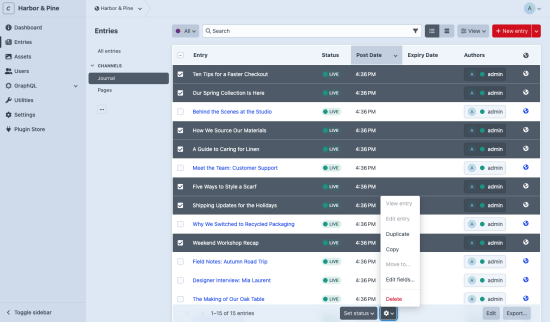
Bulk edit one or more fields across many entries at once in Craft CMS 5, including fields inside Matrix nested entries.
Features
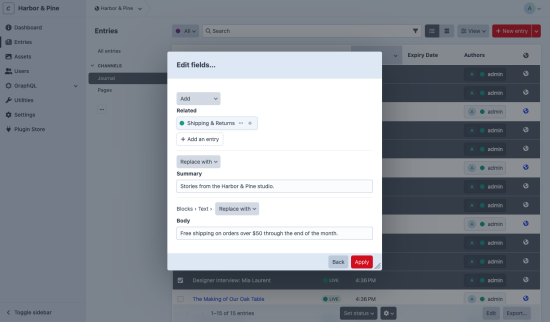
- Replace or clear any field on the selected entries: plain text, rich text, numbers, dates, dropdowns, lightswitches, and so on.
- Add or remove relations (entries, assets, categories, tags, users) without overwriting the relations an entry already has.
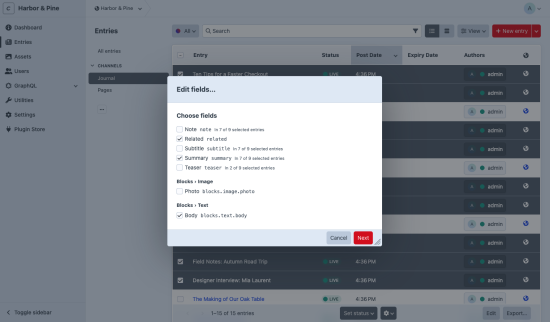
- Edit inside Matrix. Fields of each Matrix entry type are listed as Matrix field › Entry type › Field. The edit is applied to every nested entry of that type in the selected entries.
- Layout-specific handles stay apart. Craft 5 lets the same field appear under different handles in different layouts (or twice in one layout). Bulk Fields only changes an entry if its layout contains the exact field instance you picked. Other entries are skipped, not overwritten.
- Mixed selections are fine. You can select entries from different entry types together. Each field shows how many of the selected entries contain it.
How it works
- Select entries in the entry index.
- Choose Edit fields… from the actions menu.
- Pick the fields, enter the new values, and apply.
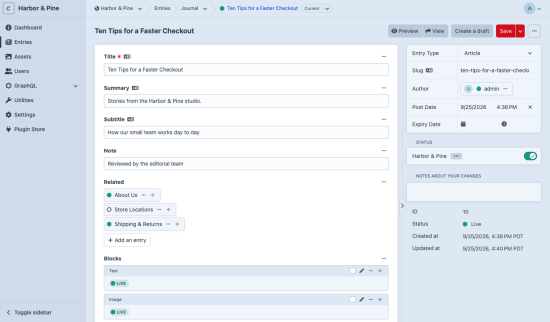
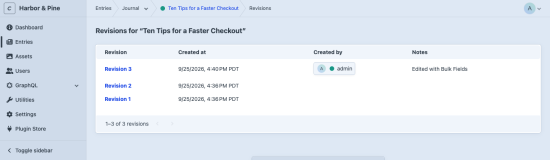
The edit runs as a queue job, and every entry gets a normal revision, so you can see and revert what changed.
Permissions: the user must be allowed to save every selected entry. Otherwise nothing is queued. Fields hidden from the user by a field-layout condition, or made read-only by an edit condition, are not offered and can't be submitted.
Limits in 1.0
- Entries only (not assets, categories, users or Commerce products).
- A Matrix field cannot be replaced as a whole. Edit the fields inside its entry types instead. Fields that hold nested elements (Matrix inside Matrix, Addresses, CKEditor fields with nested entries) are not offered.
- The edit applies to the entries you selected on the current page, in the site shown in the index.
- Entries are validated the same way the entry editor validates them. Entries that fail validation are not saved. The queue job then fails with the list of entry IDs, and the reasons are written to the logs. Running the job again is safe.
Requirements
- Craft CMS 5.7 or later
- PHP 8.2 or later
Support
Open an issue on GitHub.
Standard
Plus $19/year after one year.
Installation Instructions
To install this plugin, copy the command above to your terminal.
Reviews
This plugin doesn't have any reviews.
Active Installs
0
License
Craft
Last release
September 25, 2026
Activity (30 days)
0
Closed Issues
0
Open Issues
0
Merged PRs
0
Open PRs