 SEO & Accessibility
 AI
 Localization
 Ecommerce
 Forms
 Fields
 Development
 Security
 Templating
 Performance
 Control Panel
 Widgets
 Assets
 Utilities
 Mailer Adapters
 Social Networking
 Integrations

Calendar Sync
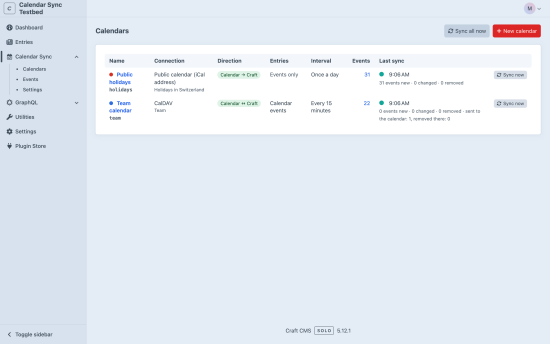
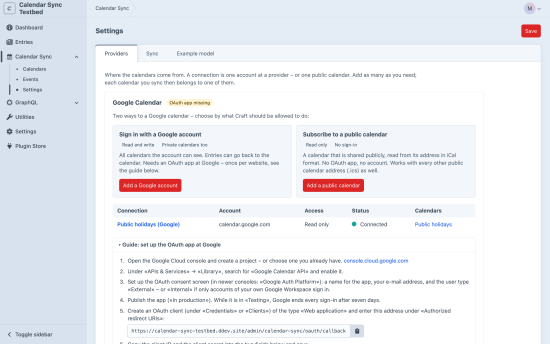
Calendar Sync connects the calendars your team already uses to Craft: Google Calendar, Microsoft 365 / Outlook and any CalDAV calendar (Nextcloud, iCloud, Fastmail, mailbox.org …). Events come to Craft, entries go to the calendar, or both.
Keep a calendar in one place and let the website show it – or publish events on the website and find them in the calendar.
What you get
- Three providers – Google Calendar, Microsoft 365 / Outlook.com / Exchange Online and CalDAV. Several accounts, several calendars per account. Each with a step-by-step guide in the settings.
- Public calendars without a sign-in – a publicly shared Google calendar or any calendar address in iCal format.
- Read, write, or busy times only – set per connection what Craft may do.
- Three directions – calendar to Craft, Craft to calendar, or both ways – set per calendar.
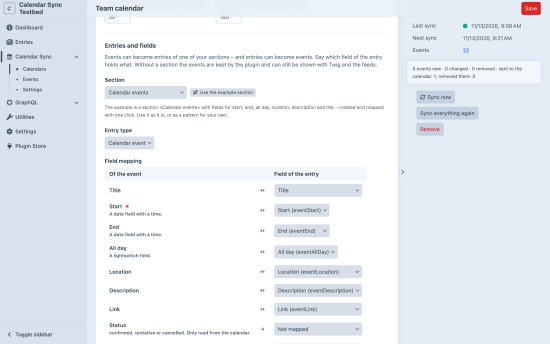
- Your data, your fields – map start, end, «all day», location, description and link to the fields of your own entries. What is not mapped is left alone: guests and reminders of an event survive a change made in Craft.
- An example model with one click – a section «Calendar events» with the fields an event needs, created and mapped for you. Or no section at all: the events are kept by the plugin and are just as easy to show.
- Sync settings – how often, how many days back and ahead, what happens when an event leaves the calendar, and who wins when both sides changed. Entries are sent to the calendar the moment they are saved.
- Presenting –
craft.calendarSync.events()for Twig, GraphQL queries, an iCalendar feed to subscribe to and a JSON feed for FullCalendar. A colour and a prefix per calendar; line breaks, attached documents and links in the description the way you need them. - Dashboard widgets – a counter and the events of a day, a week or a month.
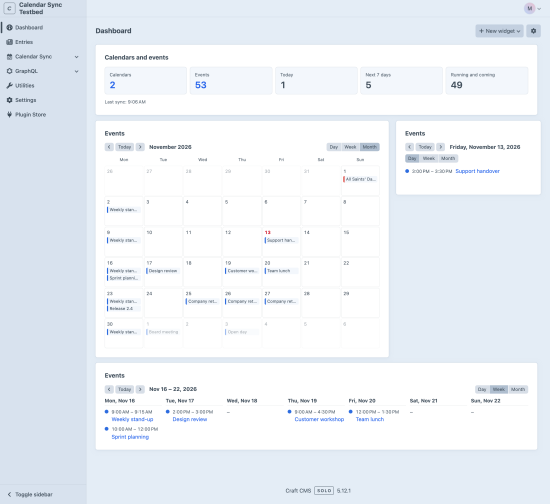
- Console commands for a cron job, queue jobs, permissions, encrypted credentials. Interface in English, German, French, Italian and Spanish.
Requirements
Craft CMS 5.3 or later, PHP 8.2 or later, MySQL, MariaDB or PostgreSQL. Google and Microsoft need an OAuth app of your own (free).
Standard
Plus $19/year after one year.
Installation Instructions
To install this plugin, copy the command above to your terminal.
Reviews
This plugin doesn't have any reviews.
Active Installs
0
License
Craft
Last release
November 13, 2026