 SEO & Accessibility
 AI
AI Localization
 Ecommerce
 Forms
Forms Fields
 Development
 Security
 Templating
 Performance
 Control Panel
 Widgets
 Assets
 Utilities
 Mailer Adapters
 Social Networking
 Integrations
Carrier for UPS
Carrier for UPS
UPS for Carrier, the shipping-carrier gateway for Craft Commerce 5, through the UPS OAuth REST APIs at onlinetools.ups.com.
This package translates the UPS APIs and nothing else. Packing, checkout, label storage, bulk printing, tracking schedules, the Access Point picker and the log all live in Carrier.
What it does
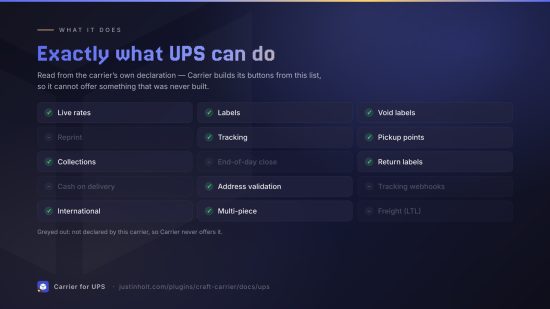
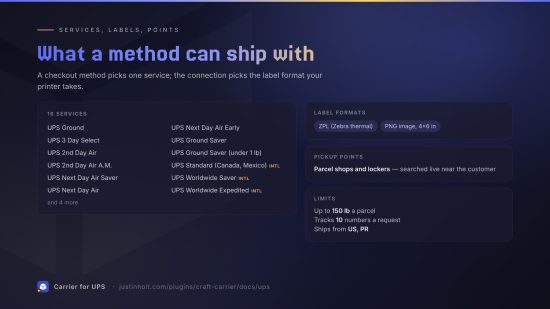
| Rates | Live rates for one service, or every service at once when a method shops. Negotiated (account) rates when your account has them, with transit days and an estimated delivery date |
| Labels | Domestic and international, multi-package (one 1Z and one label per package) |
| Label formats | ZPL (4×6 thermal) and PNG. PNG is only offered when PHP's GD extension is installed (see below) |
| Returns | Print Return Labels (UPS return service 9) |
| International | The commercial invoice is built from Carrier's customs lines. Choose who pays duties: the recipient (DDU) or your account (DDP) |
| Void | The whole shipment, by its lead 1Z |
| Tracking | Full scan history, mapped onto Carrier's statuses, with who signed |
| Access Points | Search for UPS Access Points near an address for the checkout picker, and ship to the chosen one |
| Collections | On-call pickups, with the pickup request number (PRN) as the reference |
| Address validation | Street-level validation with UPS's suggested corrections and residential/commercial classification |
| Accessorials | Signature, adult signature, Saturday delivery, residential delivery |
Ships from the United States and Puerto Rico, in pounds and inches.
No PDF labels
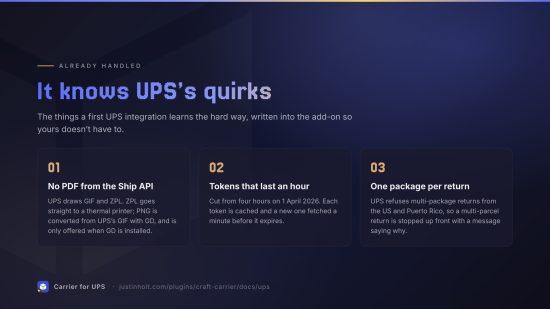
UPS's Ship API produces GIF, ZPL, EPL and SPL images. It cannot produce a PDF or a PNG. This package offers:
- ZPL for Zebra-compatible thermal printers. The best choice if you have one.
- PNG, converted from UPS's GIF on your server with PHP's GD extension. It is only offered when GD is installed. The image is passed on exactly as UPS draws it, which may be landscape; print it rotated if your printer does not do so itself.
UPS can supply PDFs through a separate Label Recovery API, but its request shape could not be confirmed without a live account, so PDF (and reprinting) is not offered rather than offered unreliably.
Setting up
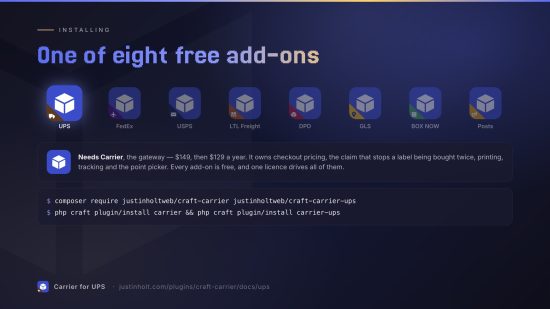
- Install Carrier, then this package:
composer require justinholtweb/craft-carrier-upsandphp craft plugin/install carrier-ups. - At developer.ups.com, sign in with your UPS account and create an app. Add these products: Authorization (OAuth), Rating, Shipping, Tracking, Locator, Pickup and Address Validation. Link your UPS shipper account to the app.
- Copy the app's Client ID and Client Secret. Store both in environment variables.
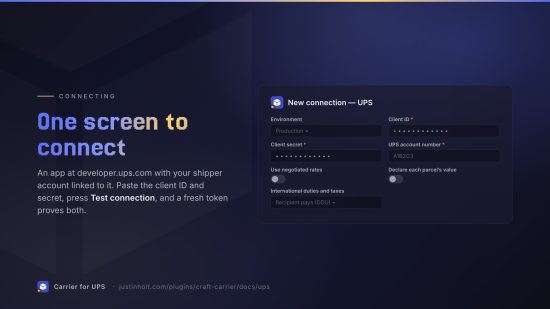
- In Carrier → Connections, add a UPS connection:
- Environment: Sandbox uses UPS's Customer Integration Environment (
wwwcie.ups.com), with the same app. Sandbox labels are not valid for shipping. - Client ID and Client secret: from step 3.
- UPS account number: your six-character shipper number. Labels are billed to it, and it unlocks negotiated rates.
- Use negotiated rates: on by default. Accounts without contract rates get published rates.
- Declare each parcel's value: off by default. Turning it on buys UPS declared-value coverage above the included $100, which UPS charges for.
- International duties and taxes: who pays.
- Environment: Sandbox uses UPS's Customer Integration Environment (
- Press Test connection. It requests a fresh access token from UPS, which proves the client ID and secret.
UPS access tokens last one hour (cut from four hours on 1 April 2026). Carrier caches them and fetches a new one a minute before they expire.
Make sure your checkout collects a phone number. UPS requires one for international recipients. Commerce addresses have no phone field, so map one in Carrier's settings.
Access Points
The UPS Access Point locator is searched live around the customer's address, so there is nothing to import. Points whose name says "Locker" are listed as lockers, and every other point as a shop. When a method requires a pickup point, the label is addressed to the chosen Access Point ("hold for pickup at a UPS Access Point"). The point's address is looked up again by its id when the label is bought, because Carrier only stores the id.
Access Point delivery is not priced separately. The checkout shows the door-to-door rate for the same service.
Returns
A return label swaps the parties: the customer's address becomes the ship-from and your store becomes the ship-to, and it is billed to your account. UPS allows one package per return from the United States and Puerto Rico, so a multi-parcel return is refused with a message saying so.
Unverified
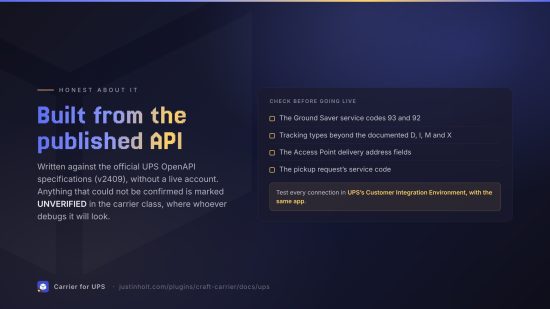
This package was written against the official UPS OpenAPI specifications (version v2409) without a live account. These points are marked UNVERIFIED in the code and should be checked in the sandbox before you go live:
- The Ground Saver service codes
93and92(under 1 lb). They come from community sources and are missing from the current Ship specification. Your account must have Ground Saver enabled. - Tracking statuses beyond the documented
D,I,MandXtypes (MV,P,U,RS), and reading "out for delivery" from the scan's wording. - Access Point delivery: the
AlternateDeliveryAddressfields, and looking a point up by its public id. - Searching for Access Points by map coordinates, when no postcode is given. The opening hours are passed to templates as UPS sends them (
extra.operatingHours), not formatted. - Pickups: the three-digit service code
003in the pickup request, and marking the pickup address as an alternate address. - Reference numbers: they are sent per package for US and Puerto Rico shipments and per shipment otherwise, because UPS rejects package references on most international lanes.
- Address validation outside the United States and Puerto Rico.
- The GIF-to-PNG conversion is not rotated, because UPS does not document which way its landscape image should be turned.
Requirements
Craft CMS 5.3+, Craft Commerce 5, Carrier 5, PHP 8.2+. PHP's GD extension for PNG labels.
Licence
The Craft License. See LICENSE.md. Carrier for UPS is free: no editions, no licence key, and no licensing code in the plugin. It needs Carrier, which is commercial.
To install this plugin, copy the command above to your terminal.
This plugin doesn't have any reviews.