 SEO & Accessibility
 AI
AI Localization
 Ecommerce
 Forms
Forms Fields
 Development
 Security
 Templating
 Performance
 Control Panel
 Widgets
 Assets
 Utilities
 Mailer Adapters
 Social Networking
 Integrations
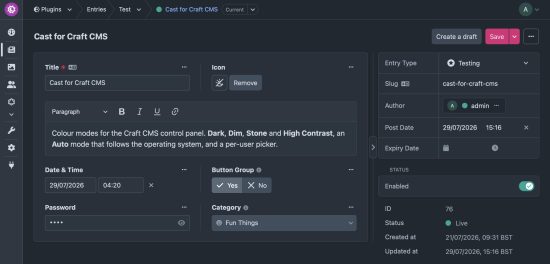
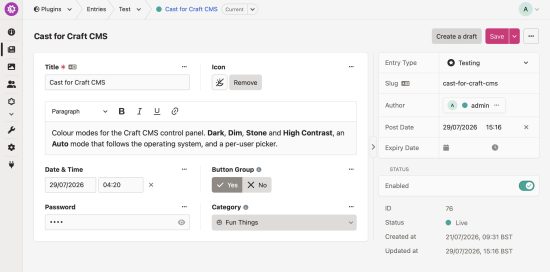
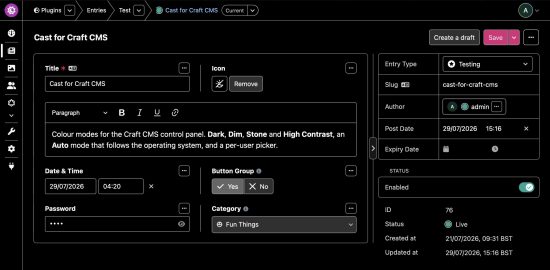
Colour modes for the Craft CMS control panel.
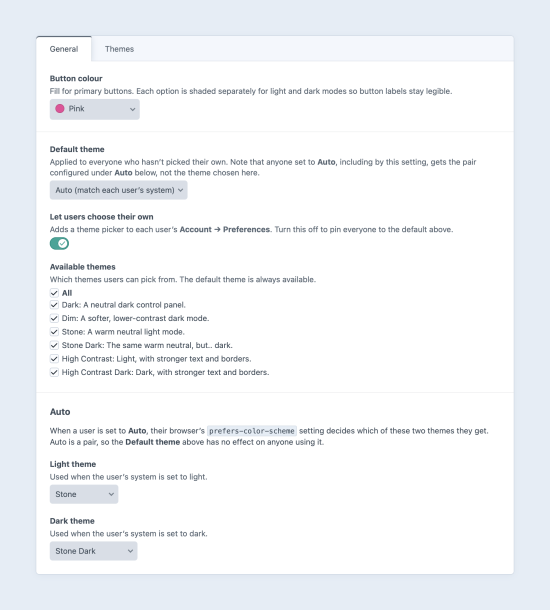
Bundled themes, an Auto mode that follows the operating system, and a per-user picker.
A theme is a stylesheet redeclaring the custom properties Craft already ships in ThemeAsset. No forked templates, no rewritten layouts, so a Craft upgrade comes through untouched. The active theme is stamped onto <html> by an inline head script, so there's no flash, and picking one repaints immediately without a save.
🚧 Cast is in beta. The theme APIs are settled (Themes::EVENT_REGISTER_THEMES and the cast-themes/ file format won't change before 1.0.0) but the plugin's own settings may still move.
Bundled themes
| Theme | Scheme | Notes |
|---|---|---|
| Dark | Dark | Neutral dark CP. The reference implementation. |
| Dim | Dark | Softer and lower contrast, for long sessions. |
| Stone | Light | A warm neutral, based on Tailwind's stone ramp. |
| Stone Dark | Dark | The same warm neutral, but.. dark. |
| High Contrast | Light | Near-black text, solid borders, widened focus ring. |
| High Contrast Dark | Dark | The same treatment on a near-black canvas. |
Adding your own theme
Drop a .css file in cast-themes/, alongside config/ and templates/. The filename is the handle, a header comment supplies the rest.
To install this plugin, copy the command above to your terminal.
This plugin doesn't have any reviews.