 SEO & Accessibility
 AI
AI Localization
 Ecommerce
 Forms
Forms Fields
 Development
 Security
 Templating
 Performance
 Control Panel
 Widgets
 Assets
 Utilities
 Mailer Adapters
 Social Networking
 Integrations
Craft Content Diff
Craft Content Diff
This plugin aims to help issues with content freezes, where it is hard to know what is actually different between production and staging environments.
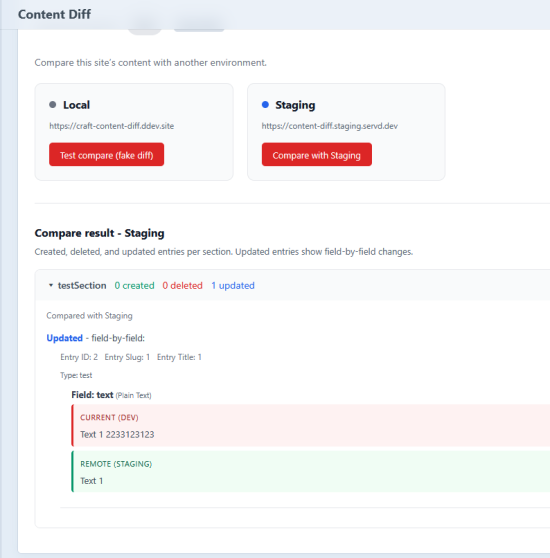
Compare entry content between Craft CMS environments (e.g. local, staging, production). View created, deleted, and updated entries with field-level diffs, including Matrix and nested blocks.
Requirements
- Craft CMS 5.0.0 or later
- PHP 8.2 or later
Installation
From the Plugin Store
Open the Plugin Store in the Control Panel, search for “Craft Content Diff”, then install.
With Composer
cd /path/to/your-project
composer require roadsterworks/craft-content-diff
./craft plugin/install craft-content-diff
Configuration
Configure everything in Control Panel → Content Diff → Settings. Each value can be a literal or an env var alias (e.g. $CONTENT_DIFF_PRODUCTION_URL); aliases are resolved at runtime.
- API key — Secret token for the diff endpoint. Use the same value on every environment (local, staging, production). Generate a key in Settings or enter a literal / env var alias, then Save.
- Production URL / Staging URL — Base URLs of the production and staging sites.
- HTTP Basic auth (optional) — If staging or production is behind server-level HTTP Basic auth, set the username and password (literals or env var aliases).
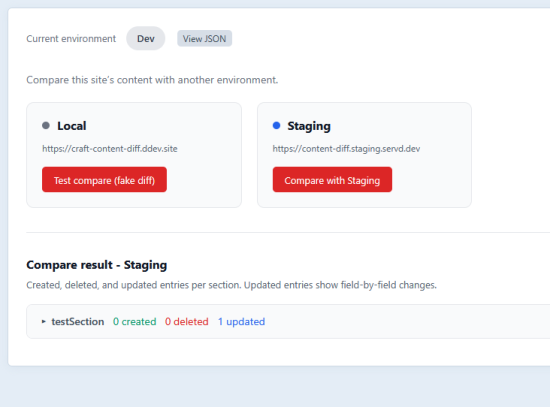
Set ENVIRONMENT (or CRAFT_ENVIRONMENT) to dev, staging, or production so the dashboard shows the right compare targets. Production sees staging; staging sees production; dev sees both plus “Local” (test compare).
How it works
- Dashboard (Control Panel → Content Diff): Choose an environment to compare with. The plugin fetches the remote site’s diff JSON and compares it to the current site’s entries (by section and entry UID). Results show added, removed, and changed entries with field-level diffs; Matrix/block fields are expanded into readable block-level labels.
- Diff endpoint: Each environment exposes a site action URL (not under
/admin), so server-to-server requests are not blocked by CP login:https://your-site.com/actions/craft-content-diff/diff?environment=local- Requests must send header
X-Content-Diff-Token(or?token=) matching the API key in plugin Settings on that environment. Invalid or missing token returns401JSON.
- Local / “Test compare”: From a dev environment you can compare with “Local” to see a fake diff (sample data) or open “View JSON” to inspect this site’s raw diff payload.
Troubleshooting
| Symptom | What to check |
|---|---|
| “Set the API key in plugin Settings on both environments” | Set the same API key in Settings on the environment you’re comparing from and the one you’re comparing to. |
| “Could not fetch data from staging/production” | Same API key on both sides; correct staging/production URL; if the remote is behind HTTP Basic, set credentials in Settings; ensure the remote is reachable (firewall, SSL). |
| Remote returns login page or 302 instead of JSON | The request must hit the site action URL (/actions/craft-content-diff/diff), not the CP. Token may be missing or wrong, or a proxy may be stripping X-Content-Diff-Token. Set the same key on both environments and ensure the header is forwarded. |
| No compare targets on the dashboard | Set ENVIRONMENT (or CRAFT_ENVIRONMENT) and configure at least one of Production URL or Staging URL in Settings. |
Logs use the category craft-content-diff. With CRAFT_STREAM_LOG=true, they go to stdout/stderr.
Please feel free to open github issues!
Licence
Proprietary (Craft License). See LICENSE.md.
Standard
Plus $7/year after one year.
To install this plugin, copy the command above to your terminal.
This plugin doesn't have any reviews.