 SEO & Accessibility
 AI
AI Localization
 Ecommerce
 Forms
Forms Fields
 Development
 Security
 Templating
 Performance
 Control Panel
 Widgets
 Assets
 Utilities
 Mailer Adapters
 Social Networking
 Integrations
Craft Link Checker
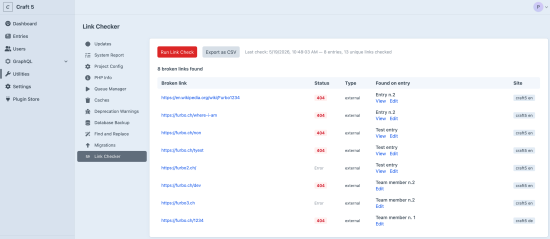
A Craft CMS plugin that crawls all live entries across all sites and verifies that every link found is reachable.
The primary interface is the Craft CP: Utilities → Link Checker. From there you can run a check, monitor progress, stop a running check, browse results (broken link, HTTP status, source entry with View and Edit links, site name), and export results to CSV. Results are persisted to storage/craft-link-checker/results.json so they survive page reloads.
Built for authenticated sites
Most link checker tools work by crawling your site over HTTP — the same way a visitor would. That approach breaks the moment your site or any section of it requires a login: the crawler hits a redirect to the login page and reports every protected URL as broken.
This plugin was built specifically to solve that problem. Instead of making HTTP requests to your own Craft installation, it reads content directly from the database. Authentication is irrelevant — every live entry across every site is scanned regardless of whether it is publicly accessible, behind a member gate, or restricted to specific user groups. The plugin runs inside Craft itself, so it always has full access to your content.
External links are still verified over HTTP, since that is the only way to know whether a third-party URL is reachable. But your own pages are never fetched — they are resolved instantly against a set of known live entry URLs built from the database before the check begins.
How it works
The check runs in two passes. Both are auto-configured — no hardcoded site handles or section handles. Adding a new Craft site or a new URL-less section is picked up automatically.
Pass 1 — entries with a frontend URL
All Craft sites are discovered via Craft::$app->getSites()->getAllSites(). For each site, live entries with a URI are queried. Links are extracted directly from the database — no HTTP requests are made to the local server. The following field types are scanned recursively, including inside Matrix and Super Table blocks:
- Redactor rich-text fields (Craft 4) — all
<a href>links in the stored HTML - CKEditor rich-text fields (Craft 5) — all
<a href>links in the stored HTML - Link fields (Craft 5) — the URL value
- URL fields — the raw URL value
Pass 2 — URL-less section entries
Sections with no URL format are detected automatically. Their entries have no frontend page but may contain fields whose links should still be checked. Results for these entries show an Edit link only.
Link verification
Each unique URL is verified once (results cached by URL to avoid duplicate HTTP requests):
| Link target | How it is verified |
|---|---|
| Points to any of the Craft sites | Looked up in a flat set built from a DB query before the passes begin. Returns 200 if the entry exists and is live, 404 otherwise. No HTTP request. |
| External URL, not skipped | HTTP HEAD request via Guzzle (GET fallback if HEAD returns 405). Timeouts: 15 s total, 8 s connect. |
| Skipped host or path prefix | Ignored entirely. |
Configuration
Go to Settings → Link Checker in the Craft CP.
Skipped Hosts — one hostname per line. Links to these hosts are not checked. Defaults to common social networks and bot-blocking sites (twitter.com, facebook.com, linkedin.com, instagram.com, youtube.com, tiktok.com, pinterest.com, xing.com, threads.net, mastodon.social, bsky.app, sbb.ch).
Skipped Path Prefixes — one URL path prefix per line. Links whose path starts with any of these are not checked. Defaults to /actions/ (Craft controller endpoints).
Interpreting results
| Status | Meaning | Action |
|---|---|---|
| 404 | Page not found | Fix or remove the link |
| 500 | Server error on target | Check again later; may be transient |
| 302 | Redirect not fully resolved | The checker uses HEAD first; some servers don't follow redirects on HEAD. The link may still work in a browser — verify manually. |
| 400 | Bad request | URL may be malformed, or the target server is rejecting the bot. May work fine in a browser — verify manually. |
| 403 | Forbidden | The page exists but denies automated access. Likely fine for real users. |
| Error | Connection failed | DNS failure, timeout, or TLS error. Host may be down or URL invalid. |
302 and 400 are not always real problems. Always verify manually before editing content.
To install this plugin, copy the command above to your terminal.
This plugin doesn't have any reviews.