 SEO & Accessibility
 AI
 Localization
 Ecommerce
 Forms
 Fields
 Development
 Security
 Templating
 Performance
 Control Panel
 Widgets
 Assets
 Utilities
 Mailer Adapters
 Social Networking
 Integrations

MCP - All in one
Give AI agents a real, controlled way to work with your Craft CMS install.
MCP - All in one is a Model Context Protocol server for Craft. Connect Cursor, Claude Code, Codex, Claude (web / Desktop / mobile), or any other MCP client. Agents can read your content model, query entries, and (when you allow it) save draft changes—with optional Craft preview links—for a human to review and publish.
Why it exists
Most AI setups guess at your CMS. This plugin talks to Craft directly: sections, fields, sites, assets, drafts, and permissions. You keep the keys. Agents do the drafting.
What you get
Control panel
A full CP section so you are never flying blind:
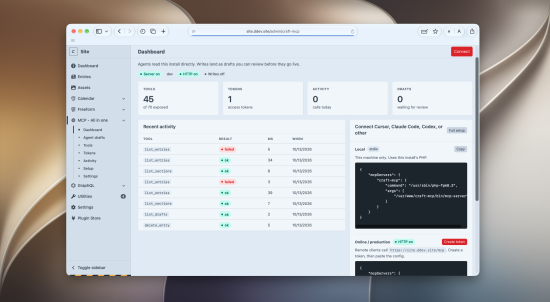
- Dashboard — ops hub with checklist, status cards, quick toggles, metrics, and recent activity
- Recent drafts — drafts waiting for review, with preview links when available
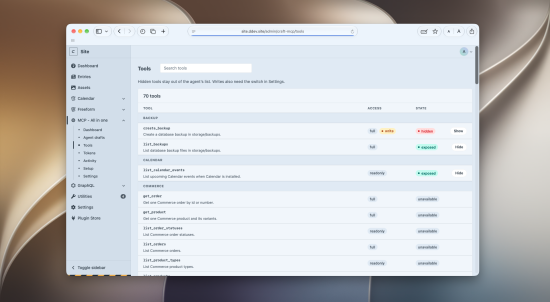
- Tools — full catalog; search, hide, or show any tool
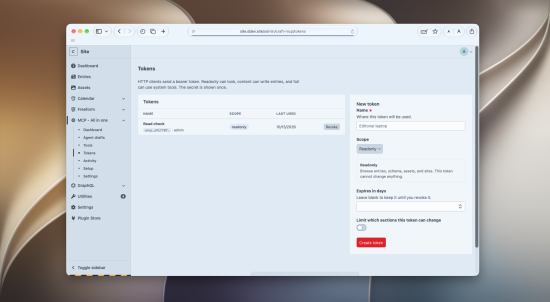
- Access — mint and revoke bearer tokens; Connected apps always visible (enable OAuth from here if off)
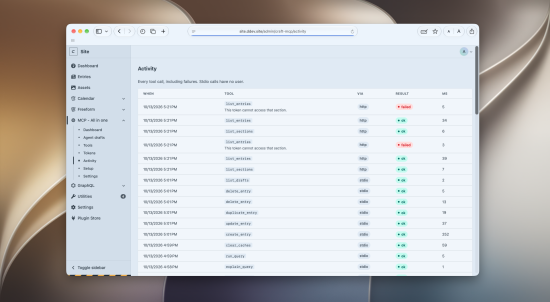
- Activity — every tool call, including failures
- Setup — Local stdio, Remote token, and Claude OAuth paths
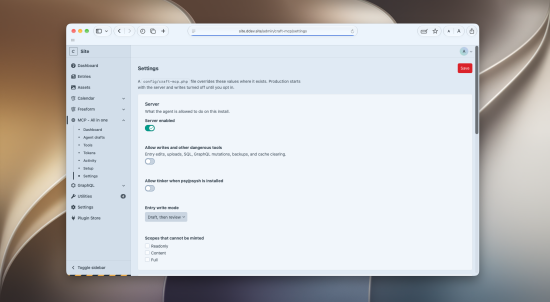
- Settings — Essentials (server, writes, HTTP, OAuth) plus Advanced settings
Ways to connect
- Local (stdio) — same machine as Craft; run
php craft craft-mcp/installto write Claude Code, Cursor, and optionally Codex config - Remote HTTP — clients hit your site (default
/mcp) with a hand-minted bearer token - Claude connector (OAuth) — one-click remote access for Claude web, Desktop, and mobile (see below)
Preview-ready writes
When writes are enabled, entry create/update (and related write tools) can return a Craft preview URL—the same kind of anonymous Share link editors use—so an agent or reviewer can see the draft without publishing.
Safe by default
- In production, the server starts off
- Writes are off until you turn them on
- Entry writes default to drafts, not live publishes
- OAuth is off until you turn it on (HTTP required)
- Tokens use scopes: Readonly, Content, and Full
- Tokens can be limited to specific sections
- Optional IP allowlist with exact addresses or CIDR ranges (IPv4 / IPv6)—useful for Claude connector egress
- Calls still respect Craft’s own user permissions
- Secrets are redacted from logs and environment tools
Claude connector (OAuth)
Connect Claude (web, Desktop, or mobile) without pasting a long-lived bearer token:
- Turn on HTTP transport and the OAuth connector in Settings (OAuth is off by default)
- Set Public base URL if Craft answers on a different host than your frontend
- In Claude: Customize → Connectors → add your MCP URL (e.g.
https://cms.example.com/mcp) - Sign in to the control panel, pick a scope (Readonly / Content / Full), and Approve
The app receives short-lived access tokens and rotating refresh tokens tied to that user and scope. Manage or Disconnect connections anytime under Access → Connected apps. Hand-minted tokens keep working when OAuth is off.
Registration is open but callbacks must match your oauthRedirectUris allowlist (Claude apps and local Claude Code loopback are included by default). Optional IP allowlist entries (including CIDR) can admit Anthropic’s connector egress without opening the world.
Tools agents can use
Content & schema — list and get entries (every status by default, or filter to live), count, drafts, revisions, describe entry types, sections, fields, volumes, assets, categories, tags, globals
Writes (when enabled) — create/update/publish/delete/duplicate entries, Matrix blocks, multi-site copy, asset upload, categories, tags, globals — draft-first by default, with optional previewUrl
Sites — sites and site groups
GraphQL — schemas, safe queries, and mutations when Full scope + writes allow it
System & debug — system info, config (safe slice), logs, queue, deprecations, project config diff, console command listing, database schema, read-only SQL, backups, caches
Optional plugins — Commerce products/orders, Freeform submissions, and Calendar events when those plugins are installed
Plus prompts and resources (craft://…) so agents can explore the content model without guessing.
Built for real teams
- Hide tools you never want exposed
- Separate who can open the dashboard, manage tokens, and change settings
- Only admins can mint Full tokens (or grant Full over OAuth)
- Review agent drafts in the CP before anything goes live
- Disconnect an OAuth app anytime from Access → Connected apps
Requirements
- Craft CMS 5.0+ or 6.0+
- PHP 8.2+
Package: rewi.sh/craft-mcp
Source: github.com/rewishapp/craft-mcp
To install this plugin, copy the command above to your terminal.