 SEO & Accessibility
 AI
AI Localization
 Ecommerce
 Forms
Forms Fields
 Development
 Security
 Templating
 Performance
 Control Panel
 Widgets
 Assets
 Utilities
 Mailer Adapters
 Social Networking
 Integrations
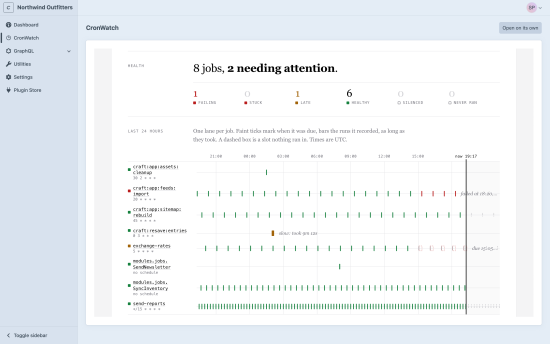
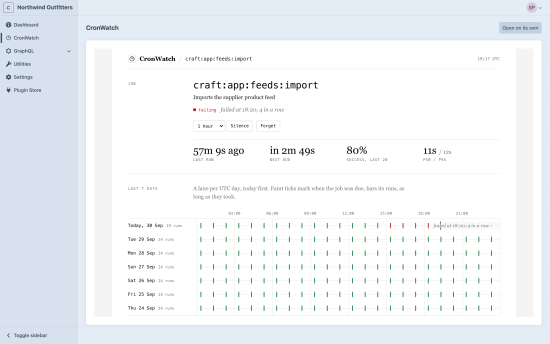
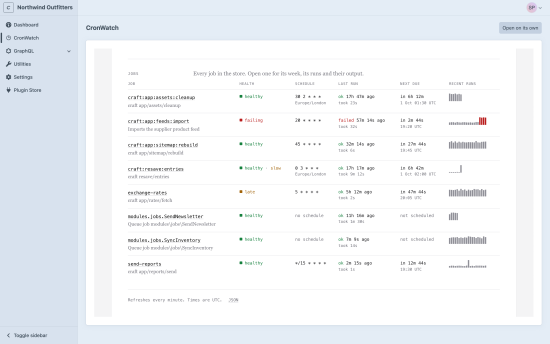
CronWatch watches the work your Craft CMS site does in the background: the console commands your crontab runs and the queue jobs you choose. Every run is recorded in your site's own database, and you're told when a run is missed, fails, gets stuck or runs much slower than usual, and again when it recovers.
There's no server to run and no account to make. It lives inside your site.
What it watches
- Console commands. List the commands your crontab runs, with the schedule it keeps. A command that exits with an error is recorded as failed, and one the crontab stops running is reported missed.
- Queue jobs. List a job class, or mark it with the
#[Watch]attribute. Each attempt is a run, wherever the queue runs it, so a job that keeps failing opens one alert and the attempt that succeeds closes it.
Craft's own jobs (search indexes, resaving elements, image transforms) are left alone unless you list them.
// config/cronwatch.php
return [
    'commands' => [
        'resave/entries' => ['schedule' => '0 3 * * *', 'timezone' => 'Europe/London'],
        'app/reports/send' => ['schedule' => '*/15 * * * *', 'grace' => '5m'],
    ],
    'queueJobs' => [
        modules\jobs\SyncInventory::class => ['failuresBeforeAlert' => 3],
    ],
];
Alerts
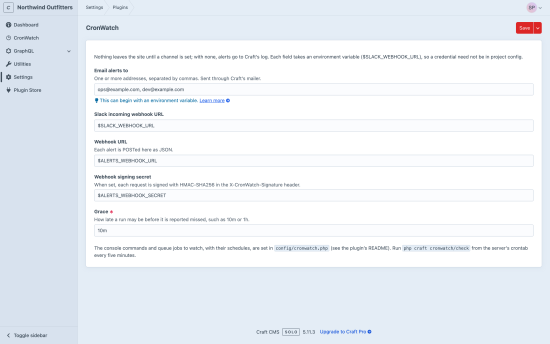
Send alerts by email through Craft's mailer, to a Slack incoming webhook, or to a webhook of your own (signed when you give it a secret). Each setting takes an environment variable, so credentials stay out of project config. Every condition sends one message when it starts and one when it clears, never a stream of repeats.
A dashboard in the Control Panel
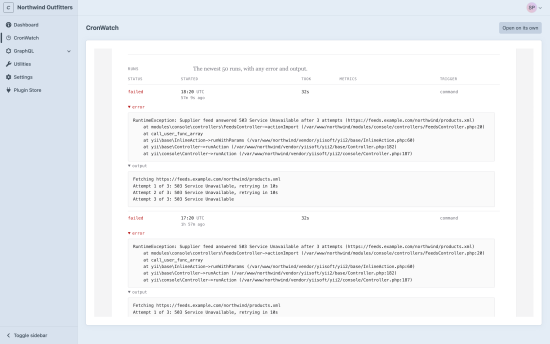
CronWatch adds a page to the Control Panel showing every job's health, the last 24 hours as a timeline, and each job's runs and output. Silencing a job or running a check needs its own permission.
Ask your coding agent
Set an API token and the CronWatch MCP server lets Claude Code, Cursor and other agents list your jobs, read why one failed, run a check and silence alerts.
Requirements
- Craft CMS 5.3 or newer
- PHP 8.2 or newer
- Craft's own database: MySQL 8.0.13+, MariaDB 10.6+ or Postgres
Missed and stuck runs are found by a check you add to your crontab: */5 * * * * php craft cronwatch/check.
CronWatch is open source (MIT) and also available for TypeScript, Ruby, Python, PHP, Go, Rust, Elixir, Java and .NET. Full docs: cronwatch.dev/docs/craft
To install this plugin, copy the command above to your terminal.
This plugin doesn't have any reviews.