 SEO & Accessibility
 AI
AI Localization
 Ecommerce
 Forms
Forms Fields
 Development
 Security
 Templating
 Performance
 Control Panel
 Widgets
 Assets
 Utilities
 Mailer Adapters
 Social Networking
 Integrations
Download Tracker
Count how many times each of your files gets downloaded, without bloating your database.
A lot of the download-tracking tools I found wrote a new database row (or even a whole element) for every single download. On a busy site that table balloons into millions of rows and starts to hurt. I also noticed that on sites with static caching turned on, every download was quietly forcing the cache to refresh. Download Tracker takes the opposite approach: it keeps one running counter per file and increments it atomically. A file downloaded a million times is still a single row.
It is also built for modern, cache-first Craft sites. If you run full-page static caching such as Blitz, you already know that a cached page never touches PHP, so anything that tries to "count on page load" simply never fires. Download Tracker sidesteps this by counting on a lightweight background request that static caches always let through.
How the counting works
When someone clicks a download link, a tiny beacon request fires in the background and bumps that file's counter. The page itself does not need to run PHP, so it works exactly the same on a cached page as it does on an uncached one.
You do not have to touch your templates. With auto-injection turned on, the plugin adds the beacon to your front-end pages for you and decides what counts as a download based on rules you control:
- Path prefixes, so you can count only files served from your download folders.
- A file extension allow-list (pdf, docx, xlsx, zip, mp3, epub and more, all editable).
- The HTML
downloadattribute, so any link explicitly marked as a download is counted. - Excluded hosts, so links to something like an image CDN are never mistaken for downloads.
Prefetch, prerender and obvious bot requests are ignored by default, so your numbers stay honest.
What it can track
- Craft assets, linked back to the asset so a deleted asset simply nulls out and keeps its history.
- Local file paths served straight off disk.
- External URLs, if you want to count files hosted elsewhere.
By default a public beacon can only ever touch counters for real, resolved files, so the table stays bounded no matter who pokes at it.
Using it in your templates
Everything is exposed through the craft.downloadTracker Twig variable, so you can read counts and build download links wherever you need them.
Show a running total for a file. You can pass an asset, an asset ID, or a URL or path string:
{{ craft.downloadTracker.total(entry.brochure.one()) }} downloads
Get the full counter record when you want more than the number:
{% set stat = craft.downloadTracker.record(entry.brochure.one()) %}
{% if stat %}
<p>
Downloaded {{ stat.count|number }} times.
Last grabbed {{ stat.lastDownloaded ? stat.lastDownloaded|date('j M Y') : 'never' }}.
</p>
{% endif %}
List your most popular files. Each row gives you filename, count, lastDownloaded, sourceType and source:
<ol>
{% for row in craft.downloadTracker.top(5) %}
<li>{{ row.filename }} <span>{{ row.count|number }}</span></li>
{% endfor %}
</ol>
For gated, private, forced ("Save as"), or remote files, build a signed download URL that counts server-side. Ordinary public links do not need this, because the click beacon already tracks them:
{% set report = entry.report.one() %}

<a href="{{ craft.downloadTracker.url(report) }}">Download the report</a>
In the control panel
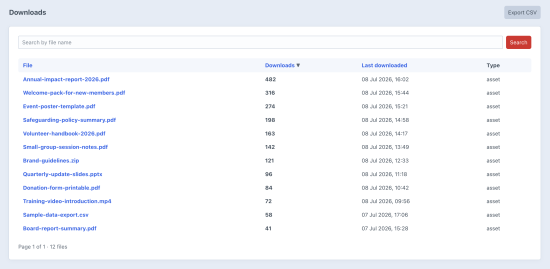
- A Downloads screen listing every tracked file with its total, its last-downloaded time and its type.
- Search and sort by file name, download count or last download.
- One-click CSV export of the current view for reporting or spreadsheets.
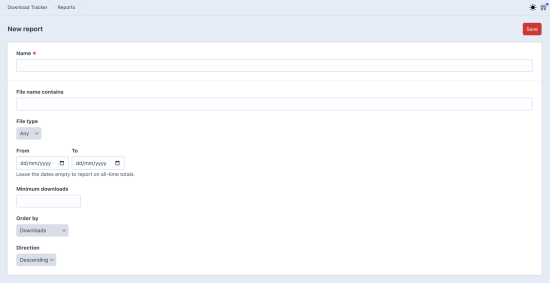
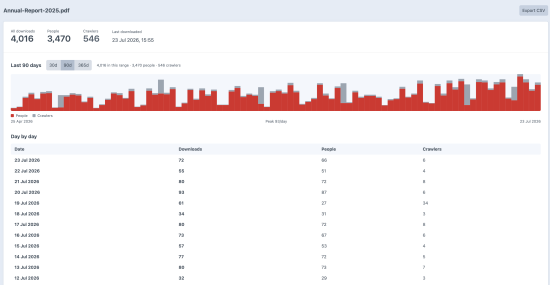
- Saved reports with date ranges, backed by a per-day rollup so you can see trends over time rather than just lifetime totals.
- A Top Downloads dashboard widget for an at-a-glance view of your most popular files.
Serving downloads (optional)
If you want the plugin to serve the files as well as count them, there is a built-in download route that can redirect public assets or stream private ones. You can force a "Save as" prompt, require login before a file is served, and sign URLs with an optional expiry. All of it is designed to keep working when your links are embedded in statically cached pages.
Configuration
Every setting can be managed in the control panel or overridden in code with a config/download-tracker.php file, so your tracking rules can live in version control and deploy with the rest of your project:
Housekeeping
Per-day rollup rows are garbage-collected on the retention window you set (a year by default), so the history table never grows without bound. There is also a download-tracker/counts console command for running that pruning from a scheduled task.
Requirements
- Craft CMS 4, Craft CMS 5
- PHP 8.2 or later
Works happily alongside Blitz and other static caching layers.
Standard
Plus $5/year after one year.
To install this plugin, copy the command above to your terminal.
This plugin doesn't have any reviews.