 SEO & Accessibility
 AI
AI Localization
 Ecommerce
 Forms
Forms Fields
 Development
 Security
 Templating
 Performance
 Control Panel
 Widgets
 Assets
 Utilities
 Mailer Adapters
 Social Networking
 Integrations
Editoria11y Accessibility Checker ✨
A simple way for content teams to catch accessibility issues early.
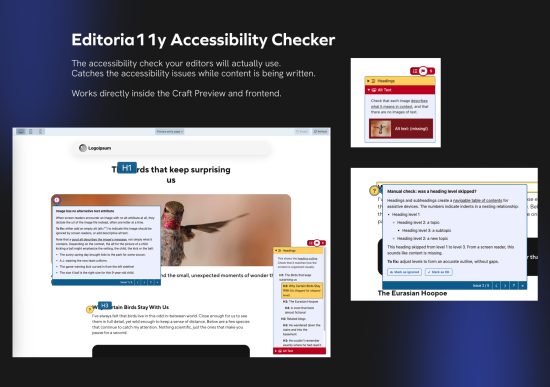
Editoria11y (short for editorial ally) works like an accessibility spellcheck that helps editors spot issues while they’re actually creating content. No separate tools, no audits weeks later, no guesswork. Just clear, actionable hints right where your team needs them.
This plugin brings the power of the Princeton-built Editoria11y checker straight into both the control panel and your site’s frontend, giving content teams a simple way to keep accessibility top of mind.
Because good accessibility isn’t just a developer responsibility. It’s something editors can meaningfully improve every single day.
✅ What it does
A quick overview of the checker’s capabilities:
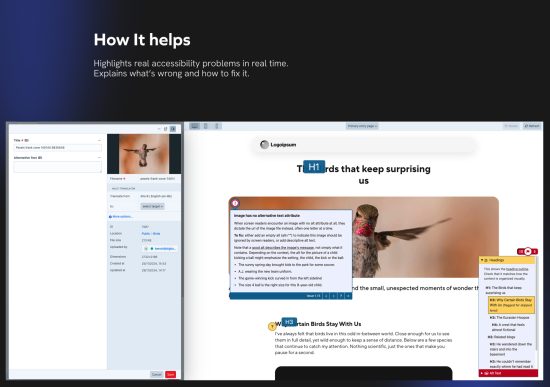
- Highlights common accessibility issues as editors browse or preview content
- Explains why something might be problematic and how to fix it
- Acts like a spellcheck for usability, clarity and inclusive design
- Helps content creators a chance to fix accessibility issues during the writing process instead of weeks later.
And because it seamlessly integrates with the Craft control panel & preview mode, the checker is never out of reach.
Frontend checks
Logged-in users can activate the checker directly on the live site (via site requests). Perfect for reviewing real content in its real context.
Preview checks in the Control Panel
Editors can run accessibility checks right from Craft's Live Preview pane before publishing updates.
⚙️ Configuration options
You decide how visible and flexible the tool should be:
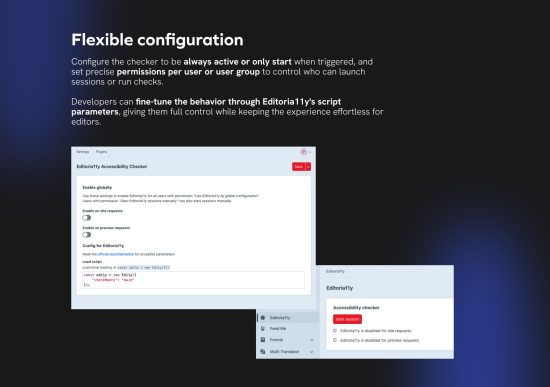
- Enable Editoria11y globally or only when a session is triggered
- Allow specific users or user groups to start a session
- Fine-grained permissions for:
- Starting a session
- Using the checker
- Running checks in frontend or preview
Customizable script parameters
If you want to fine-tune the checker’s behaviour, you can override the Editoria11y script configuration yourself. All available parameters are documented on their website
This gives Craft developers full control over things like ignored selectors, scanning behavior and interface tweaks.
💡 Why your team/client will like it
- Empowers editors to fix accessibility issues independently
- Reduces dependency on developers
- Improves the accessibility baseline of your website
- Helps teams stay aligned with WCAG guidelines in a practical, everyday way
- Turns accessibility into a habit, not an afterthought
🛟 Support
Need help? Found a bug? Check out the GitHub repository for documentation and open issues. Contributions are very welcome.
Built by Calibrate - we create websites and webshops that seamlessly integrate with your systems to deliver the best possible user experience
To install this plugin, copy the command above to your terminal.