 SEO & Accessibility
 AI
 Localization
 Ecommerce
 Forms
 Fields
 Development
 Security
 Templating
 Performance
 Control Panel
 Widgets
 Assets
 Utilities
 Mailer Adapters
 Social Networking
 Integrations

Element Relations
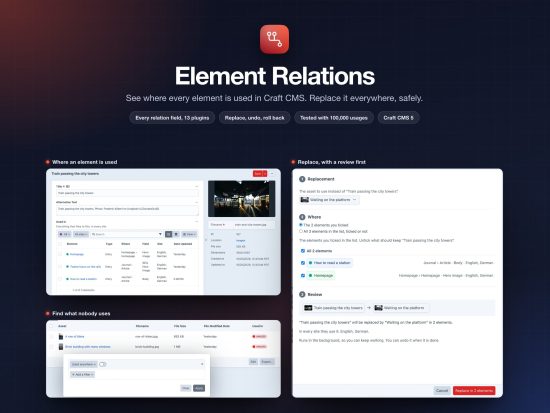
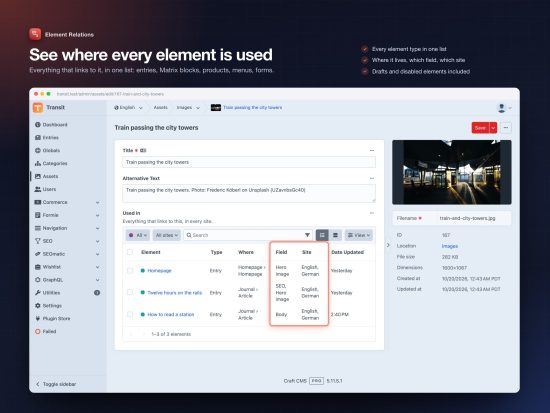
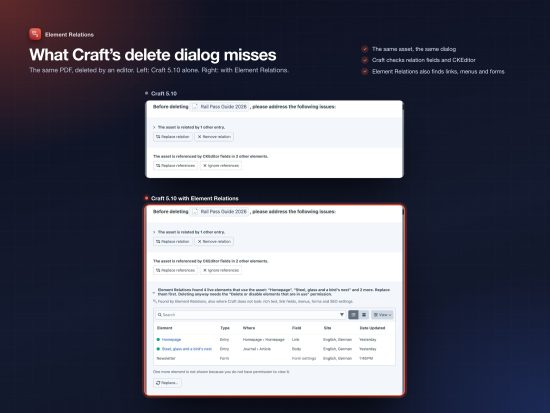
See where every element is used
One list of everything that links to an entry, asset, category, product or any other element. It covers all element types, all sites, rich text and the plugins you use. The list is Craft’s own element index, so it looks and works like the rest of the control panel.
Every Craft project asks the same questions. Can I delete this asset? Which pages show this category? Where is the old logo still used? Craft’s relations table knows part of the answer. It knows nothing about CKEditor links, link fields from plugins, SEOmatic images, Navigation menus, Formie forms or Vizy blocks. Element Relations answers all of it in one place, and lets you act on the answer.
See where it is used
- One list for every element type. Entries, Matrix and other nested content, assets, categories, tags, users, products, global sets, Navigation menus, Formie forms.
- Every row says where. The page it lives on, the field that holds the link, and the sites. An element used in two sites, or through two fields, is one row and counts once.
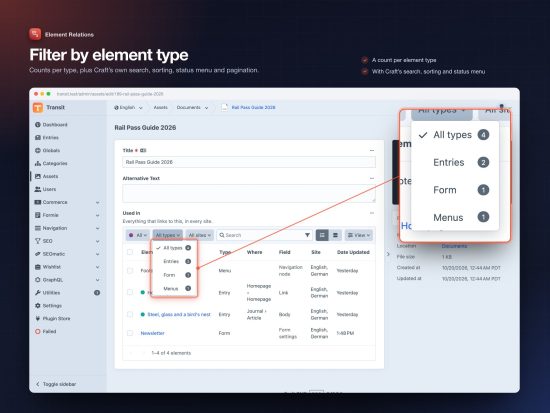
- Native. Craft’s search, sorting, filters, status menu, table and card view, plus dropdowns for element type and site, with counts.
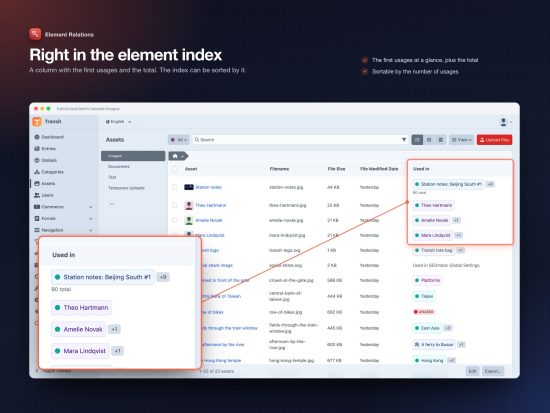
- In the element index. A column with the first usages and the total. Sort by it to find the most used assets.
- Plugin settings count too. Usages that are not elements, like SEOmatic’s global SEO image, are listed below the field.
- Follows permissions. Editors only see usages they may view. A line says how many are hidden, so nobody takes an element for unused.
Find what nobody uses
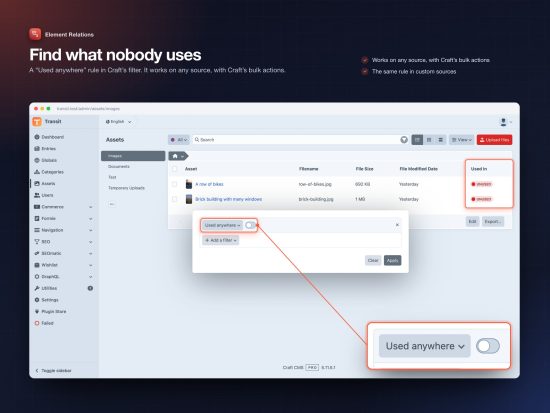
A “Used anywhere” rule in Craft’s filter. It works on any source, with Craft’s bulk actions. Set it to off, and you see every asset nobody links to. Ready to delete.
Replace it everywhere, safely
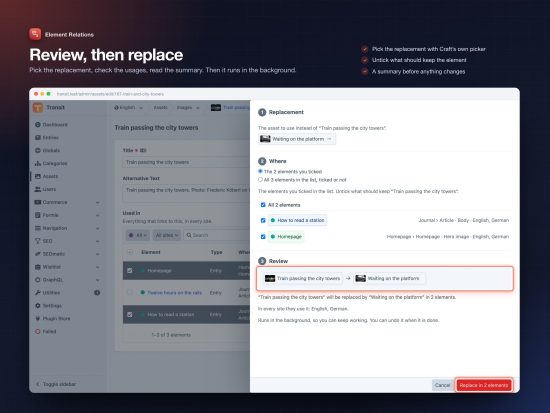
- Pick and review. Tick the usages in the list, choose “Replace…”, pick the replacement and read the summary before anything changes. Or replace an element everywhere, right from the element index.
- Every field and plugin. Relation fields, rich text, link fields, SEOmatic, Navigation, Formie and the others are rewritten the same way they were read.
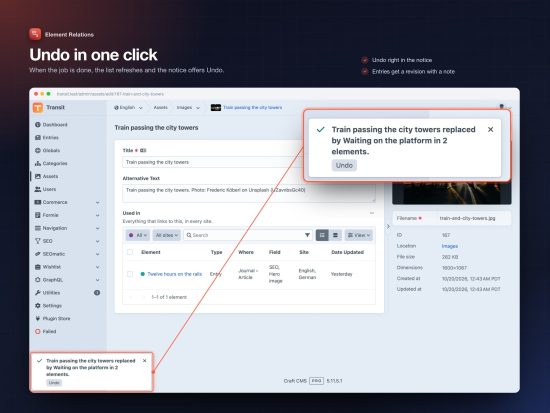
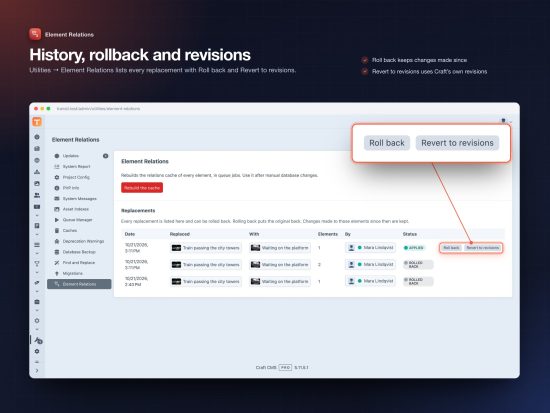
- Undo in one click. The notice has an Undo button. A history under Utilities lists every replacement, with Roll back and Revert to revisions. Entries get a revision with a note.
- Never blocks the page. Large replacements run in the background, in batches, as the user who started them. If a worker dies, they continue where they stopped.
- Command line and migrations.
php craft element-relations/replace 412 388, or many pairs at once from a CSV file, for example after merging duplicate assets.
Nothing breaks by accident
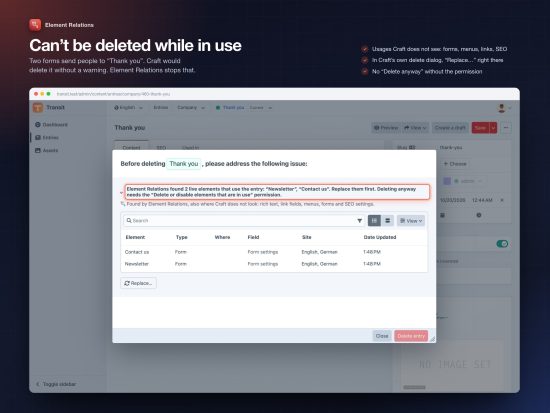
Editors can’t delete or take offline what live content uses. The error names the pages that use it. On Craft 5.10 and later, Craft’s own delete dialog lists the usages first, with “Replace…” right there. A permission lets trusted users go ahead anyway.
Supported fields and plugins
Anything that stores its links in Craft’s relations table works out of the box: Entries, Assets, Categories, Tags, Users and Products fields, Craft’s Link field, also inside Matrix, Neo, Super Table and Content Block. User photos too.
Plus own support for CKEditor, Redactor, SEOmatic, Hyper, LinkIt, Typed Link Field, LinkMate, FreeLink, Vizy, SEO (by Ether), Navigation, Wishlist and Formie.
In your templates
{# usedIn: the handle of your Element Relations field #}
{% if asset.usedIn.isInUse %}…{% endif %}
{% set count = asset.usedIn.count %}
{% set pages = craft.entries().usesElement(asset).all() %}
{% set everything = craft.usages().usesElement(asset).all() %}
The same in GraphQL: entries(usesElement: 12) { title }.
Built for large sites
Relations are read when an element is saved and stored in one indexed table. Lists and counts are paged SQL queries. Tested with one asset used by 100,000 entries: its list opens in under a second.
Tested
Every push runs three test suites on PHP 8.2 and 8.3, on MySQL and PostgreSQL: over 1,400 checks, every supported plugin, 100 % code coverage.
Requirements
Craft CMS 5.3 or later, PHP 8.2 or later. For Craft 4, use version 3.1.
Standard
Plus $29/year after one year.
To install this plugin, copy the command above to your terminal.
This plugin doesn't have any reviews.