 SEO & Accessibility
 AI
 Localization
 Ecommerce
 Forms
 Fields
 Development
 Security
 Templating
 Performance
 Control Panel
 Widgets
 Assets
 Utilities
 Mailer Adapters
 Social Networking
 Integrations

Environment Banner plugin for Craft CMS
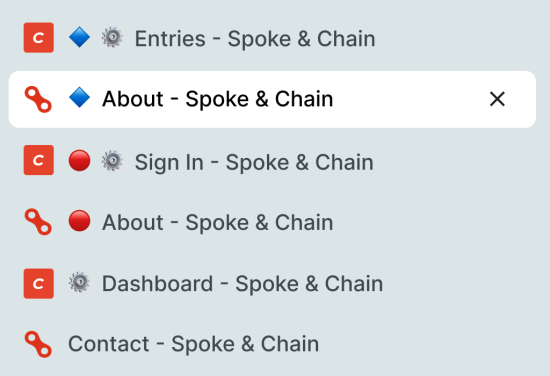
Marks Craft environments so you can tell them apart at a glance, especially useful with vertical tabs:
- A coloured banner across the top of the control panel.
- A coloured symbol at the start of every page
<title>(CP and front end), so browser tabs are easy to tell apart.
The defaults mark dev/development with a blue diamond 🔷 and staging with a red circle 🔴. Shape differs as well as colour, so it works for colour-blind users. Environments that are not listed (such as production) get nothing.
Requirements
This plugin requires Craft CMS 5.0.0 or later.
Installation
To install the plugin, follow these instructions.
Open your terminal and go to your Craft project:
cd /path/to/projectThen tell Composer to load the plugin:
composer require simplygoodwork/craft-environment-bannerIn the Control Panel, go to Settings → Plugins and click the “Install” button for Environment Banner.
Configure
It works with no config. To change it, create config/environment-banner.php:
<?php

use craft\helpers\App;

return [
    // Defaults to Craft's CRAFT_ENVIRONMENT. Set it if your project uses a different variable.
    'environment' => App::env('ENVIRONMENT'),

    'environments' => [
        'dev' => ['label' => 'Local development', 'color' => '#2563EB', 'symbol' => '🔷'],
        'staging' => ['label' => 'Staging', 'color' => '#D80621', 'symbol' => '🔴'],
    ],

    'showBanner' => true,
    'prefixTitles' => true,
];
Notes
The banner is a ::before on #page-container. If a Craft release changes the CP markup, that selector is the one to revisit.
Brought to you by Good Work.
To install this plugin, copy the command above to your terminal.
This plugin doesn't have any reviews.