 SEO & Accessibility
 AI
AI Localization
 Ecommerce
 Forms
Forms Fields
 Development
 Security
 Templating
 Performance
 Control Panel
 Widgets
 Assets
 Utilities
 Mailer Adapters
 Social Networking
 Integrations
A Realsuite integration that extends the Formie plugin for Craft CMS. Pushes Formie form submissions to the Realsuite SiteSync API as leads.
Requirements
This plugin requires:
- Craft CMS 5.0.0 or later
- PHP 8.2 or later
- Formie 3.0 or later
- A Realsuite account with a SiteSync API key
Installation
With Composer
Open your terminal and run the following commands:
# go to the project directory
cd /path/to/my-project.test

# tell Composer to load the plugin
composer require esign/craft-formie-realsuite

# tell Craft to install the plugin
./craft plugin/install formie-realsuite
From the Plugin Store
Go to the Plugin Store in your project's Control Panel and search for "Formie Realsuite Integration". Then press "Install".
Usage
Setting Up the Realsuite Integration
- Navigate to Formie → Settings → CRM
- Click New Integration
- Select Realsuite as your integration provider
- Enter your Realsuite SiteSync API Key and save the integration
- After saving, click the Refresh button in the right-hand sidebar to verify the API connection
Sending Form Submissions to Realsuite
- Go to the form you want to connect with Realsuite
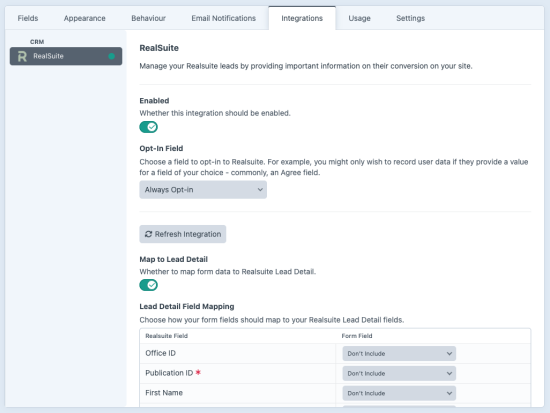
- Navigate to the Integrations tab
- Enable your Realsuite integration
- Toggle one or more lead types and map your form fields:
| Lead type | Endpoint | Use case |
|---|---|---|
| Lead Detail | POST /leads/detail | Visitor requests more info about a specific property (publicationId required) |
| Lead Estimate | POST /leads/estimate | Visitor requests a property valuation, includes address and estate type fields |
| Lead Info | POST /leads/info | General contact/info request |
| Lead Search Profile | POST /leads/search-profile | Visitor submits a property search profile with criteria (price, area, type, etc.) |
- Map each form field to the corresponding Realsuite field and save the form
Field Mapping Notes
- Lead Detail —
publicationIdandlastNameandinfoare required - Lead Estimate —
lastNameis required; address and estate type fields are optional - Lead Info —
lastNameis required - Lead Search Profile —
lastNameis required; thesearchProfileobject is assembled automatically from theSearch Profile:,Residential:, andProfessional:prefixed fields - Array fields (Search Profile: Sorts, Genres, Characterisations, Zipcodes) — map these to a Formie Checkboxes or Multi-select Dropdown field to pass multiple values
Installation Instructions
To install this plugin, copy the command above to your terminal.
Reviews
This plugin doesn't have any reviews.
Active Installs
6
License
MIT
Last release
March 4, 2026
Activity (30 days)
0
Closed Issues
0
Open Issues
0
Merged PRs
0
Open PRs