 SEO & Accessibility
 AI
AI Localization
 Ecommerce
 Forms
Forms Fields
 Development
 Security
 Templating
 Performance
 Control Panel
 Widgets
 Assets
 Utilities
 Mailer Adapters
 Social Networking
 Integrations


Glue
Two entries in, one entry out.
Glue merges two Craft entries into one. You pick a winner field by field — or take both, where taking both means something — and Glue writes the result to a new entry or into one of the two you started with. Pro then repoints everything that pointed at the entry you retired.
It is for the afternoon somebody discovers the importer ran twice, or that the press release has been written up by two people, or that a client has been quietly maintaining two versions of the same product page since 2019.
Requirements
Craft CMS 5.3 or later, PHP 8.2 or later. No other plugins, no build step, no third-party services.
Installation
composer require justinholtweb/craft-glue
php craft plugin/install glue
Using it
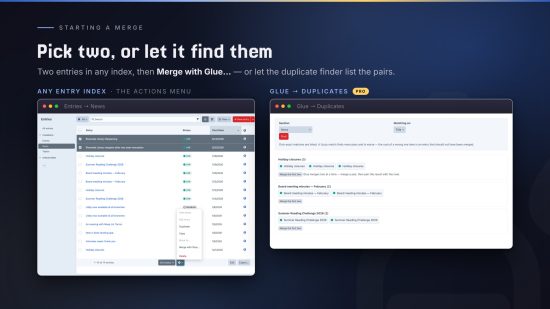
Select exactly two entries in any entry index, open the actions menu, and choose Merge with Glue….
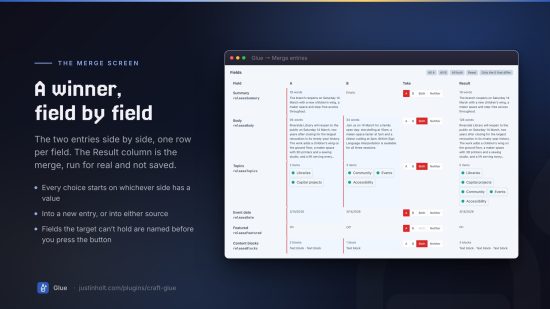
The merge screen puts the two entries side by side with one row per field of the target entry type:
| Field | A | B | Take | Result |
|---|---|---|---|---|
| Body | 412 words | 96 words | ( A · B · Both · Neither ) | 508 words |
| Topics | Pricing, Support | Support, Billing | ( A · B · Both · Neither ) | Pricing, Support, Billing |
| Hero image | hero-v2.jpg | Empty | ( A · B · Both · Neither ) | hero-v2.jpg |
Every choice starts pre-selected on whichever entry actually has a value, so the common case — two records of the same thing, one filled in further — is a handful of decisions rather than one per field. The Result column is live: it is the merge, run for real and not saved.
Then choose where it goes:
- A new entry — both sources survive untouched. The safe default.
- Into the first or second entry — that entry keeps its ID, its URL, its revision history and every inbound link. The other is retired.
And what happens to the originals: leave them, disable them, or move them to the trash.
What “Both” does
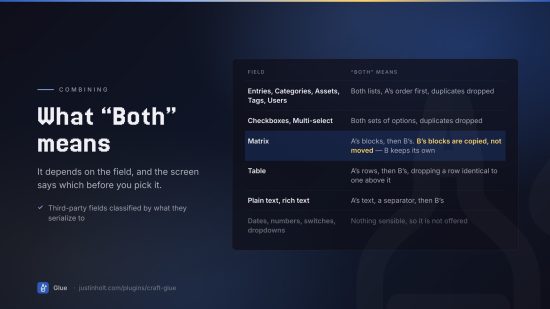
It depends on the field, and the screen says which before you pick it:
| Field | “Both” means |
|---|---|
| Entries, Categories, Assets, Tags, Users | Both lists, A’s order first, duplicates dropped |
| Checkboxes, Multi-select | Both sets of options, duplicates dropped |
| Matrix | A’s blocks, then B’s. B’s blocks are copied, not moved — B keeps its own |
| Table | A’s rows, then B’s, dropping a row identical to one above it |
| Plain text, rich text | A’s text, a separator, then B’s |
| Dates, numbers, switches, dropdowns | Nothing sensible, so it is not offered |
Fields Glue has never seen are classified by what they serialize to, so a third-party relation field gets a union and a third-party rich text field gets a join without Glue knowing anything about either.
Repointing what linked to the retired entry — Pro
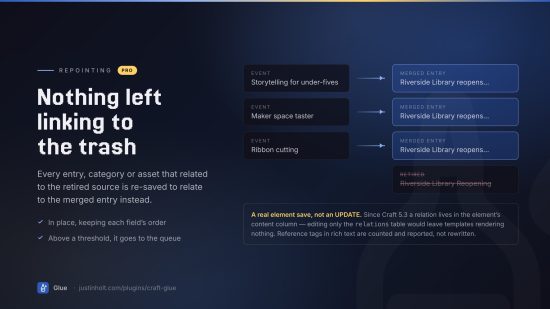
Retiring an entry that forty other entries link to is not a merge problem, it is a link-rot problem. Switch Repoint everything that linked to them on and Glue re-saves every entry, category or asset that related to a retired source so that it relates to the merged entry instead — in place, keeping each field’s order, and dropping the duplicate if it already related to both.
It is a real element save, not an UPDATE, because since Craft 5.3 a relation field’s value
lives in the element’s content column and the relations table is a secondary index. Editing
only the table would leave every relatedTo query agreeing with you while the templates rendered
nothing.
Above a threshold the work goes to the queue instead of the request.
Reference tags in rich text — {entry:482:url} — create no relation and are not rewritten.
Glue counts them and tells you, so you know what to search for before emptying the trash.
Revisions are not rewritten either: a revision is a record of what an entry was.
The history
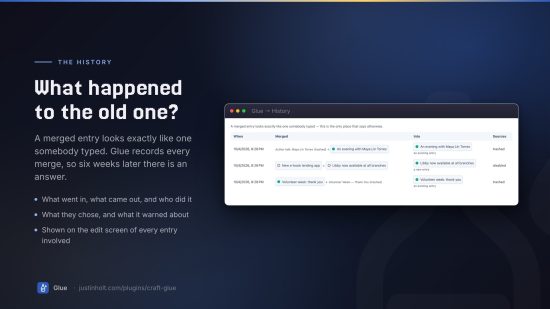
A merged entry looks exactly like one somebody typed. Six weeks later, “what happened to the old press release?” has no answer anywhere in Craft — the survivor’s revisions never mention the entry it absorbed, and the absorbed entry’s own history simply ends.
Glue records every merge: what went in, what came out, who did it, what they chose, and what it warned about. It shows in Glue → History, and on the edit screen of any entry that was part of one.
Editions
Lite is a complete merge tool. Every combine strategy, every target, the compatibility warnings, the disposition of the sources and the history are all in Lite. An editor cleaning up a dozen duplicates by hand never meets a paywall.
Pro is for the two things that only arrive with volume:
| Lite | Pro | |
|---|---|---|
| Merge two entries, field by field | ✅ | ✅ |
| Every “Both” strategy | ✅ | ✅ |
| New entry, or merge into a source | ✅ | ✅ |
| Disable or trash the originals | ✅ | ✅ |
| Merge history and audit | ✅ | ✅ |
| Repoint inbound relations | ✅ | |
| Merge presets | ✅ | |
| Merge every site at once | ✅ | |
| Console commands | ✅ | |
| Duplicate finder | ✅ |
Lite $59, then $49/year · Pro $79, then $69/year. Nothing downgrades silently: a lapsed Pro licence keeps every merge it has already made — merged entries are ordinary entries — and the Pro controls refuse with a reason rather than quietly doing something else.
From the command line — Pro
# What would merging these two do?
php craft glue/inspect --a=482 --b=917          # free, writes nothing

# Do it
php craft glue/merge --a=482 --b=917 --target=a --disposition=trash --rewire

# Work out which pairs are worth merging in the first place
php craft glue/duplicates --section=news

# Repoint inbound relations without merging anything
php craft glue/rewire --from=482 --to=917
--dry-run resolves the whole merge and prints it without writing. --preset=<handle> replays
saved choices.
Presets — Pro
Save a screen’s worth of choices under a name and replay it on the next pair. Presets live in project config, so they are reviewed in a pull request and deployed with the entry types they describe.
A preset replayed against an entry type it was not written for leaves the fields it has never heard of to the pre-selection rule rather than emptying them.
Permissions
Glue adds three, and Craft’s own still apply on top — a merge is a save, and a merge that retires its sources is a delete:
- Merge entries
- View the merge history
- Save and delete merge presets
Twig
{% if craft.glue.wasMergedInto(entry.id) %}
    <p>This page brings together two earlier ones.</p>
{% endif %}

{{ craft.glue.mergeUrl(482, 917) }}
Events
use justinholtweb\glue\services\Merger;
use justinholtweb\glue\events\MergeEvent;
use yii\base\Event;

Event::on(Merger::class, Merger::EVENT_BEFORE_MERGE, function(MergeEvent $event) {
    // $event->plan, $event->pair, $event->result
    if ($event->pair->a->section->handle === 'invoices') {
        $event->isValid = false;   // veto
    }
});

Event::on(Merger::class, Merger::EVENT_AFTER_MERGE, function(MergeEvent $event) {
    // $event->result->entry is saved by now
});
Things to know
- Glue merges entries, not Matrix blocks. A nested entry has an owner, a field and a sort order, none of which a merge knows how to reassign.
- Singles are not offered as a target. A single is one entry by definition.
- Drafts are left alone. Merges read the canonical entries, and somebody’s open provisional draft is never re-saved.
- Fields the target entry type does not have are dropped, and Glue says which before you press the button.
- Two layouts can use the same handle for different fields. Glue matches by handle and then checks what is underneath: the same field is silent, the same kind of field is allowed with a warning, and two different kinds are not offered at all.
Documentation
Installation · Using Glue · Configuration · Console commands · How merging works · FAQ · Troubleshooting
Licence
To install this plugin, copy the command above to your terminal.
This plugin doesn't have any reviews.