 SEO & Accessibility
 AI
AI Localization
 Ecommerce
 Forms
Forms Fields
 Development
 Security
 Templating
 Performance
 Control Panel
 Widgets
 Assets
 Utilities
 Mailer Adapters
 Social Networking
 Integrations
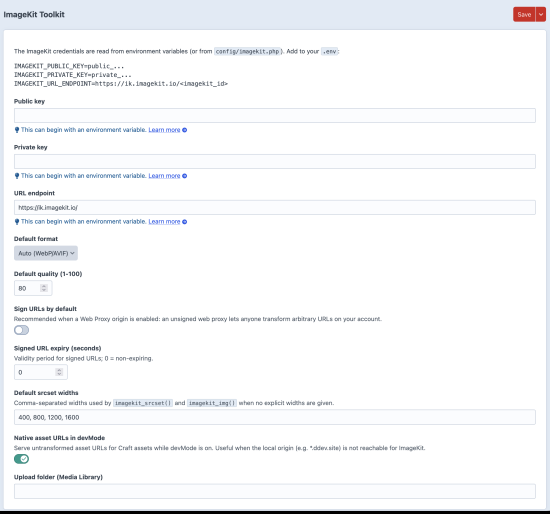
ImageKit for Craft CMS
ImageKit for Craft CMS integrates the ImageKit image optimization service directly into Craft CMS. It allows you to serve assets through ImageKit while continuing to manage your images using Craft's native asset system.
The plugin is intended for developers who want to use ImageKit's CDN and transformation capabilities without building a custom integration.
What it does
The plugin connects your Craft CMS installation to ImageKit and makes it possible to deliver images through ImageKit instead of directly from your server.
ImageKit can perform image transformations on demand, including resizing, cropping, compression and format conversion. Generated images are cached by ImageKit, so multiple versions do not need to be stored in your Craft installation.
Features
- Integrates ImageKit with Craft CMS
- Serve assets through the ImageKit CDN
- URL-based image transformations
- Automatic image optimization
- Automatic format conversion where supported
- Responsive image delivery
- Compatible with existing Craft asset workflows
Why use ImageKit?
Craft CMS already provides excellent image transform functionality. ImageKit becomes particularly useful when you want to offload image processing and delivery to an external service.
This can reduce the processing load on your web server, improve cache efficiency and make use of ImageKit's global CDN. Because transformations are generated on demand, there is no need to pre-generate or store every image variation.
Typical use cases
The plugin is suitable for projects where:
- Images are served to a large number of visitors.
- Performance and caching are important.
- A CDN is already part of the infrastructure.
- ImageKit is used elsewhere within the project.
- Dynamic image transformations are preferred over locally generated variants.
Development
The plugin is designed to integrate naturally with Craft CMS and follows standard Craft development practices. It can be used in both traditional and headless Craft projects.
Configuration is intentionally minimal, allowing the plugin to fit into existing projects without requiring major changes to templates or asset management.
For installation instructions, configuration options and examples, please refer to the documentation.
To install this plugin, copy the command above to your terminal.
This plugin doesn't have any reviews.