 SEO & Accessibility
 AI
AI Localization
 Ecommerce
 Forms
Forms Fields
 Development
 Security
 Templating
 Performance
 Control Panel
 Widgets
 Assets
 Utilities
 Mailer Adapters
 Social Networking
 Integrations
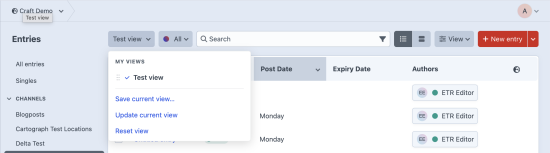
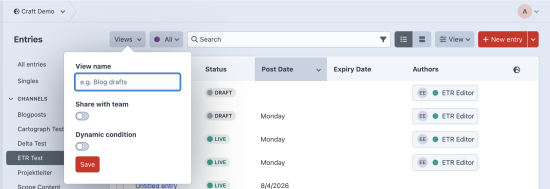
Index Views saves the state of your element indexes and lets you switch between named views.
The problem
Editors work in the entries index all day. They select a source, set the columns they need, sort the results and add filters. Then they open an entry, come back, and most of that setup is gone.
Craft keeps a part of it in the browser, but only one configuration per source. Filters and search terms are lost during navigation, and nothing follows the user to a second browser or a second computer.
Custom Sources answer a different question. Only admins can create them, they live in project config, and each one holds a single fixed configuration. They are a developer tool, not an editorial one.
What Index Views does
Index Views adds a Views dropdown to the element index toolbar. Any control panel user can save the current state as a named view, then load it again with one click.
A view records:
- The selected source
- The table columns and their order
- The sort attribute and direction
- The view mode, table or cards
- The active condition builder filters
- The search text
- The site, on multisite installs
Views are stored in the database, one set per user. They are available in every browser and on every device the user signs in from.
Default views
Click the star on a view to make it your default for the source it was saved on. The next time you open that index, the view loads automatically.
Each user sets their own star. The same shared view can be the default for one person and not for another. One default is kept per source, per element type, per user.
Sharing
Views are personal by default. A user with the "Share views with other users" permission can make a view visible to the whole team.
Only the user who created a shared view can rename or update it. Admins can delete any shared view. Each user can hide a shared view from their own menu, which does not change the menu of anyone else.
Dynamic conditions
On the entries index, a view can filter entries by the user who opens it. Select one of these match conditions:
- Author is current user
- A Users field points at the current user, for example a
reviewerfield - A chained relation, where the entry relates to an intermediary entry that links to a Craft user
The server resolves the condition on each page load. One shared view therefore shows every user only their own entries.
For example, a Projects section has a projectLead field that points to employee entries, and each employee entry has a linkedUser field. A single shared view named "My Projects" shows each project lead only the projects that they lead.
Supported element types
Entries, assets, categories and users. Other plugins can add their own element types with the EVENT_REGISTER_ELEMENT_TYPES event.
Also included
- Rename a view in place
- Duplicate a view as a personal copy
- Reorder your views by dragging
- Hide and unhide views without deleting them
- Tooltips that show the source, mode, sort, column count and filter status of a view
- Views for sources that a user cannot access are hidden automatically
- Full keyboard navigation and ARIA labels
- 33 locale translation files
Requirements
Craft CMS 5.9 or later. PHP 8.2 or later.
To install this plugin, copy the command above to your terminal.
This plugin doesn't have any reviews.