 SEO & Accessibility
 AI
AI Localization
 Ecommerce
 Forms
Forms Fields
 Development
 Security
 Templating
 Performance
 Control Panel
 Widgets
 Assets
 Utilities
 Mailer Adapters
 Social Networking
 Integrations
Jarhead
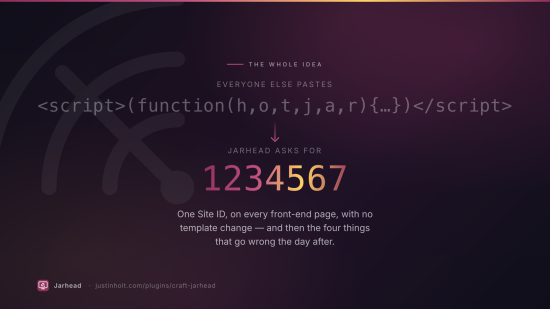
Hotjar for Craft CMS. Paste the Site ID; every front-end page gets the tracking code, with no template change.
Reference point: the WordPress plugin Hotjar. That plugin
is one field and one wp_head hook, and for a single-site WordPress blog it is genuinely enough.
Craft sites are not that. Jarhead does the one field too — and then does the four things that go
wrong on the day after you install it.
Free. Single edition, everything switched on, no licence key.
Install
composer require justinholtweb/craft-jarhead
php craft plugin/install jarhead
Craft 5.3+, PHP 8.2+. No runtime dependencies beyond Craft's own. No database tables.
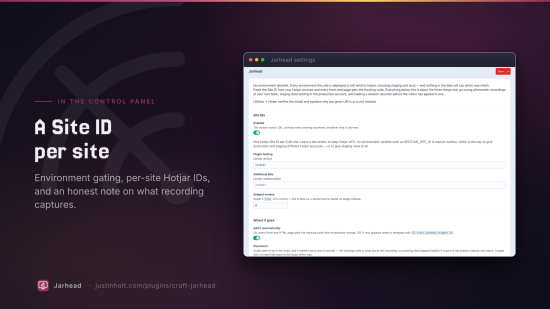
Then: Settings → Plugins → Jarhead, paste your Hotjar Site ID, done.
The four things
1. Half your recordings are your own team
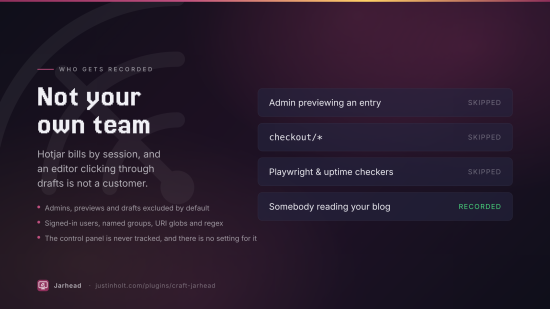
Hotjar bills by session. An editor clicking through drafts, a designer refreshing a template, an admin previewing an entry — all of it records, all of it counts, none of it is a customer.
Jarhead excludes admins and previews by default, and will also exclude signed-in users, named user groups, and any URI you name.
'excludeAdmins' => true,
'excludePreviews' => true,
'excludedGroups' => ['editors', 'staff'],
'uriRules' => [
    ['pattern' => 'checkout/*', 'mode' => 'exclude'],
    ['pattern' => 'account/*', 'mode' => 'exclude'],
],
It also refuses to run under an automated browser — Playwright, Puppeteer, Selenium, most uptime checkers. That one is decided in the visitor's browser rather than from the user agent, because a user-agent test on the server would vary your page cache.
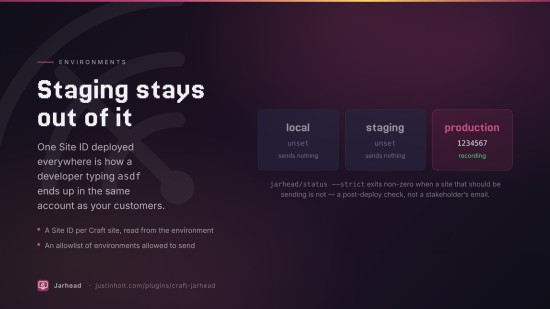
2. The Site ID ships to every environment
One ID in one field, deployed to staging, to .ddev.site, to a client's UAT box. Every recording
of a developer typing asdf into a form lands in the same account as the real ones, and nothing
in the data tells them apart afterwards.
// config/jarhead.php
return [
    'siteIds' => ['default' => '$HOTJAR_SITE_ID'],
    'allowedEnvironments' => ['production'],
];
The Site ID is per Craft site and read through App::parseEnv(), so production and staging can
have different Hotjar accounts — or staging can have none. An environment variable that does not
exist in this environment is treated as "not configured here", not as a literal string, so the
same project config is correct everywhere.
php craft jarhead/status --strict exits non-zero when a site that should be sending is not,
which makes it a post-deploy check rather than something a stakeholder tells you about.
3. Consent is bolted on afterwards, if at all
Session recording is personal data by any reading of GDPR — it is a video of somebody using your
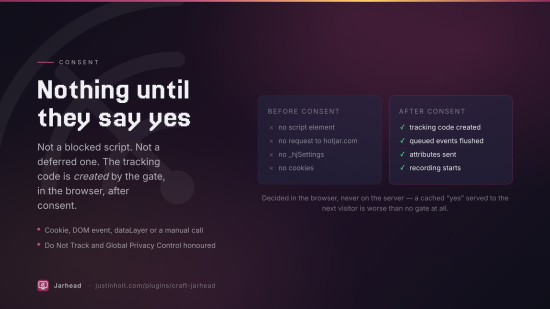
site. Under a consent gate, nothing reaches Hotjar until the visitor agrees: no script element,
no request to static.hotjar.com, no _hjSettings. Not a blocked script and not a deferred
one — the tracking code is created by the gate, in the browser, after consent. (The gate itself
is in the page, and it holds Hotjar's URL as a string it has not used.)
'consentMode' => 'cookie',
'consentCookie' => 'cookie_consent',
'consentCookieValue' => 'substring:analytics',
Four gates:
| Mode | Boots when |
|---|---|
cookie | a named cookie exists, optionally holding a named value |
event | a DOM event fires on window or document |
dataLayer | dataLayer carries analytics_storage: 'granted' — Google Consent Mode v2 |
manual | your code calls window.jarhead.consent() |
Do Not Track and Global Privacy Control are honoured on top of whichever gate you pick, and both are read in the browser for the same caching reason.
Anything you call while the gate is shut is queued, not lost — an event written into a template is earlier than the visitor's decision by definition.
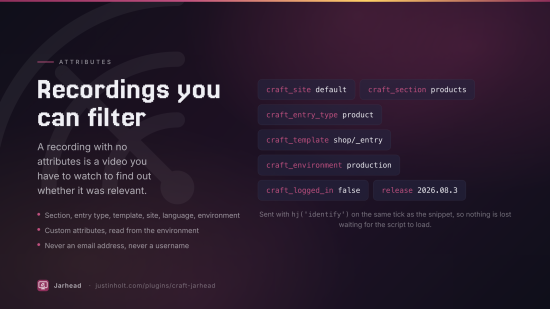
4. A recording with no tags is a video you have to watch
Every Craft page already knows its section, its entry type, its template, its site, and whether the viewer was signed in. Jarhead sends the ones you switch on, as Hotjar attributes, so recordings and heatmaps can be filtered:
'autoAttributes' => ['craft_site', 'craft_section', 'craft_entry_type', 'craft_template'],
'customAttributes' => [
    ['name' => 'release', 'value' => '$RELEASE_TAG'],
],
Signed-in users can optionally be identified by their Craft user ID, HMAC'd with your security key by default. There is no setting anywhere that sends an email address or a username — a Hotjar account is not the right home for either, and an identifier only has to be stable to be useful.
Twig
Everything is safe to call on a page that is not being tracked; you never have to ask first.
{# Place the tracking code yourself. Doing this stands automatic injection down for the page,
   so you can leave the setting on. #}
{{ craft.jarhead.snippet }}

{# Is this page tracked, and if not, why not? #}
{{ craft.jarhead.enabled }}
{{ craft.jarhead.explain.reason }}     {# 'preview', 'uri-excluded', 'environment', … #}
{{ craft.jarhead.explain.message }}    {# a sentence you can put in a staging footer #}

{# Events and attributes. Queued if the consent gate is still shut. #}
{{ craft.jarhead.event('Newsletter signup') }}
{{ craft.jarhead.identify(null, { plan: 'pro', trial: 'no' }) }}
{{ craft.jarhead.tag(['checkout', 'guest']) }}

{# The raw snippet, for pasting into a tag manager. No gate, no exclusions, no attributes. #}
{{ craft.jarhead.trackingCode() }}
JavaScript
window.jarhead.consent();                       // grant consent (the only way in under `manual`)
window.jarhead.event('Added to cart');
window.jarhead.identify('user-123', { plan: 'pro' });
window.jarhead.tag(['checkout']);
window.jarhead.stateChange('/checkout/step-2'); // a route change Jarhead did not see
window.jarhead.ready(function () { /* Hotjar is loaded */ });
window.jarhead.status();                        // why it has or has not booted
status() is the first thing to type into a console when a page is not recording:
{ booted: false, blockedBy: 'gpc', consentMode: 'cookie', hotjarSiteId: 1234567, queued: 2 }
The Hotjar utility
Utilities → Hotjar. Three questions, in the order they actually get asked:
- Is it configured? Every Craft site, its resolved Site ID, whether that came from an environment variable, and the verdict for its homepage right now.
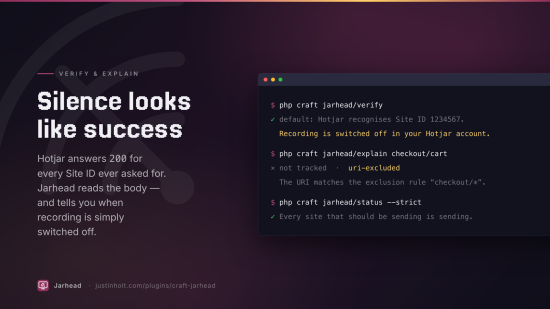
Does Hotjar know this ID? A button that asks Hotjar's CDN for the tracking script belonging to your Site ID, and reads the answer properly. Hotjar returns
200 application/javascriptfor every numeric ID ever asked for — an ID that does not exist gets 200 with an empty body — so a check written against the status code says yes tohotjar-1.js. Jarhead reads the body.The script also carries your site's Hotjar settings, so this reports the two things that actually explain an empty account: recording switched off for the site, and sampling below 100%. Neither is an installation problem, and both look exactly like one.
This is the only outbound request Jarhead ever makes, it happens only when somebody presses the button, and it goes to
static.hotjar.comand nowhere else.- Why is it not on that page? Type a URI, optionally a user ID and a preview flag, and get back the first rule that applied — through the same code path a real request takes.
The utility also prints the Content Security Policy directives Hotjar needs, because a CSP is the single most common reason a correctly installed tracking code does nothing and reports it to a console nobody is looking at.
Console
php craft jarhead/status                 # what each site would do right now
php craft jarhead/status --strict        # non-zero exit if a site is not sending — for CI
php craft jarhead/verify                 # ask Hotjar whether the Site IDs exist
php craft jarhead/explain checkout/cart  # why that URI would or would not be tracked
php craft jarhead/explain blog --user=14 # …as a specific user
php craft jarhead/snippet --site=default # the raw tracking code
What Jarhead never does
- It never tracks the control panel, and there is no setting for it. A session recorder pointed at the control panel records other people's addresses, order histories and account details. That is a data breach with a subscription.
- It never changes Hotjar's snippet. The tracking code is emitted verbatim, because it is the documented integration surface — Hotjar's own support will ask you to compare it — and a plugin that "improves" it is a plugin whose bug reports all close as "not our code". Jarhead changes what runs around the snippet.
- It never stores anything about a visitor. No tables, no counters, no logs of who was tracked. Hotjar is the thing collecting the data; a shadow copy in Craft would be a second privacy problem added to solve the first.
- It never sends an email address or a username.
Settings reference
Every setting is overridable from config/jarhead.php.
| Setting | Default | |
|---|---|---|
enabled | true | Master switch |
siteIds | [] | Hotjar Site ID per Craft site handle; $ENV_VAR supported |
snippetVersion | 6 | Hotjar's hjsv |
autoInject | true | Splice into front-end HTML automatically |
injectionPoint | 'head' | head or body; falls back if the tag is absent |
scriptNonce | '' | CSP nonce, usually an environment variable |
allowedEnvironments | [] | Empty means all of them |
trackInDevMode | false | |
excludePreviews | true | Live preview, drafts, share tokens |
excludeAdmins | true | |
excludeLoggedIn | false | |
excludedGroups | [] | User group handles |
uriRules | [] | ['pattern' => …, 'mode' => 'include'\|'exclude']; re: for regex |
excludeAutomatedBrowsers | true | navigator.webdriver |
consentMode | 'off' | off, cookie, event, dataLayer, manual |
consentCookie | '' | |
consentCookieValue | '' | Comma separated; substring: prefix supported |
consentEvent | 'jarhead:consent' | |
consentDataLayerKey | 'analytics_storage' | |
consentDataLayerValue | 'granted' | |
consentPollInterval | 500 | Milliseconds, cookie mode only |
consentTimeout | 0 | Seconds; 0 watches for the life of the page |
honourDnt | true | |
honourGpc | true | |
autoAttributes | site, section, entry type, environment | |
customAttributes | [] | ['name' => …, 'value' => …]; $ENV_VAR supported |
identifyUsers | false | |
hashUserIds | true | |
spaSupport | false |
URI patterns are globs by default (blog/*), regular expressions when prefixed with re:, and
__home__ matches the homepage. An exclusion always beats an inclusion regardless of order,
because these are read as "everywhere, except there".
Licence
The Craft License. See LICENSE.md. Jarhead is free: no editions, no licence key, and no
licensing code in the plugin.
Jarhead is not affiliated with, endorsed by, or sponsored by Hotjar Ltd. "Hotjar" is their trademark; this plugin only installs the tracking code they publish.
To install this plugin, copy the command above to your terminal.
This plugin doesn't have any reviews.