 SEO & Accessibility
 AI
AI Localization
 Ecommerce
 Forms
Forms Fields
 Development
 Security
 Templating
 Performance
 Control Panel
 Widgets
 Assets
 Utilities
 Mailer Adapters
 Social Networking
 Integrations
Lyfe
Lifecycle marketing automation for Craft Commerce 5 — a trigger → condition → action engine that runs on your own server.
Post-purchase follow-ups. Review requests. Replenishment reminders. Win-backs. Abandoned carts. VIP tagging. First-order-versus-repeat copy. SMS. All of it driven by rules you write in the control panel, against data that never leaves your database.
Why this exists
Craft Commerce has a real gap here.
| What's out there | What it does | What it doesn't |
|---|---|---|
verbb/abandoned-cart | One job, done well: email people who left a cart | No other triggers, no conditions, no multi-step sequences |
| Klaviyo Connect, Omnisend and friends | Ship your customer data to a SaaS | Your data leaves your stack, and you pay per contact forever |
| Commerce's status emails | One email per status change | No delays, no conditions, no segments |
Nobody ships a self-hosted rules engine over Commerce events. AutomateWoo ($99/yr) is the reference implementation on the WooCommerce side; Lyfe is the Craft answer, and it fits the "own your stack" position that made you choose Craft in the first place.
Requirements
- Craft CMS 5.3+
- Craft Commerce 5.0+
- PHP 8.2+
Installation
composer require justinholtweb/craft-lyfe
php craft plugin/install lyfe
Then give it something to run on a schedule:
* * * * * /path/to/project/craft lyfe/run/due
That single command advances due steps, sweeps abandoned carts and runs scheduled contact scans. If you have no cron, turn on Also process during web requests in the settings — it pushes a throttled queue job instead, never inline. The one thing that does run inside the customer's request is a workflow's first step when it has no delay; it can't fail the checkout, but it does take time, so give customer-facing first steps a delay of a minute or more.
How a workflow works
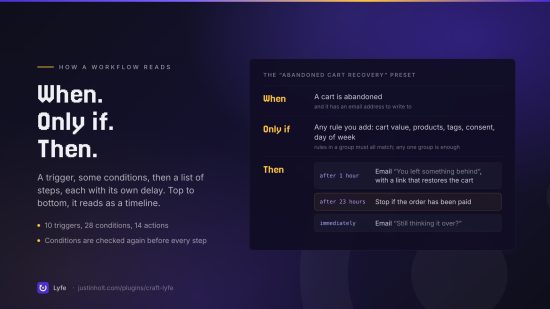
Three parts, in the order the editor asks for them.
1. When — a trigger. An order was placed. An order moved into "shipped". Somebody registered. A cart went quiet. A contact got tagged. Or nothing at all: a scheduled scan that walks your contacts on a timer, which is the only way to catch a customer who has simply stopped buying.
2. Only if — conditions. Order total, items, products, SKUs, coupon, gateway, shipping country, status. Lifetime spend, order count, days since last order, tags, user groups, consent. Day of week, hour of day. Rules in a group must all be true; any one group being true is enough.
3. Then — an ordered list of actions, each with its own delay before it happens. Send an email. Send an SMS. Tag the contact. Note it on the order. Change the order status. Generate a one-off discount code. Call a webhook. Stop the run if they have already bought.
Which reads, top to bottom, as a timeline:
When   an order is placed
Only if it is the customer's first order
Then   immediately   tag them "first-time-buyer"
       after 2 days  email "Welcome — a few things worth knowing"
       after 12 days email "How did we do?"
What it will not do to you
These are design decisions, not omissions.
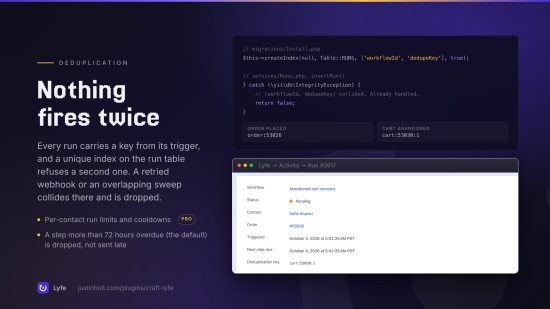
- Nothing fires twice. Every run carries a deduplication key, enforced by a unique database index. A retried webhook, a Commerce event that fires twice, an overlapping sweep — all collide there and are dropped.
- A queue outage does not deliver nine days of mail at once. A step more than
staleAfterHoursoverdue is abandoned and recorded, not sent late. - Conditions are re-checked before every step. In the nine days between "order placed" and "how did we do", the customer may have unsubscribed, refunded, or bought again. Lyfe looks again before it sends.
- Unsubscribed contacts are never marketed to. The refusal is recorded rather than silent — "why did this customer not get the email" is the question the message log exists to answer.
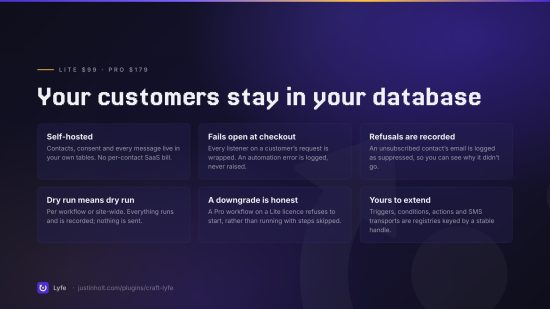
- An automation cannot break checkout. Every listener on a customer's request is wrapped
separately; a failure is logged, not raised. (Before release this had a hole: a site whose
address layout had no
phonefield failed every checkout. A phone is now read only when the field exists.) - Dry run means dry run. Per workflow or globally. Everything runs and is recorded; nothing is sent.
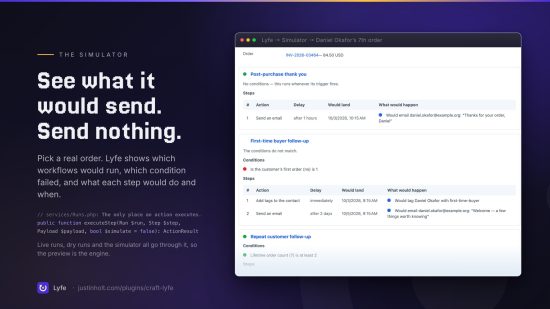
The simulator
Pick a real order or contact and Lyfe tells you, rule by rule, which workflows would run and why the rest would not:
✗ Win back a lapsed customer
    · The conditions do not match.
    ✓ Subscribed to marketing email (yes) is yes
    ✗ Days since last order (12) is at least 120
It shares its code path with the engine — Conditions::explain() and Runs::executeStep() are
the same methods a live run uses, with a simulate flag — so what it shows you is what actually
happens. There is a console version too: php craft lyfe/workflows/simulate <orderId>.
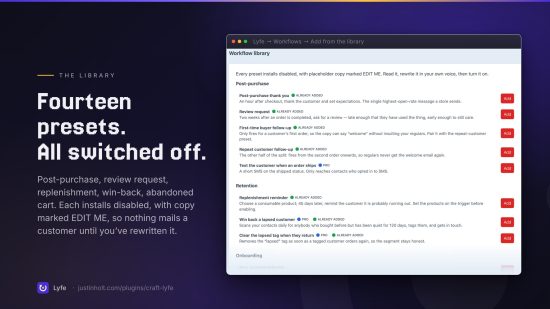
The library
Fourteen presets, each installing disabled with placeholder copy plainly marked EDIT ME:
| Preset | |
|---|---|
| Post-purchase thank you | An hour after checkout |
| Review request | Two weeks after completion |
| Replenishment reminder | 45 days after a chosen product |
| New account welcome | Plus a nudge if they haven't ordered |
| First-time buyer follow-up | Only fires on order one |
| Repeat customer follow-up | The other half of the split |
| Abandoned cart recovery | Two emails, each stopping once they buy |
| Stop chasing recovered carts | Cancels the chase when the order lands |
| Win back a lapsed customer | Daily scan, 120 days quiet |
| Clear the lapsed tag | When they come back |
| Tag VIP customers | Weekly scan on lifetime spend |
| Text the customer when an order ships | SMS on status change |
| Alert the team to a large order | Internal, transactional |
| Follow up on a refund | The cheapest customer research there is |
Editions
Lite — $99. The whole engine: every order and account trigger, every condition, multi-step workflows with delays, email, tagging, order notes, webhooks, the simulator, run and message logs, the console commands, and every preset it can run.
Pro — $179. Everything that needs standing infrastructure:
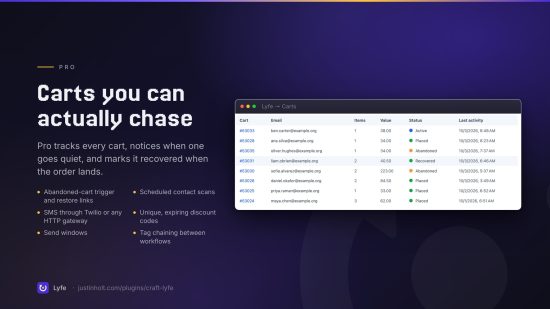
- abandoned cart tracking, the
cart.abandonedtrigger and recovery links - scheduled contact scans — win-backs and VIP tagging on a timer
- SMS, through Twilio or your own HTTP gateway
- unique discount code generation
- order status and user group actions, and the unsubscribe action
- send windows, per-contact run limits and cooldowns
- the
contact.taggedchaining trigger, so one workflow can hand off to the next - cancelling another workflow's pending runs
A licence downgrade is handled honestly: a Pro workflow refuses to start rather than running with its Pro steps quietly skipped, and the reason is written to the log.
Contacts
Lyfe keeps its own contact record, because most Commerce customers never register an account and consent has to live somewhere. Contacts are created automatically from orders and registrations, identified by lowercased email, and carry tags, a phone number, and per-channel subscription flags.
To build them from your existing orders:
php craft lyfe/contacts/backfill
Email templates
Subjects and bodies are Twig, rendered against the payload:
Hi {{ contact.firstName ?? 'there' }},

Your order {{ order.reference }} for {{ order.totalPrice|commerceCurrency(order.currency) }}
is on its way.

{% if stats.orderCount > 1 %}Thanks for coming back.{% endif %}

<a href="{{ unsubscribeUrl }}">Unsubscribe</a>
Available: contact, order, user, workflow, stats, data, unsubscribeUrl and
cartRestoreUrl — for abandoned carts, a link that puts the cart back in the customer's session.
Set an email layout template in the settings to wrap every body in your own HTML.
Who can write what
Twig in a step can reach everything Twig can — craft.app.config.db.password included — and an
email or a webhook is a way to send what it prints to yourself. So a step remembers whether an
admin last wrote it:
- An admin's step renders as written, with the real elements:
{{ order.getShortNumber() }},craft.*, any filter. - Anyone else's step (a marketer with Create, edit and delete workflows) renders inside
Craft's Twig sandbox, when it's on (
enableTwigSandbox, Craft 5.9+). It gets the same variable names as plain data —order.reference,order.totalPriceAsCurrency,order.lineItems,contact.firstName,cartRestoreUrland so on — but no objects orcraft.*. Useorder.totalPriceAsCurrencyrather than|commerceCurrency, which the sandbox doesn't allow. - Without the sandbox, a marketer can save plain text but not Twig, and a step with Twig that an admin didn't write fails rather than runs.
- Webhook steps are an admin's — the server makes that request, so it reaches whatever the
server can — and
$ENV_VARheader values resolve only in an admin's step.
Trust follows whoever last wrote the step. A marketer can still reorder, retime, pause or enable an admin's workflow: a step they leave exactly as it was stays trusted. Anything they write or rewrite runs under their rules, and saving the workflow doesn't change that, not even when an admin saves it. Such a step carries a Written by someone who isn't an admin badge in the editor, and an admin trusts it by ticking Approve on that step, after reading it. Steps from before 5.0.0 start untrusted and are approved the same way.
SMS
Two transports ship with Lyfe:
- Twilio — account SID, auth token and from-number, called directly over HTTP. No SDK: it is one authenticated form POST, and a plugin that adds a large dependency tree to every install it touches is a bad neighbour.
- Generic HTTP — post to any URL.
{{to}}and{{body}}are substituted into it, and a POST also sends{"to": …, "body": …}as JSON. Vonage, MessageBird, Sinch and a self-hosted gateway all work without Lyfe pretending to know their APIs.
Add your own with Sms::EVENT_REGISTER_TRANSPORTS.
Console commands
php craft lyfe/run/due                     # the cron entry point
php craft lyfe/run/status                  # what's waiting
php craft lyfe/run/cancel <runId>
php craft lyfe/run/prune [days]            # trim run, message and log history

php craft lyfe/workflows                   # list, with run counts
php craft lyfe/workflows/library           # the presets
php craft lyfe/workflows/install <preset>
php craft lyfe/workflows/simulate <orderId>
php craft lyfe/workflows/run-for-tag <workflow> <tag>

php craft lyfe/contacts/backfill
php craft lyfe/contacts/sync-stats
php craft lyfe/contacts/unsubscribe <email>
Extending it
Triggers, conditions, actions and SMS transports are all registries keyed by a stable handle, so your own classes are first-class:
use justinholtweb\lyfe\services\Types;
use justinholtweb\lyfe\events\RegisterTypesEvent;

Event::on(Types::class, Types::EVENT_REGISTER_ACTIONS, function(RegisterTypesEvent $event) {
    $event->types[] = MyAction::class;
});
Extend BaseAction, implement handle(), displayName(), settingsFields() and run().
Handles are what get stored, so your class can move without a migration.
Support
justin@justinholt.com
Standard
Plus $79/year after one year.
To install this plugin, copy the command above to your terminal.
This plugin doesn't have any reviews.