 SEO & Accessibility
 AI
AI Localization
 Ecommerce
 Forms
Forms Fields
 Development
 Security
 Templating
 Performance
 Control Panel
 Widgets
 Assets
 Utilities
 Mailer Adapters
 Social Networking
 Integrations
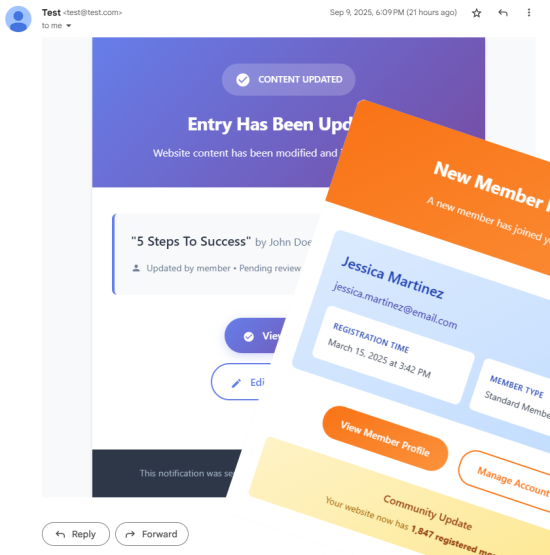


Receive an email when new entry is created, when new user signs up, when a new order is placed or order status changes - and many more!
MailCraft allows basic content managers to set up email notifications directly from the Craft CMS control panel—no developer assistance required. Install once, and let your clients handle the rest.
Key Features
- Visual Email Builder: Create beautiful email templates using familiar Twig syntax
- Event-Driven Triggers: Send emails automatically based on specific Craft Cms/Craft Commerce events
- Scheduled Delivery: Set up delayed emails for follow-ups, reminders, and nurture campaigns
- Conditional Logic: Target specific users or content with powerful filtering options
- Zero Code Required: All configuration happens in the admin interface
Event Triggers & Notification Types
MailCraft supports various event types to help you automate your notifications:
Content Events
- Entry Created - Send notifications when new content is published
- Entry Updated - Alert team members when existing content changes
- Entry Deleted - Notify when content is removed
- Filtering - Target by section, entry type, status, field values, and more
Asset Events
- Asset Uploaded - Notify when a new file is added to a volume
- Asset Updated - React to file changes, including title, alt text, focal point adjustments, image edits, and custom field updates. Email includes a list of what changed
- Asset Deleted - Notify when a file is removed from a volume
User Management
- User Created - Welcome new registrations automatically or notify admins
- User Updated - React to profile changes or important user updates
- User Activated - Send onboarding materials when accounts become active
- User Verified Email - Acknowledge successful verification steps
- User Deleted - Notify when a user account is removed
- Filtering - Target by user group, custom fields, and more
E-Commerce
- Order Created - Send order confirmations, automate shipping updates, schedule review requests, trigger cross-sell campaigns, send product guides, or alert admins
- Order Status Changed - Send an email when when order status changes
System Notifications
- Updates Available - Get notified when a new version of Craft CMS or plugins is available. Option to send email on all updates or only on critical updates
- Failed Queue Job - Notify admins when a queue job fails
Missing an Event? ⚠️
If you need a specific event that isn't currently supported, please open an issue on GitHub.
Custom Email Design
Want full control over the look and feel of your emails? Use our Email Templates plugin alongside MailCraft to design beautiful, reusable email layouts — no coding required.
Feature Requests & Contributions
We're actively developing MailCraft and welcome community input:
- Issues & Requests: Open an issue on GitHub
- Contribute: Pull requests welcome for features that benefit the community
Standard
Plus $29/year after one year.
To install this plugin, copy the command above to your terminal.
This plugin doesn't have any reviews.