 SEO & Accessibility
 AI
AI Localization
 Ecommerce
 Forms
Forms Fields
 Development
 Security
 Templating
 Performance
 Control Panel
 Widgets
 Assets
 Utilities
 Mailer Adapters
 Social Networking
 Integrations
Matrix Horizontal Columns
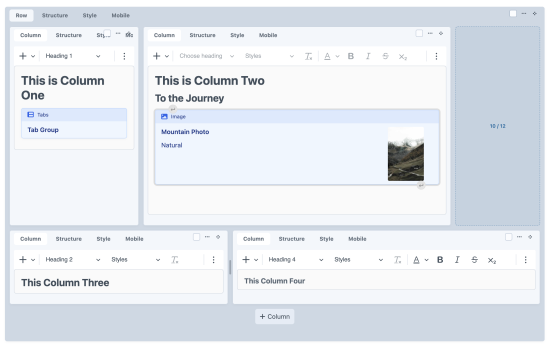
Matrix Horizontal Columns for Craft CMS
Turns a nested row → columns Matrix setup into a real grid in the control panel. Column entries sit side-by-side at the width they'll have on the front end, wrap like a Bootstrap row, and can be dragged into place in any direction.
The plugin doesn't touch content or the database beyond its own settings and adjusting the "Width" setting. Aside from that it only changes how the page builder UI looks in the control panel, so it's safe to try and uninstall without impacting page content.
Important: This plugin does not create a page builder or any of the blocks, fields, or entry types needed for one. All it does is hook into an existing page builder with a required specific structure to work properly.
How it works
The plugin looks for this structure:
Matrix field (e.g. "Page Builder")
└── Row entry type (e.g. pbRow)
    └── Matrix field
        └── Column entry type (e.g. pbColumn)
            └── Width field (e.g. a Dropdown with values 1–12)
Inside every row, column entries:
- are laid out left-to-right and wrap onto new lines when their widths add up to more than a full row;
- take
width / gridColumnsof the row (full width when no width is set), updating as soon as the width field changes; - stack full width when the row is narrower than 480px;
- can be drag-sorted in any direction;
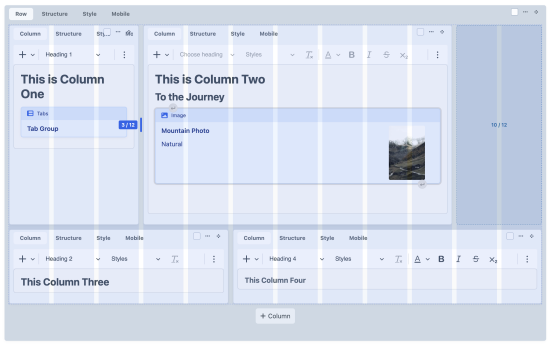
- can be resized by dragging the handle on their right edge (or focusing it and using the arrow keys), snapping to the grid and to the widths the width field allows;
- show grid guides while being resized or dragged.
Lines that don't fill the whole row show their free space as a dashed outline labelled with how much of the row is used (e.g. 8 / 12).
Nothing changes on the front end or in how content is saved. The plugin only affects the control panel.
Installation
From the Plugin Store, or with Composer:
composer require adrianjean/matrix-horizontal-columns
php craft plugin/install matrix-horizontal-columns
Configuration
Go to Settings → Plugins → Matrix Horizontal Columns and pick:
- Row Entry Type – the entry type that contains the columns
- Column Entry Type – the entry type laid out side-by-side within a row
- Column Width Field – a Dropdown, Button Group or Number field in the column entry type's layout, holding its width in grid columns. Leave empty to make every column full width.
- Grid Columns – how many columns make up a full row (default 12)
Entry types are matched by ID and the width field by its handle in the column's field layout, so handle overrides on Matrix fields and field layouts are respected. Settings are stored by UID in project config.
The plugin does nothing until the row and column entry types are set.
To install this plugin, copy the command above to your terminal.
This plugin doesn't have any reviews.