 SEO & Accessibility
 AI
AI Localization
 Ecommerce
 Forms
Forms Fields
 Development
 Security
 Templating
 Performance
 Control Panel
 Widgets
 Assets
 Utilities
 Mailer Adapters
 Social Networking
 Integrations
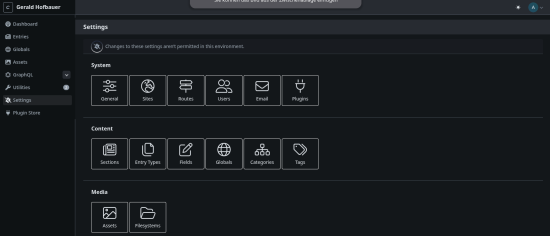
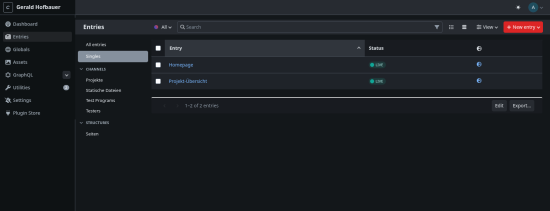
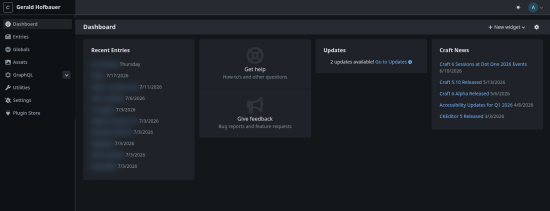
Nightshift adds a proper dark mode to the Craft 5 control panel — no setup, no fuss.
A round sun/moon button sits in the CP header, next to your account menu. Click it and the whole panel switches to a calm, low-glare dark theme. Your choice is remembered per browser and applied before the first paint, so there's no flash of light when you reload.
Features
- 🌙 One-click toggle right in the CP header
- 🖥️ Follows your OS — respects
prefers-color-schemeand reacts to it live; the toggle sets a per-browser override - ⚡ No flash of light — the theme is applied before render
- 🎨 Broad coverage — global nav, panes, inputs, tables, menus, modals, slideouts, the field-layout designer, even the Plugin Store are all themed
- 🪶 Zero config, zero database — drop it in, it just works
- 🔒 Control-panel only — never touches your site's front end
How it works
Nightshift flips Craft's neutral colour ramp once, so surfaces, borders, and text recolour coherently — while your brand/status colours and focus rings stay untouched. Tiny and non-invasive: no settings screen, no stored data, no front-end impact.
Free and open source (MIT).
Installation Instructions
To install this plugin, copy the command above to your terminal.
Reviews
This plugin doesn't have any reviews.
Active Installs
12
License
MIT
Last release
September 3, 2026
Activity (30 days)
0
Closed Issues
0
Open Issues
0
Merged PRs
0
Open PRs