 SEO & Accessibility
 AI
AI Localization
 Ecommerce
 Forms
Forms Fields
 Development
 Security
 Templating
 Performance
 Control Panel
 Widgets
 Assets
 Utilities
 Mailer Adapters
 Social Networking
 Integrations
Odometer
Counts what people actually read.
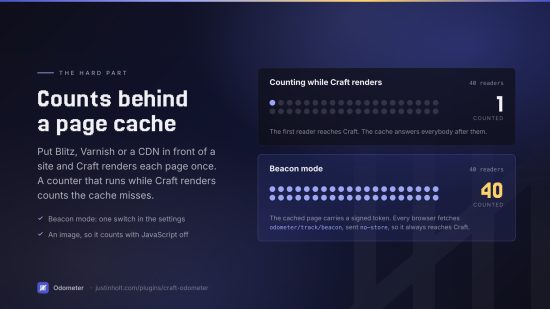
A view counter is a small idea with one hard part, and it is not the counting. It is that the moment a site gets fast enough to need a page cache, the obvious implementation stops working — Craft renders the page once, the cache serves it to everybody else, and the number quietly becomes "how many cache misses happened".
Odometer counts either way. Server-side while Craft renders, or through a signed beacon the browser
fetches, which always reaches Craft because nothing sensible caches a 42-byte image with
Cache-Control: no-store on it.
Then it gives you the numbers where you want them: entry.odometer.total in a template,
craft.odometer.popular() as an ordinary chainable element query, a sortable Views column on entry
indexes, a panel in the entry sidebar, a dashboard widget, and a report in the control panel.
Free. Craft 5.3+, PHP 8.2+. No outbound requests, no third-party services, no build step, no cookies, and nothing about a visitor is ever written to the database.
Reference point: the abandoned Views Work plugin, whose feature list this covers — pageviews by day, week, month and lifetime, a trending list, a control-panel widget and a signed tracking image — plus everything that turned out to be missing once it was gone.
Install
composer require justinholtweb/craft-odometer
php craft plugin/install odometer
That is the whole setup. Every front-end page that resolves to an element is counted from then on.
What it does
Counts a view
Three ways, and the right one depends on what is in front of the site.
Automatically (the default). Craft renders a page, the page resolves to an element, the view is counted. Two statements, no reads, nothing on the response.
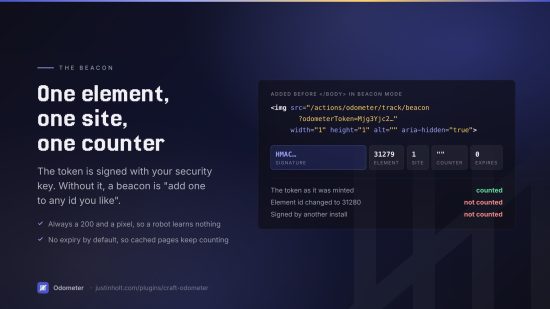
With a beacon, for a site behind Blitz, Varnish, a CDN or any other full-page cache. The page carries a signed token, the browser fetches one tiny URL, and Craft counts it there. The token names exactly one element, one site and one counter, and is signed with the site's security key — without that the endpoint would be "increment any number you like by id".
<!-- what gets added to the page, in beacon mode -->
<img src="/actions/odometer/track/beacon?odometerToken=Mjg3Yjc2…" alt="" width="1" height="1"
     aria-hidden="true" decoding="async" style="position:absolute;width:1px;height:1px;opacity:0">
The image counts readers with JavaScript switched off. The script alternative does not count a page
the browser merely prefetched, and carries its URL in a data attribute so it needs no
unsafe-inline in a content security policy.
Only when asked, from a template or from PHP:
{% do craft.odometer.record(entry) %}
Decides whether it was a person
In order, cheapest first:
- not the control panel, not a preview, not a console request
DNT: 1orSec-GPC: 1, if honouring those is switched on- a user agent on the robot list
- an address on the ignore list
- a signed-in user, if the settings say to skip those
- the same visitor reading the same page again inside the dedupe window
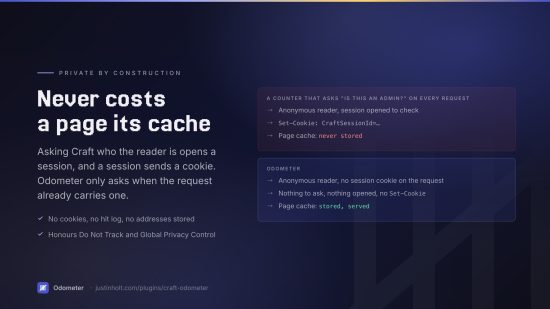
The order matters more than it looks. Asking Craft who the visitor is opens a session, a session
means a Set-Cookie on the response, and a Set-Cookie on every response is a full-page cache that
never hits again. So Odometer only asks once it can already see a session cookie on the request. An
anonymous reader never pays for that setting.
The repeat-visit test hashes the address and user agent with the site's security key, keeps the hash in the cache for exactly as long as the dedupe window, and never writes it anywhere. There is no visitor table, no cookie, and no way to get an address back out of what is stored.
Stores two things
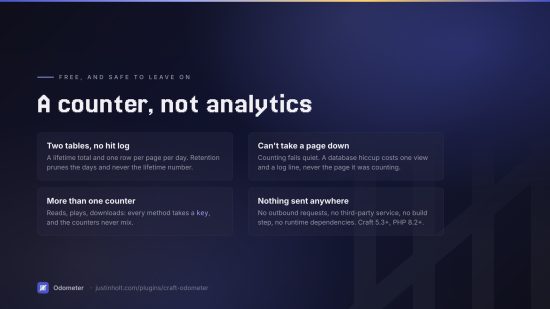
odometer_totals — one row per element per site per counter, holding the lifetime number.
odometer_daily — one row per element per day, which is what makes "popular this week" answerable.
There is deliberately no row per view. A hit log is the obvious third table and it is a trap: it
grows without bound on exactly the sites that need this plugin most, it stores a visitor's address
to answer a question nobody asked, and every query written against it is a GROUP BY over millions
of rows that a daily bucket already answered.
Retention prunes day buckets and never touches lifetime totals. Losing a lifetime count to a settings change is not something an editor should ever have happen to them.
Twig
One element's numbers
Every element grows a odometer property. Nothing is read until something asks.
{{ entry.odometer.total }}       {# all time #}
{{ entry.odometer.today }}
{{ entry.odometer.week }}        {# last 7 days #}
{{ entry.odometer.month }}       {# last 30 days #}
{{ entry.odometer.year }}        {# last 12 months #}
{{ entry.odometer.thisWeek }}    {# the calendar week so far #}
{{ entry.odometer.thisMonth }}
{{ entry.odometer.thisYear }}
{{ entry.odometer.period(90) }}  {# any window #}
{{ entry.odometer.lastViewed|datetime }}
{{ entry.odometer.trend('week') }}   {# % against the previous 7 days, or null #}
Or through the variable, which also takes a bare id:
{{ craft.odometer.views(entry) }}
{{ craft.odometer.views(entry, 'week') }}
{{ craft.odometer.views(1234, 'month') }}
A period may be 'today', 'yesterday', 'week', 'month', 'year', 'thisWeek',
'thisMonth', 'thisYear', 'all', a number of days (30), or a phrase like 'last90days'.
Days are calendar days in the site's own time zone, because "today" is a question about where
the person asking is standing.
Popular and trending
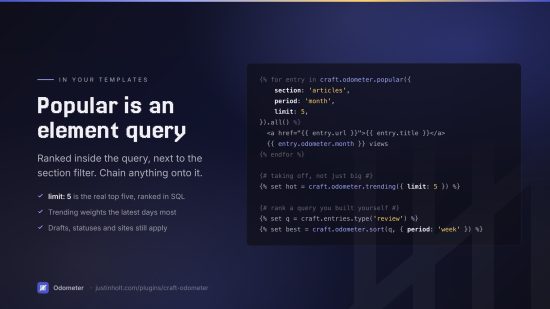
Both return an ordinary element query. Chain anything you like onto it — .with(), .search(),
.count(), pagination — and every rule Craft has about drafts, revisions, statuses and enabled
sites still applies.
{% for entry in craft.odometer.popular({ section: 'articles', period: 'month', limit: 5 }).all() %}
    <a href="{{ entry.url }}">{{ entry.title }}</a> — {{ entry.odometer.month }} views
{% endfor %}

{% for entry in craft.odometer.trending({ limit: 5 }).all() %}
Trending is not "most viewed recently". It is most viewed recently weighted by how recently, so a piece that took two hundred views yesterday outranks one that took three hundred spread over the week — which is what somebody means when they say something is taking off.
To rank a query you built yourself:
{% set query = craft.entries.section('articles').type('review') %}
{% for entry in craft.odometer.sort(query, { period: 'week' }).all() %}
Options, all optional:
| Option | Default | Meaning |
|---|---|---|
section | every section | A section handle, or a list of them |
elementType | craft\elements\Entry | Rank something other than entries |
period | all time | Any window craft.odometer.period() accepts |
limit | none | How many |
siteId | the current site | An id, or '*' for every site at once |
order | 'desc' | 'asc' for the least-read |
minViews | none | Ignore anything under this |
includeUnviewed | false | Keep elements with no views, at the bottom |
key | the default counter | Which counter to rank by |
Charts
{% for date, views in craft.odometer.series(entry, 30) %}
    <div style="height: {{ views }}px" title="{{ date }}"></div>
{% endfor %}
The quiet days are present with a zero. A chart drawn only from the days that have rows shows a dead week as a straight line at the top.
craft.odometer.siteSeries(30) does the same for the whole site.
Beacons, by hand
Turn auto-injection off and place it yourself, wherever it belongs:
{{ craft.odometer.beacon(entry) }}      {# the whole tag #}
{{ craft.odometer.beaconUrl(entry) }}   {# just the URL, for your own JS #}
Everything else
{{ craft.odometer.top('week', { limit: 10 }) }}   {# element ids and counts, no elements loaded #}
{{ craft.odometer.summary().views }}              {# site-wide figures #}
{{ craft.odometer.period('week').label }}          {# "Last 7 days" #}
{{ craft.odometer.isCounting }}
More than one counter
Every method takes a key, so one element can carry several independent counters — reads, plays,
downloads, shares — without any of them knowing about the others.
{% do craft.odometer.record(entry, { key: 'downloads' }) %}
{{ craft.odometer.views(entry, 'all', { key: 'downloads' }) }}
In the control panel
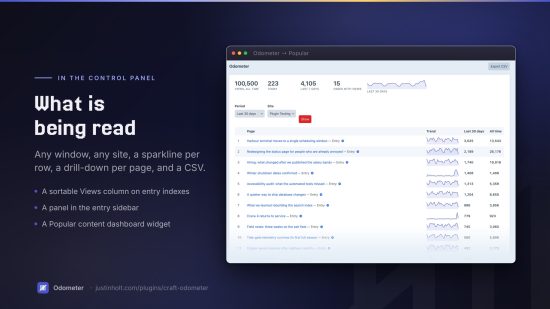
- Odometer → Popular — the board, for any window and any site, with a sparkline per row, a drill-down per element and a CSV export.
- A Views column on entry indexes, sortable, wherever elements can have URLs. One join for the whole page, not one query per row.
- A panel in the entry sidebar with the lifetime number, the last seven days, and thirty days of history. No field layout to edit.
- A Popular content widget for the dashboard, with a trending mode.
- A Odometer Views field, for editors who would rather have the number inside a tab. It stores
nothing, so adding it costs one row in
fieldsand removing it can never lose data.
Two permissions: View reports, and Reset and prune view counts nested under it.
PHP
use justinholtweb\odometer\Plugin;
use justinholtweb\odometer\models\Period;

$odometer = Plugin::getInstance();

$odometer->views->record($entry);                       // subject to every rule
$odometer->views->record($entry, ['force' => true]);    // regardless of them
$odometer->views->total($entry->id, $siteId);
$odometer->views->count($entry->id, $siteId, null, Period::lastDays(7));
$odometer->views->totals([1, 2, 3], $siteId);           // batched
$odometer->views->series($entry->id, $siteId, null, Period::lastDays(30));
$odometer->ranking->popular(['section' => 'articles', 'period' => 'week']);
$odometer->ranking->apply($someElementQuery, ['period' => 'week']);
Two events, both on the views service:
use justinholtweb\odometer\events\ViewEvent;
use justinholtweb\odometer\services\Views;

Event::on(Views::class, Views::EVENT_BEFORE_RECORD, function(ViewEvent $event) {
    $event->isValid = false;   // and this view is not counted
});

Event::on(Views::class, Views::EVENT_AFTER_RECORD, function(ViewEvent $event) {
    // $event->elementId, ->siteId, ->key, ->element, ->isProgrammatic
});
Console
php craft odometer/views/top --period=week --limit=20
php craft odometer/views/summary
php craft odometer/views/prune          # retention; Craft's own garbage collection does this too
php craft odometer/views/recount        # rebuild totals from day buckets
php craft odometer/views/reset --elementId=1234
--allSites, --siteId, --key and --period are available where they make sense.
Settings
Everything below has a working default; a fresh install needs none of it.
| Setting | Default | |
|---|---|---|
| How views are counted | automatically | Or beacon, manual, off |
| Beacon type | an image | Or a script |
| Token lifetime | never expires | See below |
| Repeat views | 30 minutes | 0 counts every request |
| Sections | every one | Or only / except a list |
| Other element types | counted | Categories, products, anything with a URL |
| Ignore robots | on | With a list of 60-odd user agents |
| Ignored addresses | none | Addresses, prefixes, CIDR ranges |
| Signed-in users | ignore admins | Or everybody, or nobody |
| Honour Do Not Track | on | |
| Keep history for | 730 days | 0 keeps it forever |
| Trending window | 7 days | |
| Trending half-life | 3 days | 0 turns decay off |
Token lifetime defaults to "never expires" on purpose. In beacon mode the token lives inside the page's HTML, and on a cached site that HTML may be served for weeks. An expiring token there is a counter that quietly stops. The token permits exactly one thing — adding to one element's count — and every other rule still applies to the request that carries it.
What Odometer is not
It is not analytics. There are no sessions, no referrers, no bounce rates, no funnels and no per-visitor anything, because all of that requires keeping records about people and this does not. If you want analytics, use analytics — Telescope puts GA4 in the control panel and is also free.
What Odometer answers is "which of these has been read, and how much", which is the question that actually changes what a site puts on its homepage.
Documentation
Licence
The Craft License. See LICENSE.md. Odometer is free: no editions, no licence key, and no licensing
code in the plugin.
To install this plugin, copy the command above to your terminal.
This plugin doesn't have any reviews.