 SEO & Accessibility
 AI
AI Localization
 Ecommerce
 Forms
Forms Fields
 Development
 Security
 Templating
 Performance
 Control Panel
 Widgets
 Assets
 Utilities
 Mailer Adapters
 Social Networking
 Integrations
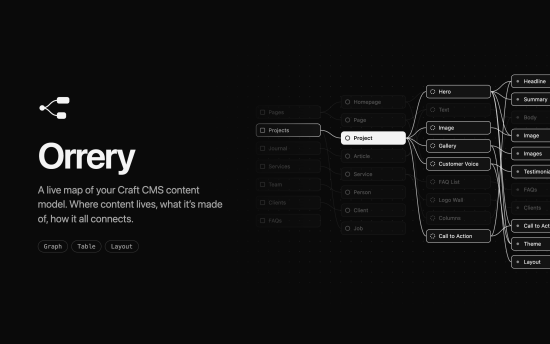
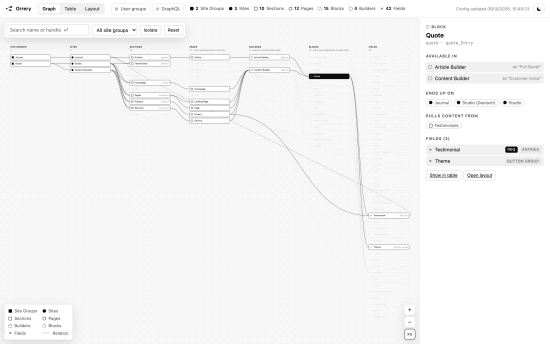
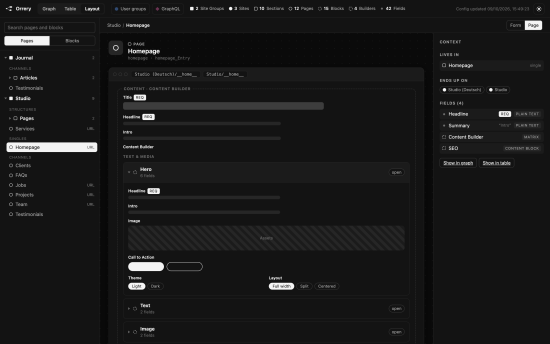
A live map of your Craft CMS content model: where content lives, what it’s made of, and how it all connects. Orrery reads the project config and draws it in the control panel. Nothing to build, nothing stored, no Node on the server.
Views
- Graph: site groups → sites → sections → pages → builders → blocks → fields, as one pannable map. Click anything to light up what it’s connected to, or Isolate it to lay out only that part. Double-click zooms in like a map, Shift + double-click zooms out. Drag a node to move it and the others make room. Dashed lines are relations, where a field pulls entries from another section.
- Table: every field and each layout it sits in, with the label it gets there. Flip it to read every entry type with its fields. Filter by type, by site group, or to fields that aren’t used anywhere.
- Layout: every field layout as the editor sees the form, or drawn as a page wireframe with its builders and blocks.
- Diff: pick what to compare (sites, sections, entry types, fields, user groups or GraphQL schemas), then two of them. Properties are compared side by side, and everything they contain, like the fields of an entry type or the rights of a user group, row by row: only in one of them, or in both but set up differently. Any Compare button in the details starts a comparison there.
Access
Two pickers in the header switch on user groups and GraphQL schemas, one by one or all at once. Whatever they can reach gets a mark in every view, a blue dot for user groups and a pink diamond for schemas, and the details of a site, section or entry type list what each of them may do there. Open a group or schema to see all of its rights; the graph lights up everything it reaches.
User groups show which sites they may edit and what they may do with the entries of each section. Schemas show the sites, sections and Matrix fields they may query or change.
A page is an entry type attached to a section, a block one attached to a Matrix field. When a section or Matrix field gives an entry type its own name, Orrery shows that name too. An entry type attached to neither is unused. The graph leaves it out but lists it under Worth a look in its info, so you can open it and see what it holds before you delete it. Its handle isn’t checked against the prefixes.
Every view has shareable links, like #graph/page:<uid>, #table/field:<uid> or #diff/page:<uid>/page:<uid>. The arrows next to the logo step back and forward through where you’ve been, across views. Details open on the right when you pick something; the info button at the top right explains the view you’re in.
Requirements
Craft CMS 5.0 or later, PHP 8.2 or later.
Usage
Orrery adds its own section to the control panel. Use Fullscreen for more room, Open in new tab for a page of its own, or Download to save the whole map as one HTML file that opens without Craft.
Users need the Access Orrery permission to see it. The viewer is in English, field types included, whatever language the control panel is in.
Export
The same file, or the raw data as JSON, from the command line:
php craft orrery/export                                # content-model.html in the current directory
php craft orrery/export @storage/content-model.json    # .json writes the data instead
The JSON holds the raw config values: names, base URLs and languages set through environment variables or aliases, like $PRIMARY_SITE_URL or @web, stay as written, so no resolved environment value ends up in the file. Field types are named in English, and there’s no timestamp. Two exports are the same file as long as the content model is, on any machine, so committing it lets you review content model changes in a pull request. The viewer and the HTML file show the resolved values. Mind where you write it: the export lists every section, entry type and field.
Settings
Projects that prefix entry type handles, like page_ and block_, can have Orrery flag the ones that don’t. Nothing gets renamed; they’re only marked in the viewer. Set one prefix each under Settings → Plugins → Orrery, or use config/orrery.php, where an array allows several:
return [
    'pageHandlePrefix' => ['page_', 'single_'],
    'blockHandlePrefix' => 'block_',
];
A handle passes if it starts with any of its prefixes. Leave a prefix blank to skip that check. Anything set in config/orrery.php wins over the control panel, where it then shows read-only.
To install this plugin, copy the command above to your terminal.
This plugin doesn't have any reviews.