 SEO & Accessibility
 AI
AI Localization
 Ecommerce
 Forms
Forms Fields
 Development
 Security
 Templating
 Performance
 Control Panel
 Widgets
 Assets
 Utilities
 Mailer Adapters
 Social Networking
 Integrations
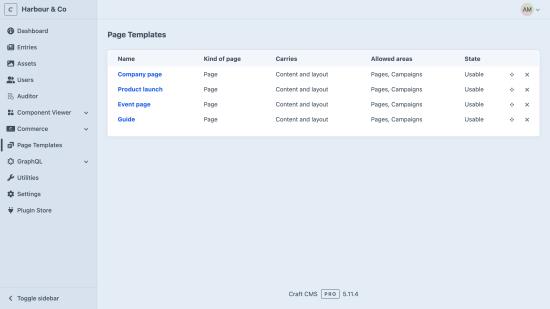
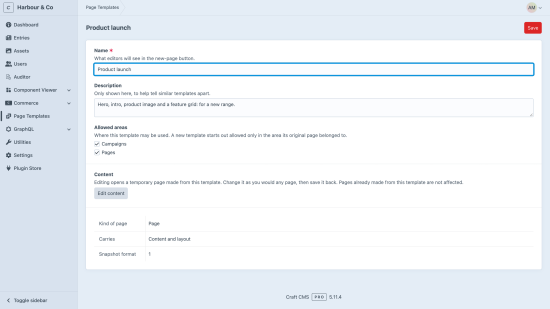
Page Templates turns a page you have already built into a reusable template, and starts future pages from it. There are no new screens for editors to learn: templates are saved from a page's own actions menu, offered from the New entry button, and edited in Craft's own editor.
Save a page as a template
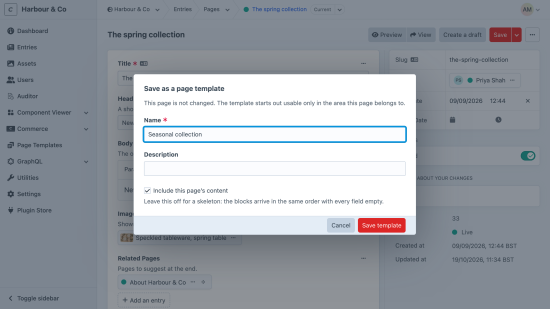
Open a page you are happy with and choose Save as a page template from its actions menu — the same menu holding Duplicate and Delete. Name it, and choose whether it carries the page's content or just its layout. The page itself is not changed.
Saved with content, a template reproduces custom field values, nested blocks to any depth, and relation and asset references — pointing at the same targets, so nothing is duplicated and no image is ever copied. Saved as layout only, it reproduces the block skeleton with every field empty.
Start a page from one
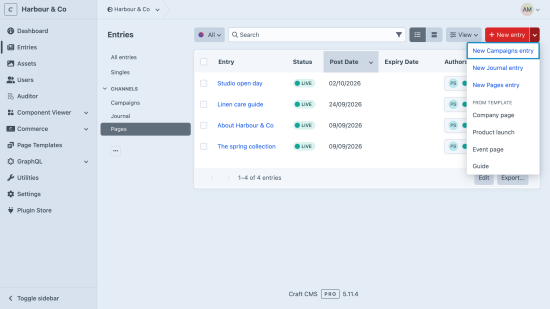
The New entry button gains a From template group listing the templates available for that section. Pick one and you land on a new, unsaved page, already assembled. Pages made from a template are independent immediately: editing one changes neither the template nor the page it came from.
If any part of a template could not be reproduced, the new page says so and names what is missing before you save. A page that is not a complete copy never looks like one.
Curate the list
The Page Templates section lists every template with its state. Rename and reorder them, widen the sections they may be used in, edit a template's content in Craft's own editor, and delete them — deleting a template never affects pages already made from it.
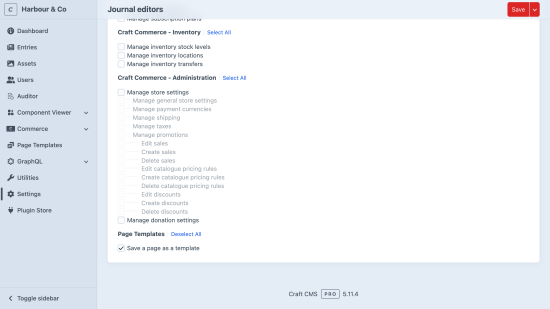
Permissions that stay out of the way
- Save a page as a template — plus permission to edit that page.
- Page Templates section access — to manage the list.
- Using a template needs nothing extra: if you can create a page in a section, you can start it from a template.
Both plugin permissions are off by default. Console commands cover capturing, producing and listing templates for scripted setups.
Standard
Plus $19/year after one year.
To install this plugin, copy the command above to your terminal.
This plugin doesn't have any reviews.