 SEO & Accessibility
 AI
AI Localization
 Ecommerce
 Forms
Forms Fields
 Development
 Security
 Templating
 Performance
 Control Panel
 Widgets
 Assets
 Utilities
 Mailer Adapters
 Social Networking
 Integrations
PWA
Turn a Craft site into an app people can install.
A progressive web app is three artifacts, and a browser refuses to install one if any of them is wrong: a manifest describing the app, a service worker deciding what happens when the network does not answer, and a set of icons at the sizes each platform insists on. PWA produces all three from what Craft already knows — and then, because "correct" is not something you can tell by looking, fetches them back over HTTP and tells you plainly what is wrong.
Install it, pick one square image, and reload the front end. That is the whole setup.
What it does
Manifest. Per site, because two sites on one Craft install are two apps as far as a browser is concerned. Name, short name, scope, start URL, display mode, colours, shortcuts, screenshots — served live from a route, so it can never be stale or half-deployed.
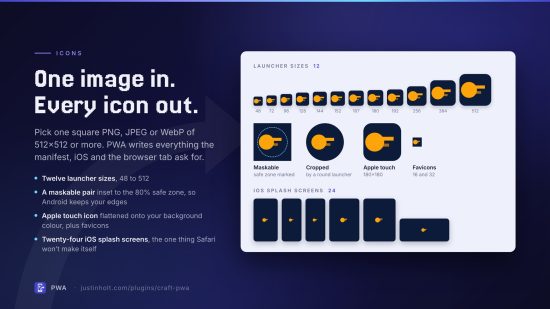
Icons. One square source image in, everything out: the twelve sizes launchers ask for, the maskable pair inset to the 80% safe zone so Android does not shave the edges off your logo, an Apple touch icon flattened onto your background colour, favicons, and twenty-four iOS splash screens — because Safari is the one platform that will not derive a launch screen for itself.
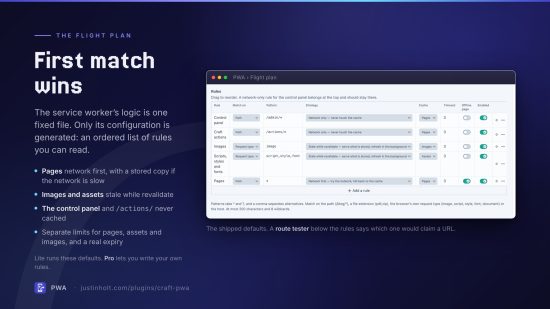
Service worker. Generated from a flight plan you can read: an ordered list of rules, first match wins. Pages from the network with a cached fallback, assets and images served from cache and refreshed behind you, the control panel never touched. Per-bucket eviction limits and a real expiry, because a cache with no expiry is not a cache, it is a copy.
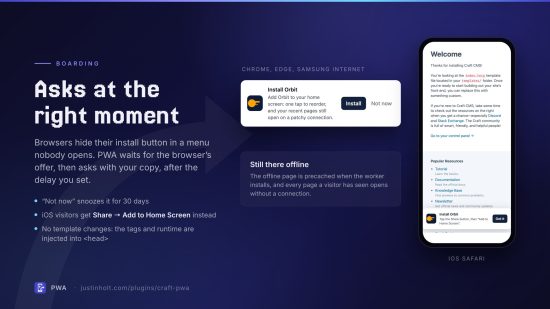
Offline. A fallback page precached at install time — long before anybody needs it — and every page a visitor has already seen, still there when the connection is not.
Install prompt. Browsers hide their install button in a menu nobody opens. PWA intercepts the offer and asks at a moment you choose, with copy you write, snoozed for a month if it is dismissed. iOS visitors get the "Share → Add to Home Screen" instructions instead, because Safari has never implemented the event there is nothing else to do about.
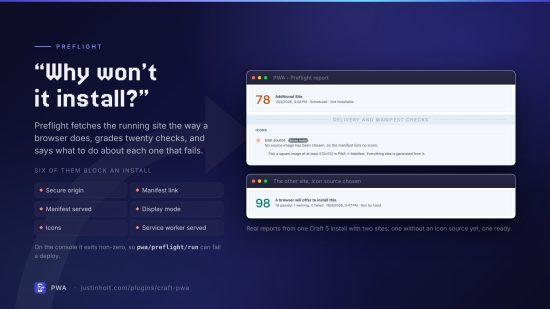
Preflight. The part that stops this being guesswork. It fetches the running site the way a browser would and grades what it finds — is the manifest reachable, is the worker being served as JavaScript, does the start URL redirect, is the 512px icon actually there. Six checks are marked blocking: fail one and no browser will offer to install, whatever else is right. Every finding carries the one thing to do about it.
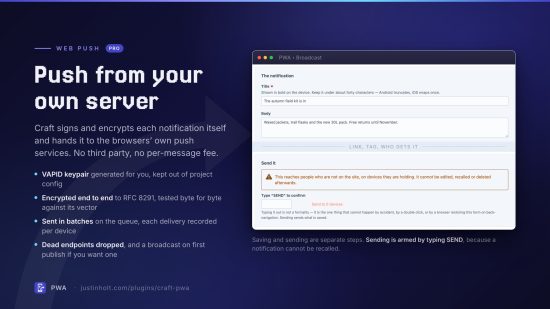
Web push (Pro). Sent from this Craft install straight to browsers — no third party, no per-message pricing. VAPID keypair generated for you, payloads encrypted end to end so the push service relays something it cannot read, delivery recorded per device, dead endpoints dropped automatically.
Requirements
Craft CMS 5.3+, PHP 8.2+, ext-openssl (for push), and GD or Imagick (for icons). The icon source
must be a PNG, JPEG or WebP image; SVG is not accepted.
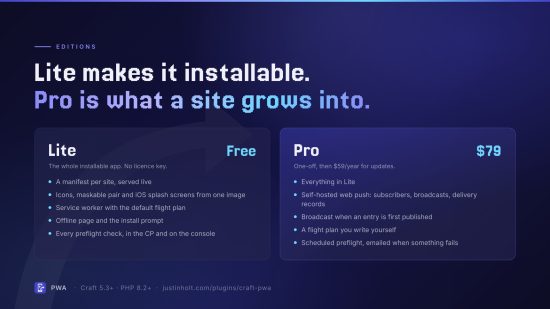
Lite
Pro
Plus $59/year after one year.
To install this plugin, copy the command above to your terminal.
This plugin doesn't have any reviews.