 SEO & Accessibility
 AI
AI Localization
 Ecommerce
 Forms
Forms Fields
 Development
 Security
 Templating
 Performance
 Control Panel
 Widgets
 Assets
 Utilities
 Mailer Adapters
 Social Networking
 Integrations
Sager
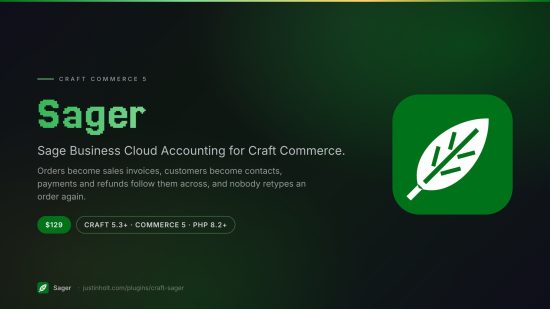
Sage Business Cloud Accounting for Craft Commerce. Orders become sales invoices, customers become contacts, payments and refunds follow them across, and nobody retypes an order again.
Sager talks to the Sage Accounting v3.1 REST API
(api.accounting.sage.com/v3.1) — the product Sage sells as Sage Business Cloud Accounting, and
formerly as Sage One.
- Craft 5.3+, Commerce 5.0+, PHP 8.2+
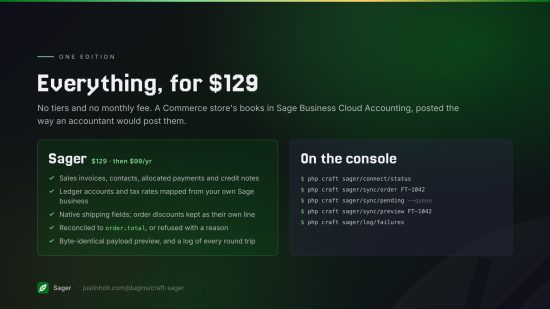
- $129, $99/year to renew. One edition; everything below is in it.
- Documentation: justinholt.com/plugins/craft-sager/docs
composer require justinholtweb/craft-sager
php craft plugin/install sager
What it does
| Craft Commerce | Sage Accounting |
|---|---|
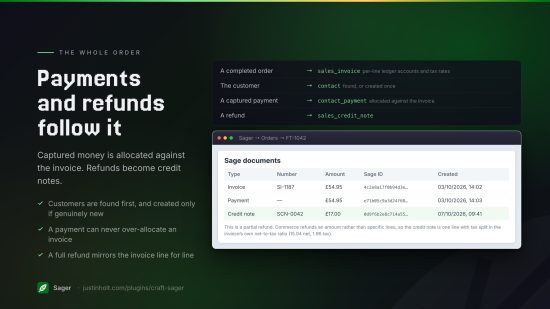
| A completed order | sales_invoice, with per-line ledger accounts and tax rates |
| The customer | contact (found first, created only if genuinely new) |
| A captured payment | contact_payment, allocated against the invoice |
| A refund | sales_credit_note |
| Shipping cost | Sage's native shipping fields, not a fake line item |
| Order-level discounts | Their own negative line, so they stay visible in the books |
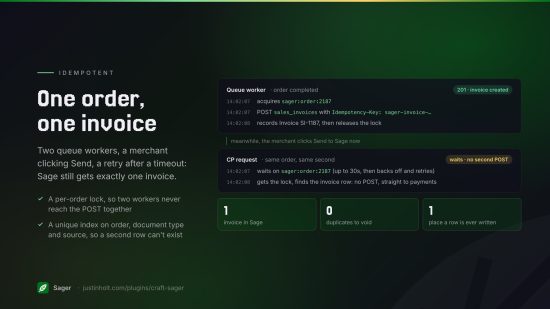
Everything runs in Craft's queue. Nothing Sager does can slow down a checkout or stop a customer paying: a Sage outage is Sager's problem, never the shopper's.
Why it exists
The hard part of this integration is not the HTTP. It is that Sage refuses an invoice line
without a ledger_account_id and a tax_rate_id, and both are GUIDs that are different in every
business and every country. Generic connectors hand you a text box and wish you luck.
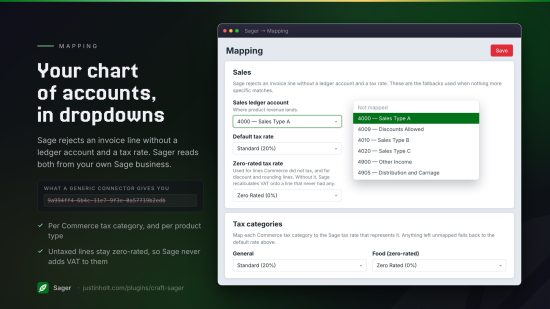
Sager reads your actual chart of accounts and your actual tax rates out of your own Sage business and puts them in dropdowns. You never type a GUID, and you never hand-build a field to hold one.
Setup
1. Create a Sage app
In the Sage developer portal, create an app and register the callback URL that Sager shows you on its Settings screen. It has to match byte for byte.
2. Give Sager the credentials
Sager → Settings. Put the client ID and secret in .env and reference them as $SAGE_CLIENT_ID
and $SAGE_CLIENT_SECRET:
# .env
SAGE_CLIENT_ID="..."
SAGE_CLIENT_SECRET="..."
The client secret must be an environment variable reference — Sager refuses to save a literal one. Plugin settings are project config, and project config gets committed. A client secret in your git history is a client secret in your git history forever. The client ID can be either.
3. Connect
Hit Connect to Sage, approve, and pick the business this store posts to. If your login only reaches one business, Sager picks it for you.
The connection is database state, not project config, so it is made separately on every
environment — and it works on production with allowAdminChanges off. Settings and mapping are
project config: on production their screens are read-only, and you change them on dev and deploy.
4. Map
Sager sends you to the Mapping screen, which cannot be skipped in spirit even though nothing stops you leaving it. The two that genuinely matter:
- Sales ledger account — where product revenue lands.
- Default tax rate — every line needs one, even a zero-rated one.
Then, worth doing:
- Zero-rated tax rate, used for lines Commerce did not tax and for discount and rounding lines. Without it, Sage recalculates VAT onto a line that never had any.
- Bank account, required if you are syncing payments.
- Tax categories — map each Commerce tax category to the Sage rate that represents it.
- Product types — optional, for sending a product type's revenue to its own nominal.
The Overview screen lists these as a checklist, so you are never guessing which one is stopping an order.
How the money is handled
This is the part worth reading, because it is the part your accountant will ask about.
Everything is computed in integer minor units. No float ever holds a running total.
Every line's net, tax and total are taken from Commerce's own adjustments rather than recalculated from a rate, and sent to Sage explicitly — so the two systems cannot drift:
- line
net_amount= subtotal + discount, less included tax when your prices include tax - line
tax_amount= Commerce's tax for that line, withunit_price_includes_taxset when it applies - per-line discounts become Sage's
discount_amount - order-level discounts become their own negative line
- shipping goes on Sage's
shipping_net_amount/shipping_tax_amountfields - adjustments Sager does not recognise get their own named line rather than vanishing
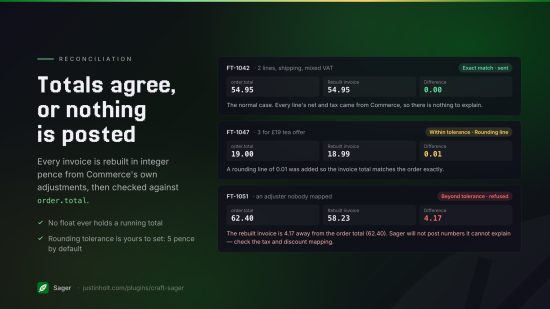
Then the invoice is reconciled against order.total:
- exact match — the normal case — and it is sent
- within the rounding tolerance (5 minor units by default), a visible Rounding line is added so the totals agree, and the reason is shown in the preview
- beyond it, the sync fails with a diagnostic instead of posting. Sager will not put numbers in your ledger that it cannot explain.
Seeing what it will send
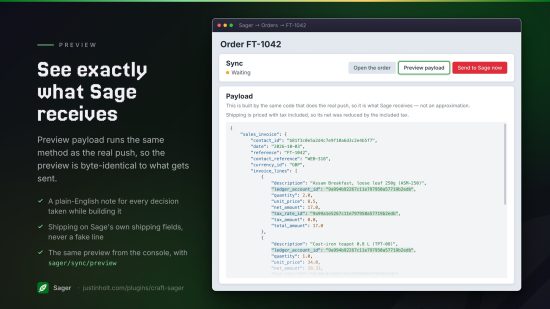
Every order's page under Sager → Orders has a Preview payload button. It is built by the same code that does the real push — literally the same method — so it is what Sage receives, not an approximation of it. It shows the JSON, plus a plain-English note for every decision taken while building it.
On the console:
php craft sager/sync/preview AB-1234
Console commands
php craft sager/connect/status          # connection, mapping and order counts; non-zero if not connected
php craft sager/connect/businesses      # the businesses this connection can reach
php craft sager/connect/refresh         # reload the cached ledger accounts, tax rates, etc.

php craft sager/sync/order AB-1234      # one order, by number, short number or reference
php craft sager/sync/order AB-1234 --queue
php craft sager/sync/pending            # every completed order Sage has never seen
php craft sager/sync/pending --limit=500 --queue
php craft sager/sync/preview AB-1234    # the payload, sending nothing

php craft sager/log/failures            # the last few failures
php craft sager/log/prune --days=30     # also runs on its own during Craft's garbage collection
Permissions
- View Sage sync status — the Overview, Orders and per-order screens, and the order-screen panel
- Send orders to Sage — the send, re-check and preview buttons
- View the connection log — the Log screen
Every Sager screen also requires Commerce's Manage orders permission. Settings and Mapping are for admins only, as are connecting to Sage and clearing the log.
Twig
{% if craft.sager.isSynced(order) %}
  Invoice {{ craft.sager.invoiceNumber(order) }} in {{ craft.sager.businessName() }}.
{% endif %}

{{ craft.sager.status(order) }}      {# synced | pending | failed | skipped | null #}
{{ craft.sager.documents(order) }}   {# every Sage document created for this order (no payload) #}
Every method takes the order you give it and does not check who is asking — load the order by its
unguessable number first, never by an ID from the query string.
When things go wrong
Everything Sager sends and everything Sage says back is in the log, bodies intact, with credentials and tokens redacted. That is the first place to look, and each order's screen links straight to its own entries.
Some specifics:
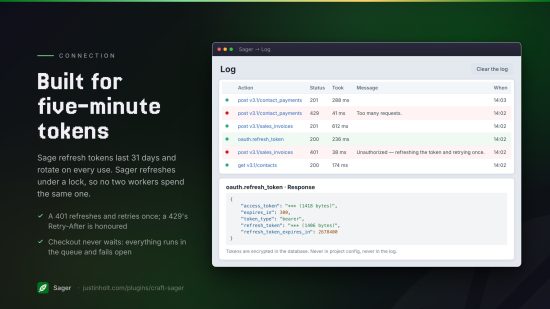
- "Reconnect Sager to Sage." Sage's refresh tokens live 31 days and rotate on every use. If one is lost — a database restored from an old backup, the production database copied to dev and refreshed there, a Craft security key rotated — it cannot be recovered, and Sager stops rather than burning retries on a token that will never work again. Reconnecting works on production.
- A 429. Sage rate-limits per company and per app. Sager honours the
Retry-Afterit sends and re-queues; you do not need to do anything. - A 422 mentioning a ledger account or tax rate. Something is unmapped — the Overview checklist will say which — or the mapping was built against a different Sage business than this environment is connected to.
- "The rebuilt invoice is X away from the order total." An adjustment on the order is not being
accounted for. Run
sager/sync/previewon it — the notes explain what Sager did with each piece.
Limits worth knowing
- Sage has no webhooks. Sync is push-from-Craft. Changes made in Sage do not come back.
- Partial refunds cannot be attributed to lines, because Commerce refunds an amount rather than a basket. They become one credit note line with tax split in the invoice's own net-to-tax ratio.
- Product and stock sync are not in this release. They need per-merchant tuning and deserve more than a checkbox.
- Mappings are project config, so they deploy with your code — and their values are GUIDs from
one Sage business. Dev and production must connect to the same Sage business, or the
deployed mapping is wrong on production. If an environment genuinely needs a different business,
override the mapping for it in
config/sager.php, or redo the mapping. - Refunds are sent when they happen. A refund made while refund sync was off is not sent later. One that arrives before its invoice exists waits for the invoice and is then retried.
Testing
133 integration checks drive the whole pipeline against a scripted Sage — a Guzzle mock handler injected into the API service — so the request envelope, Sage's error array, the 401-refresh-and-retry, the 429 backoff and the idempotency index are all exercised for real rather than described. The suite is self-cleaning: fixtures, rows and settings are restored whether it passes or fails.
License
Sager is licensed under the Craft License. One license per production Craft installation.
Standard
Plus $99/year after one year.
To install this plugin, copy the command above to your terminal.
This plugin doesn't have any reviews.