 SEO & Accessibility
 AI
AI Localization
 Ecommerce
 Forms
Forms Fields
 Development
 Security
 Templating
 Performance
 Control Panel
 Widgets
 Assets
 Utilities
 Mailer Adapters
 Social Networking
 Integrations
Schemy
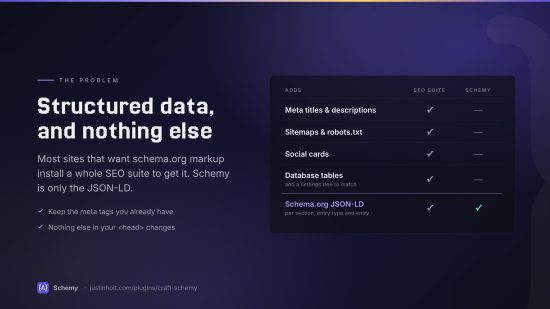
Schema.org JSON-LD for Craft CMS 5. You set schema on sections (including singles), entry types, and individual entries, and Schemy outputs it on the front end. It doesn't manage meta tags, sitemaps, redirects, or anything else SEO-related.
Requirements
- Craft CMS 5.0+
- PHP 8.2+
Installation
composer require justinholtweb/craft-schemy
php craft plugin/install schemy
To install from a local checkout, add a path repository to your project’s composer.json:
"repositories": [
  { "type": "path", "url": "../craft-schemy" }
]
How it works
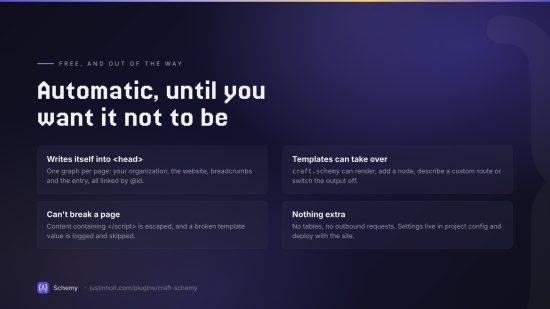
Every front-end page gets a single JSON-LD @graph containing:
- Site identity: an
Organization,Person,LocalBusiness, or similar type, configured under Schemy → Site Identity. - WebSite: built from the current site.
- The page’s main entity: whatever schema applies to the matched entry.
- BreadcrumbList: the home page, the entry’s ancestors (in structure sections), and the entry itself.
- Anything you add from templates, from the per-entry “Additional JSON-LD” box, or from the
beforeRenderGraphevent.
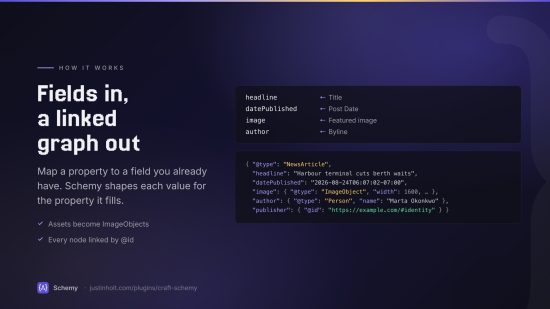
Nodes are linked by @id. An Article’s publisher, for example, points at the identity node.
Where an entry’s schema comes from
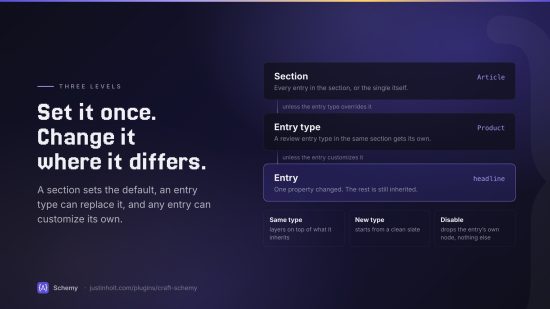
From most specific to least specific:
| Level | Where | Notes |
|---|---|---|
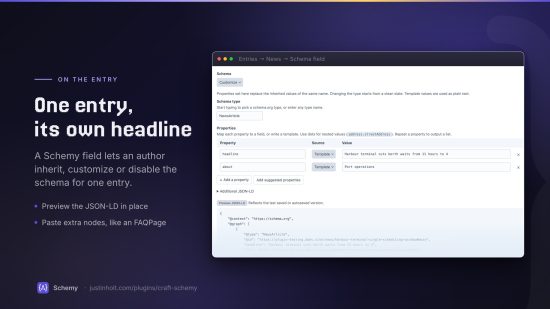
| Entry | The Schema (Schemy) field, set to Customize or Disable | Same type as inherited: properties are layered on top. Different type: starts fresh. |
| Entry type | Schemy → Sections → (section) → Entry type overrides | Scoped to that section, since entry types are shared across sections in Craft 5. |
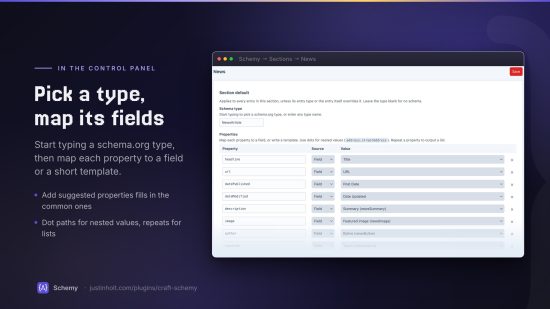
| Section | Schemy → Sections → (section) | Works the same for singles, channels, and structures. |
Property mappings
A mapping is a property name plus a value. The value comes from one of two sources:
- Field: a custom field from the layout, or a built-in attribute (
title,url,postDate,dateUpdated,author, …). Schemy converts the value based on what the property expects:- Dates become ISO 8601 strings.
- Image assets on image properties become
ImageObjects. Elsewhere, assets become their URL. - Users become
Persons. - Related entries become their titles, or
Person/Organization/Placenodes where the property calls for one. - Rich text is stripped to plain text.
- Option fields output their labels.
- Template: a Twig object template rendered against the entry, e.g.
{title},{{ entry.summary }}, or{{ entry.postDate|date('Y') }}. Plain text works too.
Some extras:
- Nested values use dot paths:
address.@type→PostalAddress,address.streetAddress→{street}. - Lists come from repeating a property: three
sameAsrows output an array of three URLs. Arbitrary JSON: if a template’s output starts with
{or[and is valid JSON, it’s inserted as structured data:{{ entry.faqs.all()|map(f => {'@type': 'Question', name: f.question, acceptedAnswer: {'@type': 'Answer', text: f.answer|striptags}})|json_encode }}
The type and property inputs autocomplete from a curated list of common schema.org types. You can still type any type or property name.
Per-entry field
Add the Schema (Schemy) field to any field layout. It has three modes:
- Inherit: use the entry type or section schema. The field shows which one applies.
- Customize: pick a type and add or override properties.
- Disable: output no main entity for this entry. Site-wide nodes still appear.
It also has an Additional JSON-LD box for raw nodes and a Preview JSON-LD button, which shows the last saved or autosaved version.
By default, template values entered on entries are output as plain text and never run as Twig, so authors can’t run Twig. Turn on Parse Twig in values in the field settings if you trust everyone who edits those entries.
The field works on any element type with a field layout (categories, users, Commerce products, …). These elements get schema only through the field, since section defaults apply only to entries.
Templates
With Output automatically on (the default), Schemy adds the script tag to <head> on every front-end page. To control placement yourself, turn it off and add:
{{ craft.schemy.render(entry ?? null) }}
Calling render() also stops automatic output for that request, so you can mix the two.
Other helpers:
{# Add a node to this page's graph #}
{% do craft.schemy.add({ '@type': 'Event', name: 'Launch party', startDate: '2026-11-01' }) %}

{# Describe a different element (e.g. on a custom route), or pass false for site-wide nodes only #}
{% do craft.schemy.setElement(product) %}

{# Output nothing on this page #}
{% do craft.schemy.disable() %}

{# Get the graph as an array #}
{% set nodes = craft.schemy.graph(entry) %}
Settings and environments
All Schemy configuration (section mappings, identity, and toggles) lives in plugin settings, so it’s stored in project config and deploys like the rest of your schema. When allowAdminChanges is off, the Schemy pages are read-only.
You can also override any setting in config/schemy.php:
<?php

return [
    'autoInject' => true,
    'includeBreadcrumbs' => false,
];
Events
Modify the graph before it’s encoded:
use justinholtweb\schemy\events\GraphEvent;
use justinholtweb\schemy\services\Schema;
use yii\base\Event;

Event::on(Schema::class, Schema::EVENT_BEFORE_RENDER_GRAPH, function (GraphEvent $event) {
    $event->graph[] = ['@type' => 'SiteNavigationElement', 'name' => 'Main'];
});
Development
composer install
vendor/bin/phpstan analyse
License
Schemy is free, one edition with everything included. It is released under the Craft License.
To install this plugin, copy the command above to your terminal.
This plugin doesn't have any reviews.