 SEO & Accessibility
 AI
AI Localization
 Ecommerce
 Forms
Forms Fields
 Development
 Security
 Templating
 Performance
 Control Panel
 Widgets
 Assets
 Utilities
 Mailer Adapters
 Social Networking
 Integrations
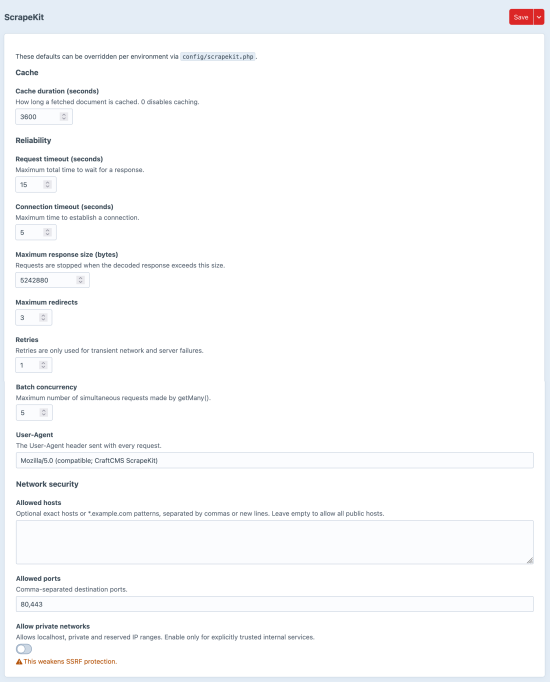
ScrapeKit
ScrapeKit lets you fetch, query and traverse external HTML, XML and JSON directly from your Twig templates.
Using familiar CSS selectors and XPath expressions, you can extract content from virtually any website without leaving Craft. Responses are cached automatically, HTML is parsed using a standards-compliant HTML5 parser, and failed requests gracefully degrade to empty results instead of breaking your templates.
Whether you're integrating external content, consuming APIs or building custom data pipelines, ScrapeKit provides a concise, expressive API that feels native to Twig.
Features
- Fetch HTML, XML and JSON from external sources.
- Query documents using CSS selectors or XPath.
- Read text, HTML, attributes and metadata with simple helper methods.
- Traverse the DOM using parent, child and sibling relationships.
- Powerful
NodeListcollections with array-like behaviour and convenience methods. - Batch multiple requests concurrently with automatic failure isolation.
- Automatic response caching with cache invalidation through Craft's cache utility or CLI.
- Per-request configuration for headers, user agent, cache duration, parser and timeouts.
- Built-in protection against private networks, unsafe redirects and oversized responses.
- Errors are logged while templates continue rendering safely.
Designed for Twig
ScrapeKit exposes a fluent API that feels at home in Twig.
{% set page = craft.scrapekit.get('https://example.com') %}

{{ page.text('h1') }}
{{ page.attr('meta[property="og:image"]', 'content') }}

{% for article in page.find('.news article') %}
    <h2>{{ article.find('h2').first().text() }}</h2>
{% endfor %}
The same API works consistently across HTML, XML and JSON, making it easy to build integrations without writing custom parsing logic.
Typical use cases
- Import content from external websites.
- Consume JSON APIs directly from Twig.
- Build custom feeds and aggregations.
- Enrich entries with external metadata.
- Monitor remote content.
- Integrate third-party platforms without writing dedicated import services.
To install this plugin, copy the command above to your terminal.
This plugin doesn't have any reviews.