 SEO & Accessibility
 AI
AI Localization
 Ecommerce
 Forms
Forms Fields
 Development
 Security
 Templating
 Performance
 Control Panel
 Widgets
 Assets
 Utilities
 Mailer Adapters
 Social Networking
 Integrations
Shopify Variants
Lets Craft editors pick individual Shopify product variants, not just products. Builds on the synced catalog from craftcms/shopify.
Two things ship in the box:
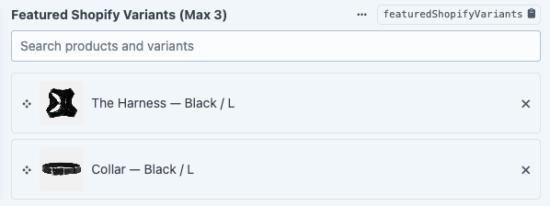
- Shopify Variants field: an ordered, optionally capped list of variants.
- Shopify variant link type: a single variant, for Craft's native Link field.
Requirements
- Craft CMS 5.10+
- PHP 8.2+
craftcms/shopify8.0+
Both the field type and the link type only appear while the Shopify plugin is installed and enabled.
The field
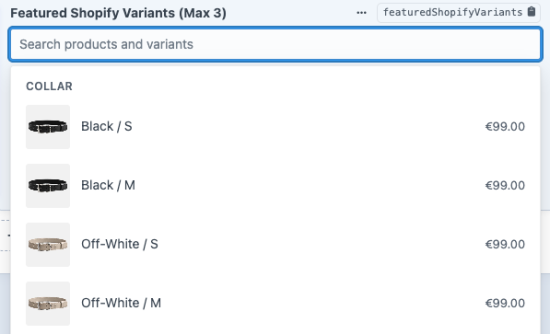
Add a Shopify Variants field, drop it in a field layout, and editors get a search box over the synced catalog with results grouped by product.
| Setting | Default | Notes |
|---|---|---|
maxVariants | blank | Most variants an editor may select. Blank means no limit. Enforced server-side as well as in the picker. |
Search matches product title, variant title, and SKU. Shopify joins a variant's option values into its title ("Black / S"), so searching an option value works too.
Value
Persisted as JSON: [{"productGid": "...", "variantGid": "..."}, ...].
In Twig the field returns a SelectedVariantCollection. Each item is a SelectedVariant:
productGid,variantGid: the stored GIDs, always present.product,variant: the resolved Shopify models, ornullif that variant is gone from the sync.isResolved(): true only when both resolved.label: product and variant title combined, with Shopify'sDefault Titleplaceholder suppressed.image:{url, alt}, ornull. Falls back to the product image, since Shopify carries no variant image on single-variant products. Prefer this overvariant.image, which is null for those.
A variant can disappear from Shopify after it was picked, so always guard on product and variant:
{% for selection in entry.featuredVariants %}
  {% if selection.isResolved() %}
    {% set product = selection.product %}
    {% set variant = selection.variant %}
    {% set image = selection.image %}
    {% if image %}<img src="{{ image.url }}" alt="{{ image.alt }}">{% endif %}
    <a href="{{ product.url }}?variant={{ variant.shopifyId }}">
      {{ selection.label }} {{ variant.price }}
    </a>
  {% endif %}
{% endfor %}
Stale selections are deliberately kept rather than silently dropped: the picker flags them so an editor can fix the entry.
The link type
Enable Shopify variant on any Link field. The stored value is a compound productGid|variantGid string, and it renders as a storefront deep link: <product url>?variant=<numeric variant id>.
It renders as an empty string when the product has no URL, so give Shopify products a URI format in the Shopify plugin's settings if you need the link to resolve.
The search endpoint
The picker fetches a page at a time from shopify-variants/variants/search rather than rendering the whole catalog into the page.
| Param | Default | Notes |
|---|---|---|
search | '' | product title, variant title, SKU |
page | 0 | zero-indexed, paginated by product |
limit | 20 | products per page, clamped to 100 |
Returns {groups, total, hasMore}. Control Panel requests from a logged-in user only; no extra permission, since this is the same catalog data an editor already needs to fill in the field.
Checking an install
php craft shopify-variants/check
Asserts that the catalog searches, paginates, and round-trips: pick an option, resolve it back, and get the same product and variant. Worth running after any craftcms/shopify upgrade. Shopify 8 moved the full GID off Variant::$shopifyId (now numeric) onto Variant::$shopifyGid, and that class of change fails silently: the picker keeps working while every stored selection resolves as missing.
To install this plugin, copy the command above to your terminal.
This plugin doesn't have any reviews.