 SEO & Accessibility
 AI
AI Localization
 Ecommerce
 Forms
Forms Fields
 Development
 Security
 Templating
 Performance
 Control Panel
 Widgets
 Assets
 Utilities
 Mailer Adapters
 Social Networking
 Integrations
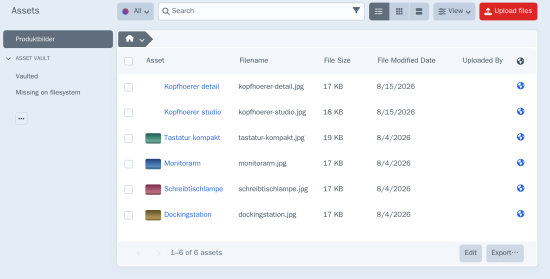
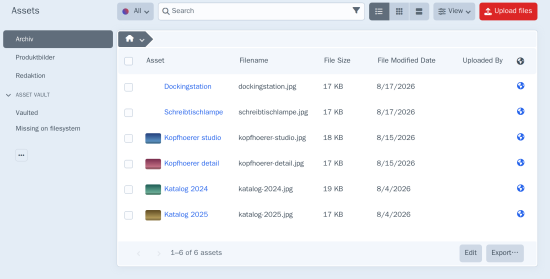
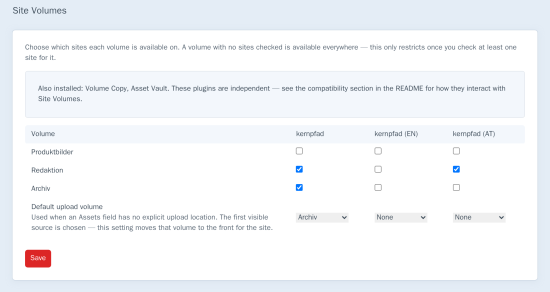
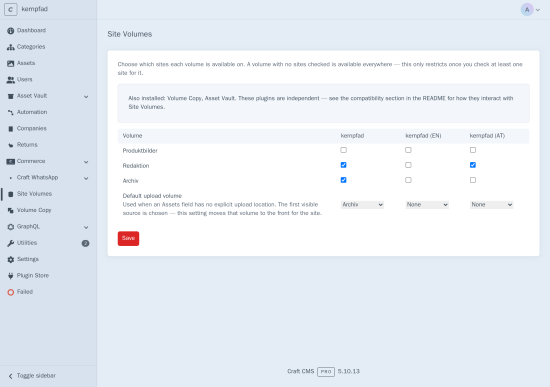
Site Volumes closes a gap in Craft's multi-site model: sections scope to sites, but every asset volume is available on every site by default. Site Volumes adds that missing per-site scoping through a simple control panel matrix.
Volume × site matrix
A dedicated Site Volumes settings screen lists every volume against every site as checkboxes. Check the sites a volume should be available on; leave a volume unchecked and it stays available everywhere. Restrictions are opt-in per volume, so installing the plugin never silently hides a volume that was already in use.
Enforced the way Craft itself builds source lists
Filtering runs through Craft's own Element::EVENT_REGISTER_SOURCES — the same mechanism Craft uses to build the Assets index and the source list Assets fields fall back on. In the control panel it follows the site the editor is actually viewing (Cp::requestedSite()), not just the app's current site, so restrictions apply correctly wherever the site switcher is used.
Default upload volume per site
Optionally set a default upload volume per site. When an Assets field has no explicit upload location, the configured default is moved to the front of the filtered source list for that site.
Safe by default
A save that would leave any site with zero available volumes is rejected outright, naming the affected site — there's no way to accidentally lock a site's Assets index and every Assets field with no way to select or upload anything. When Craft adds a new site, it automatically inherits the primary site's restricted-volume access instead of starting wide open.
Built for production Craft sites
- Filtering resolves every source through its underlying folder, so subfolder-level sources are restricted along with volume-level ones
EVENT_RESOLVE_VOLUME_FOR_SITEandEVENT_RESOLVE_DEFAULT_VOLUME_FOR_SITElet other modules hook into resolution- GraphQL and element queries are intentionally left unfiltered — this is a control panel UX restriction, not a data-access control, and the docs say so plainly
- Compatibility notice in the control panel when Volume Copy or Asset Vault is also installed
Standard
Plus $15/year after one year.
To install this plugin, copy the command above to your terminal.
This plugin doesn't have any reviews.