 SEO & Accessibility
 AI
AI Localization
 Ecommerce
 Forms
Forms Fields
 Development
 Security
 Templating
 Performance
 Control Panel
 Widgets
 Assets
 Utilities
 Mailer Adapters
 Social Networking
 Integrations
Soft Hyphen
Soft Hyphen for Craft CMS
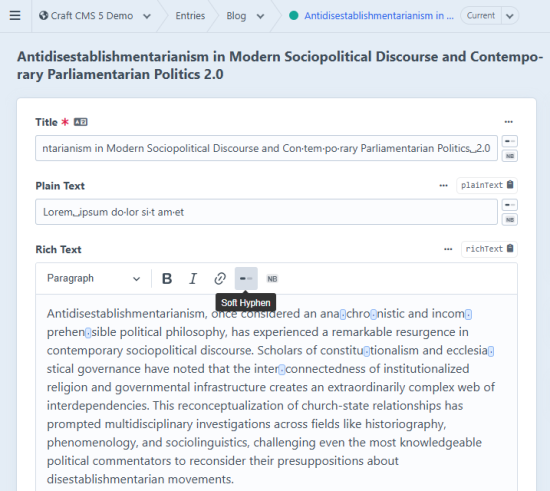
Adds soft hyphen (­) and non-breaking space ( ) insert buttons to CKEditor fields, Plain Text fields, and the entry Title field in Craft CMS.
- Soft hyphens are invisible characters that hint the browser where it can break a word across lines. When the break happens, a hyphen is shown. Useful for long words in narrow columns or responsive layouts.
- Non-breaking spaces prevent line breaks between two words. Useful for keeping units together (e.g. "100 km") or after short prepositions.
Requirements
- Craft CMS 4.0+
- CKEditor plugin 4.0+ (for CKEditor support)
Installation
composer require frontend-services/craft-soft-hyphen
php craft plugin/install soft-hyphen
CKEditor fields
The plugin automatically injects itself into every CKEditor instance. No config pasting required.
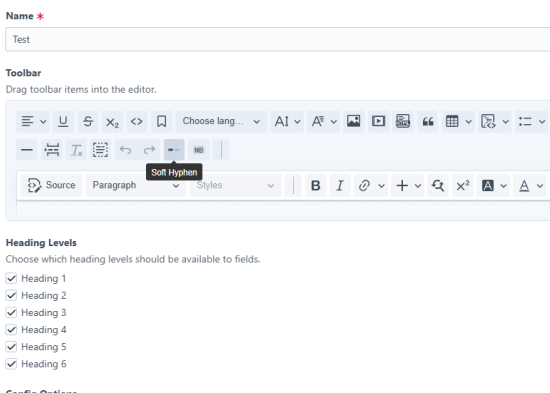
To give editors a clickable toolbar button:
- Go to Settings → CKEditor and open your config
- Drag Soft Hyphen and/or Non-Breaking Space into your toolbar
- Save
In the editor both characters are shown as visible markers so editors can see and manage them. On the frontend the markers are automatically replaced with real ­ and characters. No frontend JavaScript or template changes needed.
Plain Text fields
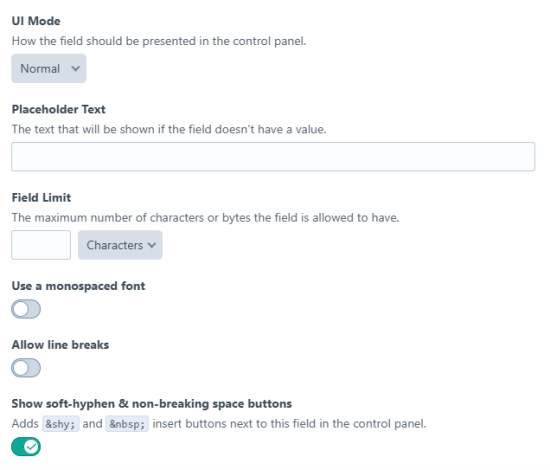
Each Plain Text field can independently have the insert buttons enabled.
- Go to Settings → Fields and open a Plain Text field
- Toggle Soft Hyphen / NBSP buttons on
- Save the field
Two small buttons will appear next to the input in the entry editor, inserting the characters at the cursor position.
Title field
To show the insert buttons next to the title field on all entries:
- Go to Settings → Soft Hyphen
- Toggle Title field buttons on
- Save
How visible proxy characters work
Because ­ and are invisible in plain <input> and <textarea> fields, the plugin displays them as visible stand-ins while editing:
| Stored in database | Shown in the CP editor |
|---|---|
soft hyphen \u00AD | middle dot · |
non-breaking space \u00A0 | open box ␣ |
These proxy characters are only used for display — they are never saved to the database. When an entry is saved, the plugin automatically converts them back to the real ­ and characters server-side before the value is persisted.
Standard
Plus $9/year after one year.
To install this plugin, copy the command above to your terminal.
This plugin doesn't have any reviews.