 SEO & Accessibility
 AI
AI Localization
 Ecommerce
 Forms
Forms Fields
 Development
 Security
 Templating
 Performance
 Control Panel
 Widgets
 Assets
 Utilities
 Mailer Adapters
 Social Networking
 Integrations
tka navigation

tka navigation
A simple Navigation Plugin for all your Navigational needs.
Requirements
This plugin requires Craft CMS 5.10.0 or later, and PHP 8.2 or later.
Installation
You can install this plugin from the Plugin Store or with Composer.
From the Plugin Store
Go to the Plugin Store in your project’s Control Panel and search for “tka navigation”. Then press “Install”.
With Composer
Open your terminal and run the following commands:
# go to the project directory
cd /path/to/my-project.test

# tell Composer to load the plugin
composer require thekitchen-agency/craft-tka-navigation

# tell Craft to install the plugin
./craft plugin/install tka-navigation
Features
- Dual Editor Interfaces: Choose the workflow that fits your editors best:
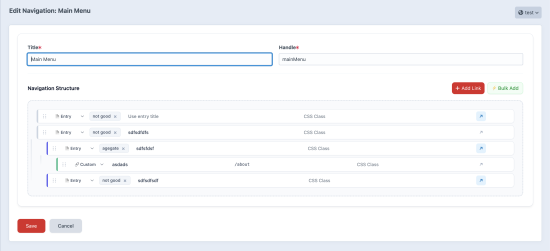
- Slick Lean Interface (Default): A modern, ultra-compact inline visual tree editor. Manage labels, paths, classes, and new-tab targets directly inside the nodes without opening modals or sidebars.
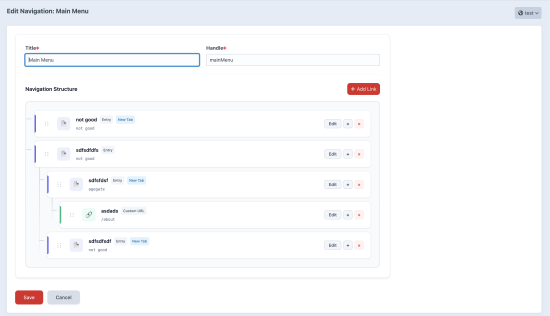
- Easy Interface: A structured split-screen grid visual layout. Opens a premium sticky "Link Settings" sidebar inspector panel on the right for clean, focused node configuration.
- Bulk Import:
- Select Entries in Bulk: Choose multiple entries from your catalog to instantly add them to the navigation structure as root-level links.
- Paste Plain Text Links: Paste lists of raw text links formatted as
Label | /pathto quickly populate your navigation layout.
- Nesting Restraints: Set a maximum depth in the plugin settings to restrict editors from building menus that exceed your CSS design structure constraints.
- Custom CSS Classes: Easily toggle optional custom CSS inputs per node inside the editor.
- Caching: Performance-oriented database caching config with custom cache duration rules.
Configuration
Navigate to Settings -> Plugins -> tka navigation to customize the plugin:
- Max Nesting Depth: Set the maximum allowed depth (e.g. 1 for root only, 0 for unlimited).
- Enable Custom CSS Classes: Toggle individual CSS fields per navigation node.
- Default External Links to New Tab: Automatically check 'Open in New Tab' for newly added custom/external nodes.
- Use Slick Lean Editor Interface: Toggle to switch between the inline editor and the sidebar inspector layouts.
- Performance & Caching: Enable/disable cache and configure the custom TTL.
Installation Instructions
To install this plugin, copy the command above to your terminal.
Reviews
This plugin doesn't have any reviews.
Active Installs
8
License
Craft
Last release
September 14, 2026
Activity (30 days)
0
Closed Issues
0
Open Issues
0
Merged PRs
0
Open PRs