 SEO & Accessibility
 AI
AI Localization
 Ecommerce
 Forms
Forms Fields
 Development
 Security
 Templating
 Performance
 Control Panel
 Widgets
 Assets
 Utilities
 Mailer Adapters
 Social Networking
 Integrations
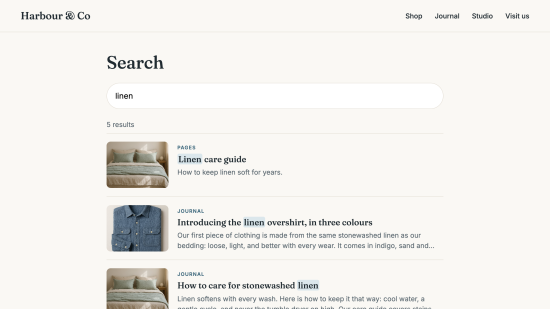
Typesense Sync keeps your Craft content in a Typesense search index and gives your search pages a safe, short-lived key. You declare what to index and what a result looks like. The plugin does the rest.
The index follows your content
When an editor publishes, disables, deletes or restores an entry, the change reaches search within moments, through Craft's queue. User status changes are followed too, without anyone saving the user. Nothing is indexed unless you declare it, and a save never fails because the search server is down.
Change the schema without taking search down
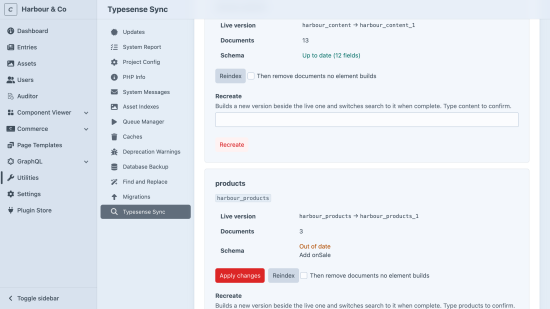
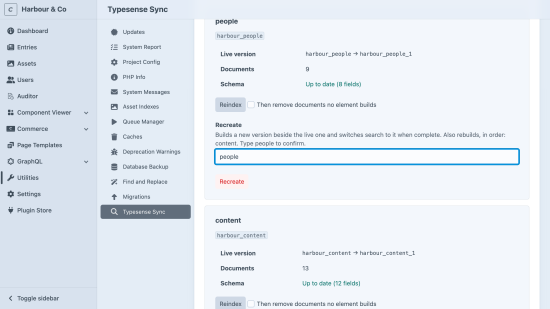
The utility shows how each collection differs from what your code declares. Apply the difference in place, or recreate the collection: a new version is built beside the live one, and search switches to it only when it is complete. Collections that join to one another are rebuilt together, in the right order, so joins keep working.
Search keys that can only read what the page may show
craft.typesense.searchConfig('content') hands your search page everything it needs, including
a key that can only search, expires within the hour, never returns pending or expired entries,
and never returns the fields you mark private. The admin key never reaches a template.
Built in, off until you need it
- Users, categories and Craft Commerce products as sources
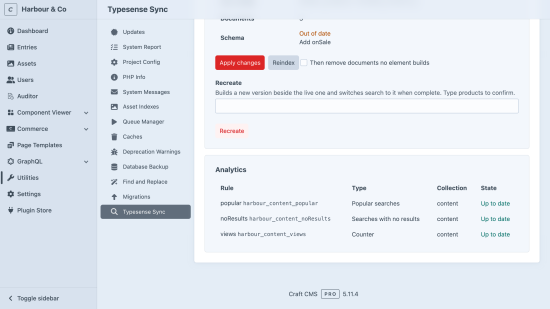
- Popular searches, searches with no results, and view counters that survive every reindex
- Collections that reference each other, with joined searches
- Copy-in example configs, result classes and Alpine.js search components
For developers
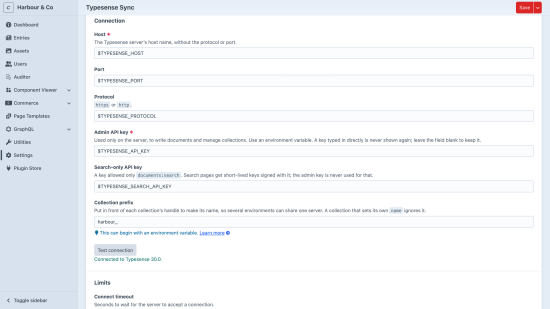
Configuration lives in config/typesense-sync.php, so it is versioned with your code, and every
key is validated: a typo is reported instead of silently ignored. Each kind of result is a small
PHP class. Events let you add fields, exclude elements, reroute content and narrow search keys.
Console commands cover setup, reindexing and rebuilds, with exit codes a deploy script can trust.
Requires Typesense 30.0 or later, self-hosted or Typesense Cloud.
Standard
Plus $29/year after one year.
To install this plugin, copy the command above to your terminal.
This plugin doesn't have any reviews.