 SEO & Accessibility
 AI
 Localization
 Ecommerce
 Forms
 Fields
 Development
 Security
 Templating
 Performance
 Control Panel
 Widgets
 Assets
 Utilities
 Mailer Adapters
 Social Networking
 Integrations

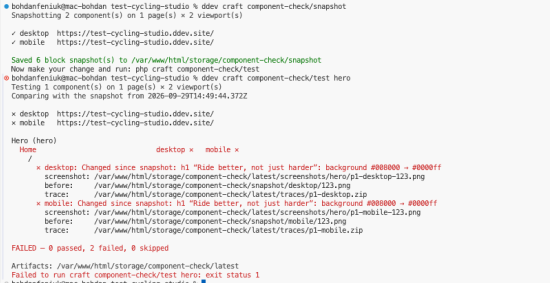
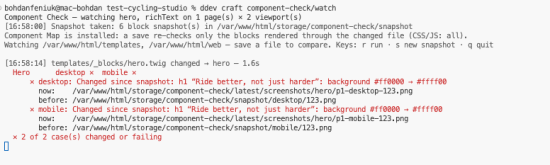
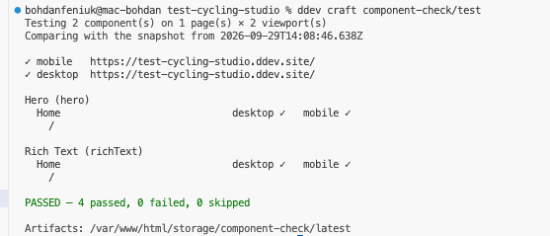
Component Check finds every page where each Matrix block (entry type) is actually used on a live page, then opens those pages in a real browser, on desktop and on mobile, and checks the blocks. You don't write any tests.
What it checks
Fails:
- HTTP errors and uncaught JavaScript errors
- Scripts or stylesheets that fail to load
- A block missing from the page or rendering at zero size
- Broken images
- Anything that looks different from the saved snapshot
Warns:
- The page or a block overflowing its width
- Text that gets cut off
How you use it
php craft component-check/discover         # where is each block used?
php craft component-check/test hero        # check one block everywhere it's used
php craft component-check/snapshot         # save how things look now
php craft component-check/watch            # re-check on every save
php craft component-check/test --changed   # only blocks your changes affect
After a change, it tells you in words what changed since the snapshot, for example "h1 background #ffffff → #1e3a8a", and shows the block before and after.
--changed checks only the blocks your uncommitted changes affect. It needs Component Map.
A shared baseline for CI
Snapshots are local by default. Point the snapshotPath setting at a folder in your repository and commit it: CI then compares every pull request against it. Each snapshot records the browser and OS that took it, so a run elsewhere says when a difference may be rendering, not your change.
For coding agents
Every command supports --json and returns a clear exit code: 0 passed, 1 failed, 2 error. An agent can edit a template, run one command, and see exactly which block broke, on which page, at which viewport.
On Craft 5.12+, Component Check also joins Craft's built-in MCP server. An agent connected to the site sees how the last run went, every failing block with the reasons, the live pages each block is on, and a block before and after as images. content-model.audit lists blocks the snapshot no longer covers and blocks without markers. All read only, for control-panel users.
Safe on every environment
Component Check turns itself off when allowAdminChanges is false, so you can install it everywhere. Block markers only render on requests that carry a signed token.
Requirements
- Craft CMS 5, PHP 8.2+
- Node with Playwright in your project (
npm i -D playwright && npx playwright install chromium)
Run php craft component-check/doctor to check your setup.
To install this plugin, copy the command above to your terminal.
This plugin doesn't have any reviews.