 SEO & Accessibility
 AI
AI Localization
 Ecommerce
 Forms
Forms Fields
 Development
 Security
 Templating
 Performance
 Control Panel
 Widgets
 Assets
 Utilities
 Mailer Adapters
 Social Networking
 Integrations
Which template renders the Hero block? What breaks if I change _components/button.twig? Which pages do I check before I open a pull request?
In a Craft project the answer is spread over Twig includes, a dispatcher that picks a template by block.type.handle, the content model in the control panel, and the entries that use each block. Component Map puts it together, from the command line:
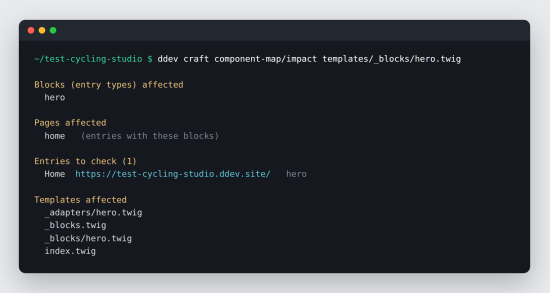
php craft component-map/impact --since=main
tells you which blocks and pages your branch affects — and lists the entries to open in the browser, with their URLs.
What it knows
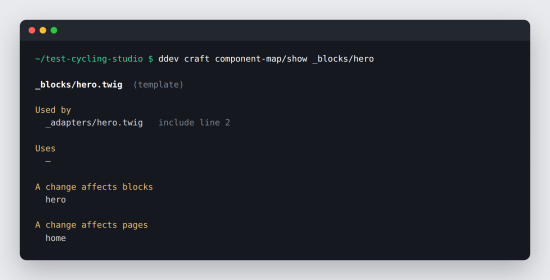
- Every template reference, read with Twig's own lexer:
include,embed,extends,import,from,use,include(),source()— including dynamic ones like'_adapters/' ~ block.type.handle ~ '.twig'. - The content model: sections and their templates, entry types, Matrix fields and the blocks they allow.
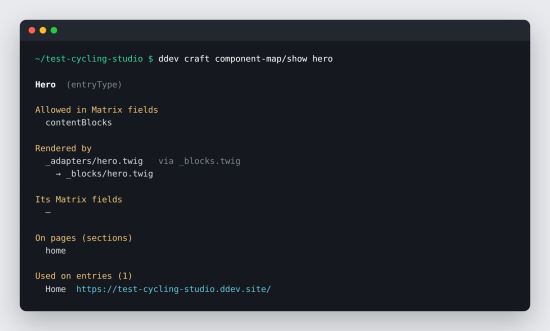
- The link between them. A Hero block is rendered by
_adapters/hero.twig, via your dispatcher — so the map knows which blocks a component change affects, not just which files include it. - Where each block is used, at any depth of nesting — a Card inside a Cards Grid on a page.
Commands
component-map/show <template|block|section>— where it is used, what it uses, which entries it is on.component-map/impact <files> | --git | --since=main— what a change affects: templates, blocks, pages, and the entries to check. Changes to project config (entry types, Matrix fields, sections) count too; deleted templates count through whatever still references them.component-map/build --stdout— the whole map as Markdown.component-map/agents --file=AGENTS.md— tells your coding agent (Claude Code, Cursor, Codex…) to check the map before and after it edits a template.
Every command also speaks --json.
For local development
Component Map runs where you and your coding agent edit templates. It is read-only and console-only: nothing is generated into your repository, nothing is exposed over HTTP. The map is built from your templates as they are, on every call — there is nothing to keep up to date.
Works on its own; if you also use Component Check, impact tells it which blocks to test.
To install this plugin, copy the command above to your terminal.
This plugin doesn't have any reviews.