 SEO & Accessibility
 AI
AI Localization
 Ecommerce
 Forms
Forms Fields
 Development
 Security
 Templating
 Performance
 Control Panel
 Widgets
 Assets
 Utilities
 Mailer Adapters
 Social Networking
 Integrations
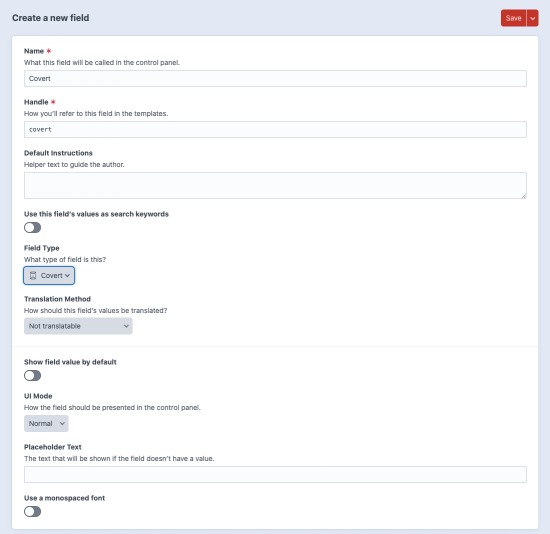
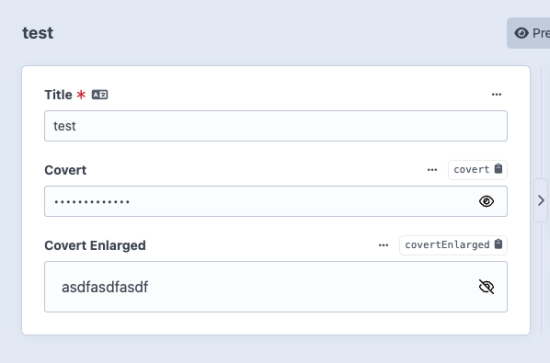

The Covert field allows you to add a Plain Text-type field that will hide its contents by default. Click the eye icon to toggle between a password-type field with the value hidden and a text-type field with the value shown.
A lightswitch on the field's settings allows you to choose whether its value is shown or hidden by default.
When an entry is saved, the Covert field's value will be encrypted (using your project's security key) and then encoded before being stored in the database.
Installation Instructions
To install this plugin, copy the command above to your terminal.
Reviews
This plugin doesn't have any reviews.
Active Installs
12
License
MIT
Last release
February 8, 2026
Activity (30 days)
0
Closed Issues
0
Open Issues
0
Merged PRs
0
Open PRs