 SEO & Accessibility
 AI
AI Localization
 Ecommerce
 Forms
Forms Fields
 Development
 Security
 Templating
 Performance
 Control Panel
 Widgets
 Assets
 Utilities
 Mailer Adapters
 Social Networking
 Integrations
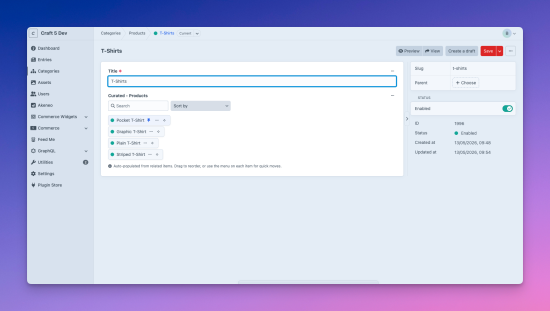
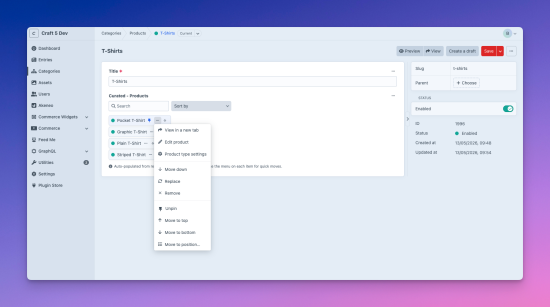
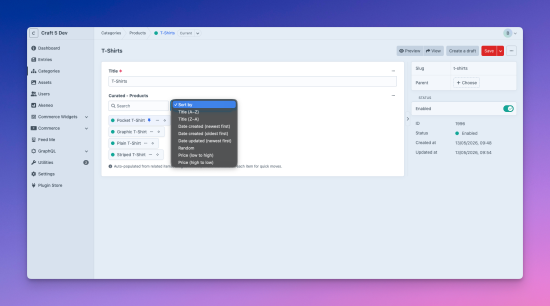
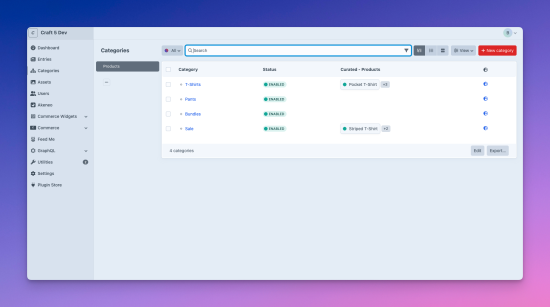
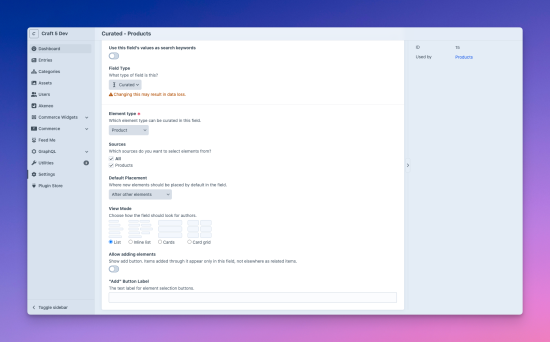
Auto-fills from your existing relations. Drag them into the order you actually want - per category, per gallery, per landing page, per site
Craft can show you related elements, but can't reorder them when the relation lives on the other side.
Curated fixes that. The field auto-populates from existing relations — add a Product to your T-shirts category and it appears in T-shirts' Curated field, ready to drag into place. The same Product can sit at #1 in T-shirts and #9 in Sale, each category with its own independent order. Works with Entries, Categories, Assets, Users, and (with Craft Commerce) Products and Variants.
🎬 Watch the video walkthrough →
See Curated in action in under a few minutes.
Perfect for…
- Categories with products: reorder products per category, move popular items to the top.
- Editorial / blog landing pages: "Related articles", "Editor's picks", "More from this author" in a deliberate sequence.
- Image galleries: order images per Album, lead image first.
- Event lineups: order speakers per conference, artists per festival, or sessions per day.
- Series and courses: drag episodes into the right sequence per series, modules per course, or chapters per book.
Features
- Per-source sort order: the same Entry can be #1 on one Category page and #9 on another. Same goes for Products in storefront categories, Assets in galleries, or Users on different team pages.
- Auto-populates: the field fills itself from every native relation between the source and target type, in either direction. No configuration.
- Default Placement: where auto-discovered relations land before they're explicitly ordered. Before or after other elements, title, date created/updated, random, plus price for Commerce Products and Variants.
- Quick reorder actions: Move to top / bottom / position N inside each item's menu, alongside Craft's Move up / Move down.
- Pin items: pin items to always lead the list, per source. Survives sorts, drag-reorders, and new auto-discovered relations.
- One-shot Sort by…: dropdown above the picker for resorting the whole list (title, date, random, price).
- Search: live filter input above the picker. Hides non-matching items while preserving order, for fields holding hundreds of items.
- Ordering-first by default: the Add button is hidden; flip Allow adding elements on the field to enable curated-only additions.
- Six element types: Entries, Categories, Assets, Users, Commerce Products and Variants. Narrow by source (Section, Group, Volume, Product Type).
- Native Twig:
category.curatedProducts.all()returns a chainableElementQuery. - GraphQL: query the field on its host element, with all the usual element arguments (
limit,status,search, etc.), and mutate it with a list of IDs in your desired curated order. - Per-site ordering: different order per site.
- Element-index column: each Curated field is a column option on its host element's index. Shows the first curated item with a "+N" overflow for the rest, exactly like Craft's native relation field columns.
Running a Craft Commerce store?
📦 Part of a suite. A wider set of plugins built for Commerce stores - pair them up for a more complete setup:
- Vouch - pull and manage customer reviews from Google, Trustpilot, Feefo and Reviews.io
- Commerce Widgets - sales, revenue and order dashboard widgets for your Commerce store
- Points - reward customers with loyalty points or site credit to spend at checkout
- Curated - build hand-picked product collections for your Commerce store
Standard
Plus $10/year after one year.
To install this plugin, copy the command above to your terminal.
This plugin doesn't have any reviews.