 SEO & Accessibility
 AI
AI Localization
 Ecommerce
 Forms
Forms Fields
 Development
 Security
 Templating
 Performance
 Control Panel
 Widgets
 Assets
 Utilities
 Mailer Adapters
 Social Networking
 Integrations
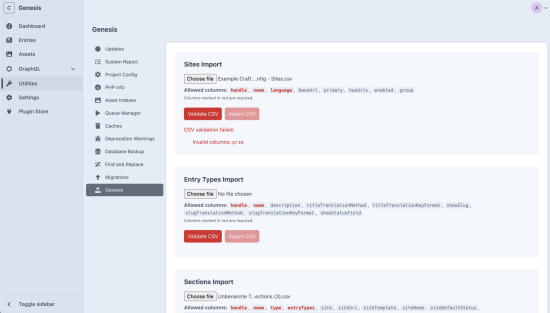
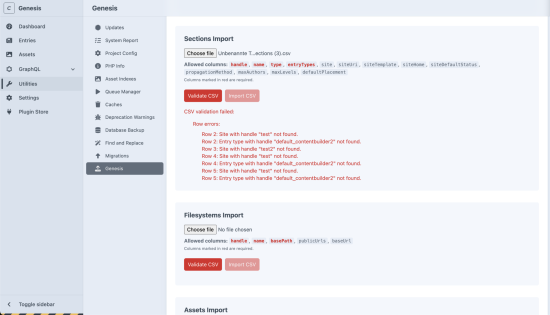
Genesis helps you to set up your Craft CMS site structure quickly using CSV files. You can define everything in a spreadsheet and import it all at once.
What Can You Import?
- Sites - Multi-site setup with language and URL configuration
- Entry Types - Define content types with translation settings
- Sections - Channels, structures, and singles with URI patterns
- Filesystems - Local storage paths for assets
- Asset Volumes - Configure where your assets live
How It Works
- Download the CSV template or create a google / excel sheet.
- Fill in your data
- Upload and validate to catch errors before importing
- Import it, Genesis handles the rest via queue jobs
Validation
Genesis validates your CSV before importing:
- Checks for required columns
- Validates column names against allowed fields
- Verifies data types (booleans, language codes, etc.)
- Ensures referenced elements exist (sites, entry types, filesystems)
This catches mistakes early so you don't end up with partial imports.
Example Config File
To get started quickly, use this example config file{target="_blank" download="https://samuelreichor.at/other-files/example-craft-config.xlsx"} and get begin to configure it.
Documentation
Visit the Genesis page for all documentation and guides.
Installation Instructions
To install this plugin, copy the command above to your terminal.
Reviews
This plugin doesn't have any reviews.
Active Installs
51
License
MIT
Last release
January 9, 2026
Activity (30 days)
0
Closed Issues
0
Open Issues
0
Merged PRs
0
Open PRs