 SEO & Accessibility
 AI
AI Localization
 Ecommerce
 Forms
Forms Fields
 Development
 Security
 Templating
 Performance
 Control Panel
 Widgets
 Assets
 Utilities
 Mailer Adapters
 Social Networking
 Integrations
Breakpoints
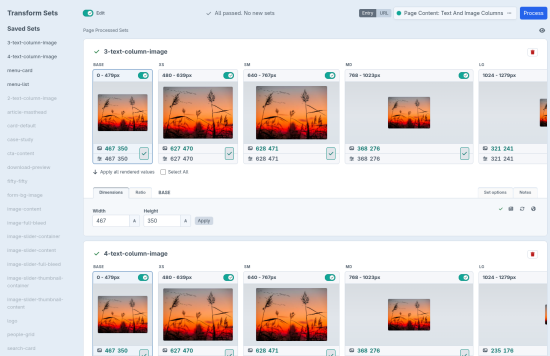
The hard part of responsive images isn’t the markup. It’s picking dimensions that match the layout you built.
So don’t pick them. Breakpoints measures the image as it actually renders at each breakpoint, then writes those measurements into a transform set.
Most of the time that’s a couple of clicks. For everything else, the control panel lets you tailor the set.
How it works
1. Render a usable image
{{ image(entry.heroImage.one(), 'hero', {
  initWidth: 1200,
  initRatio: '16:9',
  pictureClass: 'c-hero__picture',
  imgClass: 'c-hero__img'
}) }}
You get standard <picture> / <source> / <img> output immediately. Until a transform set exists for hero, Breakpoints uses your init values or project defaults so you can keep building the component.
2. Let CSS own the layout
Transforms should support the component, not define it. Constrain the image with width, max-width, aspect-ratio, grid, or flex — the same way you already write the front end.
3. Process when the layout has settled
Open Breakpoints → Transform Sets, or click the local-admin process button on the front end. Breakpoints measures the real rendered sizes, writes them into the transform set, and lets you review or edit before you commit.
Processing is for local development. Staging and production keep serving saved sets; they do not need the editor.
Transform sets
A transform set is a named recipe — hero, card, masthead — describing dimensions, format, and quality at each breakpoint slot.
Sets are stored as JSON at config/breakpoints/transform-sets.json. They are reusable across templates, reviewable in pull requests, and easy to re-process when a layout changes. If saved sizes no longer match what rendered, processing flags the mismatch.
Put shared defaults — especially breakpoint widths — in config/breakpoints.php:
return [
    'breakpoints' => [
        'sm' => 640,
        'md' => 768,
        'lg' => 1024,
        'xl' => 1280,
    ],
    'format' => 'webp',
    'secondaryFormat' => 'jpg',
    'dpr' => [1, 2],
    'allowTransformEditing' => App::env('ALLOW_TRANSFORM_EDITING') ?? false,
];
Keep allowTransformEditing on in local development only.
Markup and options
- One
<source>per breakpoint slot, with correct media ranges - Primary format plus an optional secondary source (for example WebP + JPEG)
- DPR
srcsetdensity descriptors (1xalways; add2x,1.5, or any positive ratio) - Escape width for extra-large final-slot variants (full-bleed heroes on wide displays)
- Art-directed sources: different Craft assets at selected slots in one picture
priority/ preload, native lazy loading, anddecodingcontrol- Overridable Twig templates for custom markup and lazy-loading integrations
- Optional ThumbHash placeholders
- SVG assets render as a
<picture>wrapping<img>(no sources; skipped during processing)
Art direction stays in the template:
{{ image(entry.desktopMasthead.one(), 'masthead', {
  priority: true,
  sources: {
    mobile: {
      asset: entry.mobileMasthead.one(),
      slots: ['base', 'xs']
    }
  }
}) }}
Native Craft transforms
Breakpoints uses Craft’s native image transforms. It does not replace your transform pipeline.
External services that wrap Craft transforms still apply. Known working options include Imgixer, Imgix Asset Transformer, Cloudinary, Servd, and Transform Mapper.
Breakpoints and ThumbHash work great on Servd.
Requirements
- Craft CMS 5.3+
- PHP 8.2+
While processing, keep the browser at 100% zoom and turn off full-page caches (Blitz, static HTML) locally so measurements see live markup.
Documentation
Standard
Plus $19/year after one year.
To install this plugin, copy the command above to your terminal.
This plugin doesn't have any reviews.